

A Regulated Shopify Plus Build: Checkout Extensions, Custom Apps and a Fail-Closed B2B Gate
Three storefronts on one design system, three custom Shopify apps across five extensions, a six-layer B2B gate verified server-side, and a stateless Cloudflare Worker for practitioner registration. Client anonymized: a regulated UK medical-aesthetics and pharmacy group.
The engagement
The client is a regulated UK group operating across medical aesthetics and pharmacy, anonymized here because the vertical is compliance-sensitive and none of the detail below needs a name to be useful. The brief was not a store. It was a program: several distinct storefronts, each with its own audience and its own regulatory footing, that had to feel like one brand, ship fast, and never let a non-compliant thing reach a shopper.
I built it solo, as the single senior developer, on Shopify Plus. The work spanned custom Horizon theme engineering, three custom Shopify apps, checkout extensibility, a server-side gating Function, a custom admin extension, and a Cloudflare Worker doing the registration backend. The parts that follow are the ones another senior Shopify developer would want to see.
One design system, three regulated storefronts
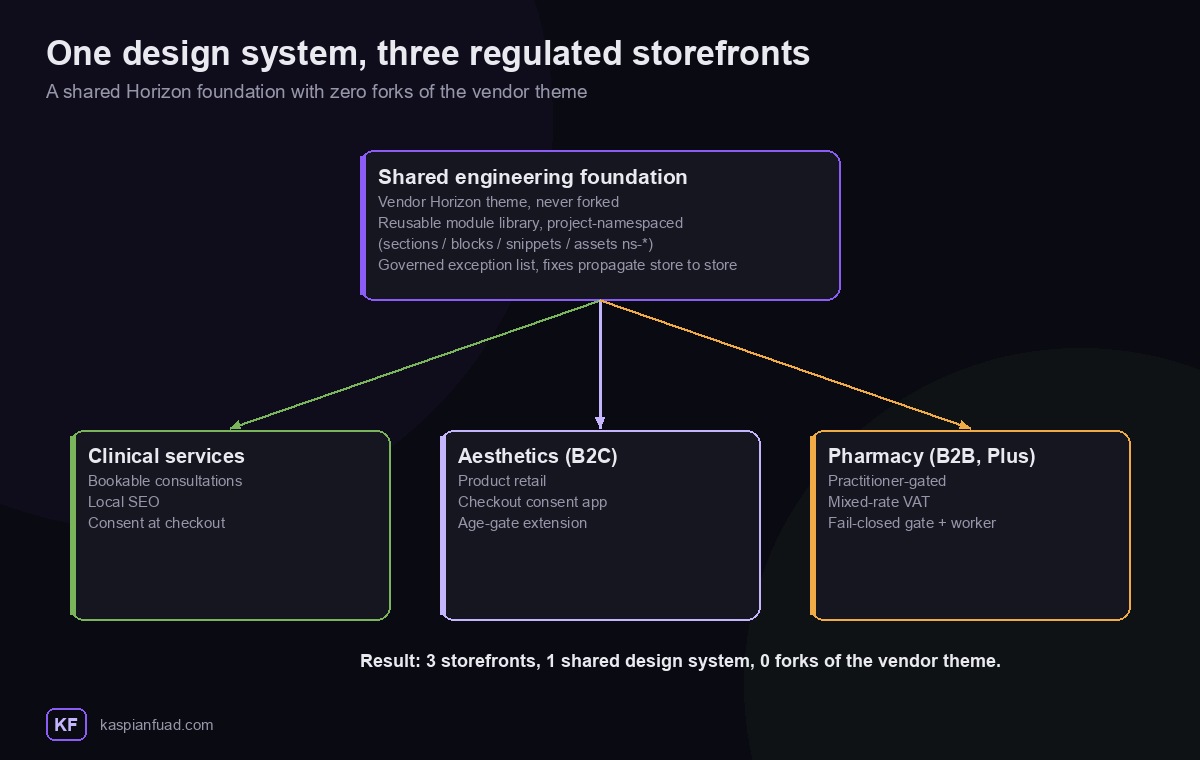
The easy version of a multi-brand build is three separate themes that drift apart within a quarter. I did the opposite. Three storefronts, three repos, but one engineering language and, critically, zero forks of the vendor Horizon theme.
Every custom file is namespaced with a project prefix (sections/ns-*.liquid, blocks/ns-*.liquid, snippets/ns-*.liquid, assets/ns-*.css and .js). Shopify-shipped Horizon files are never edited except for a short, individually documented exception list. That single rule is what makes it a system rather than three one-offs: Horizon can be updated upstream without merge pain, and a section proven on one storefront, a regulatory footer, a product card, a gating block, moves to the next as a reviewed, named commit instead of copy-paste.
You can see the model working in the git history. The pharmacy storefront inherited specific fixes that were first proven on the aesthetics storefront, a cart-URL leak fix and a product-card render guard, as deliberate ports rather than rediscovered bugs. That is the multi-store payoff: fix once, propagate everywhere, upgrade the vendor theme whenever you like.
The hardest problem: a B2B gate that fails closed
The pharmacy storefront is B2B and practitioner-gated. Every product is practitioner-only by default, and a product is public only if it is explicitly tagged otherwise. That inversion matters. An earlier whitelist model silently leaked any product whose type fell outside a fixed set. A denylist fails closed: unknown means gated.
How the gate decides what to render
Before any layer can act, the gate needs a decision, and it is a function of exactly two inputs: the customer’s state (not signed in, pending review, approved, or rejected) and the product’s class (retail, practitioner, or restricted). That state-by-class matrix is the single source of truth.
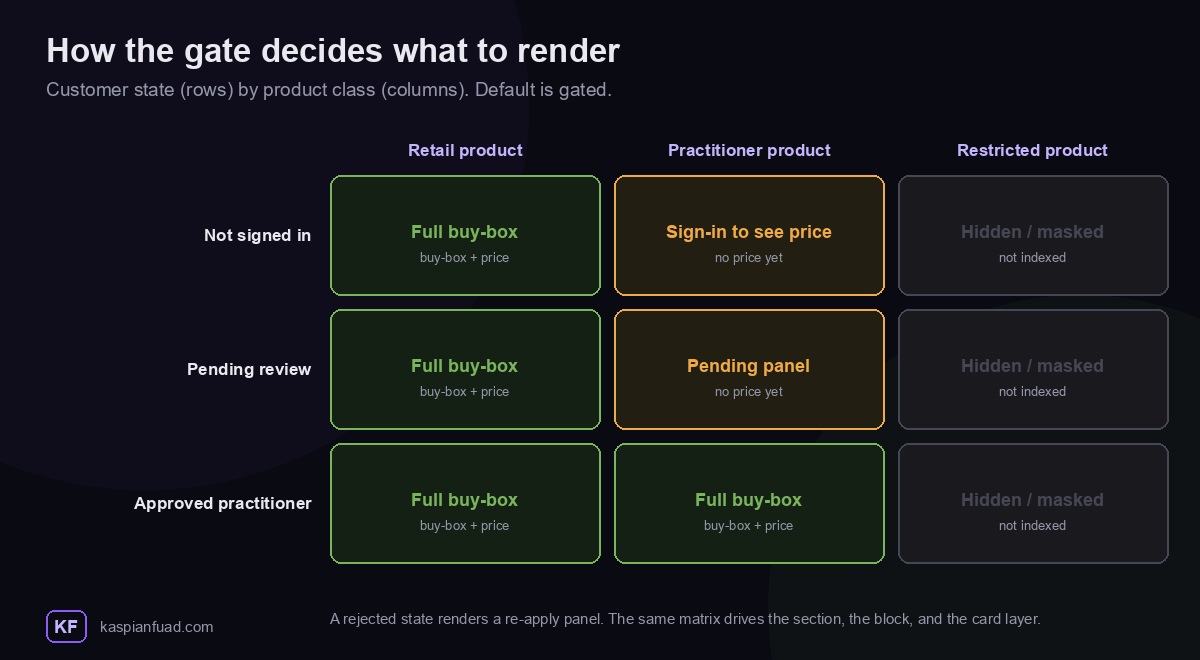
A retail product always shows a full buy-box. A practitioner product shows a sign-in prompt to a guest, a pending panel to an applicant under review, and a full buy-box only once approved. A restricted product is masked and de-indexed for everyone. The same matrix drives the PDP section, the price block, and the card layer, so those three can never disagree about what a given shopper should see. A rejected customer gets a re-apply panel rather than a dead end.
Six layers enforce that decision
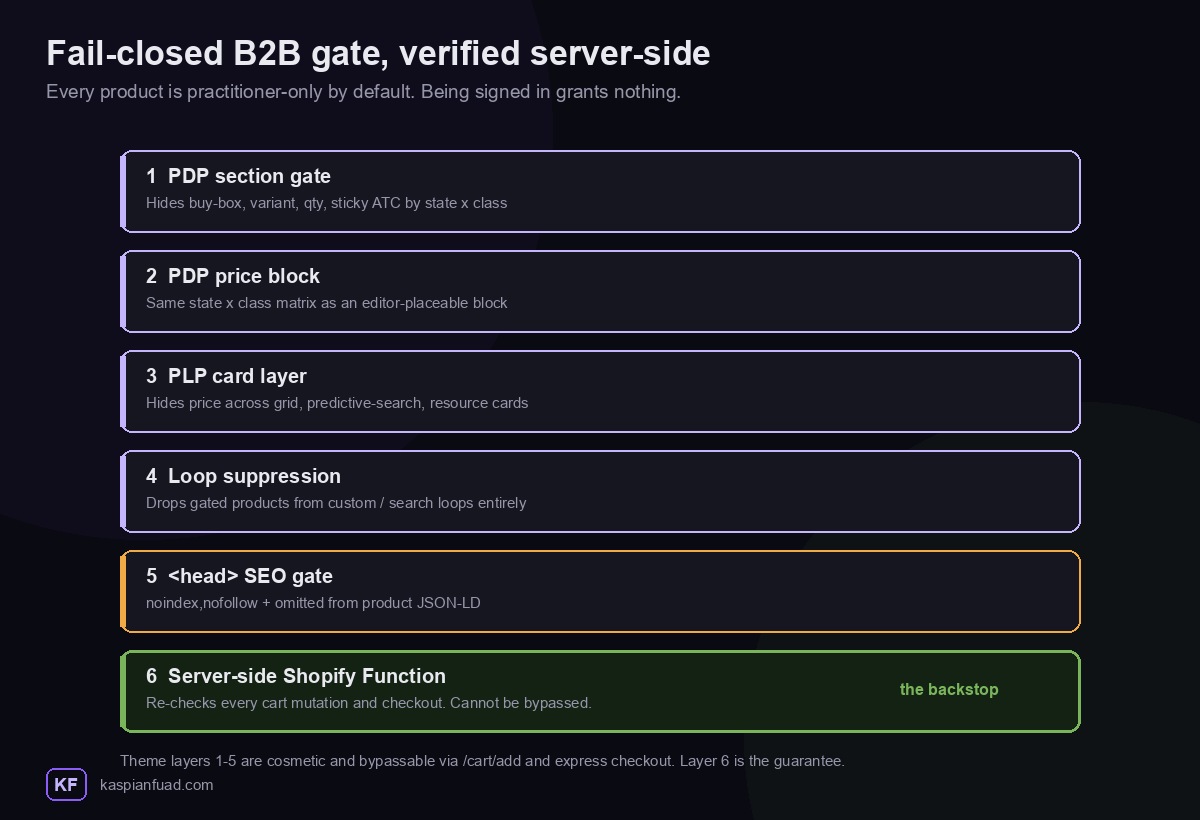
What makes this portfolio-grade is that the gate is defense in depth across six independent layers, and none of them trusts the others:
- PDP section gate. A three-state (unauthenticated, pending, approved, with a rejected branch) by three-class matrix that renders the correct panel and hides Horizon’s native buy-box, variant picker, quantity, tax note, sticky add-to-cart and recommendations.
- PDP price block. The same matrix as an editor-placeable theme block, kept in lockstep with the section.
- PLP card layer. A price gate applied across all three of Horizon’s card families: collection grids, predictive-search dropdown cards, and homepage resource cards.
- Loop suppression. A render-and-continue helper that drops gated products entirely from any custom loop that bypasses the product card, including search.
<head>SEO gate. Gated product pages emitnoindex,nofollowon first parse and are omitted from the product JSON-LD, so they never enter shopping feeds.- Server-side Shopify Function. The one that cannot be bypassed.
Layers one through five are cosmetic. They can be defeated with /cart/add, a cart permalink, or express checkout. So the guarantee lives in a Shopify Function on the cart and checkout validation target, a pure, side-effect-free check that re-runs on every cart mutation and on entry to checkout. It reads customer tag membership and per-line product membership and blocks anything not explicitly allowed. The classifier is written to fail closed: unreadable merchandise is treated as gated.
// cart/checkout validation Function: a line is gated unless provably exempt
const lineIsGated = (merchandise) => {
  if (!merchandise || typeof merchandise !== "object") return true;   // unreadable -> gated
  if (merchandise.__typename !== "ProductVariant") return false;      // gift-card top-up, etc.
  const product = merchandise.product;
  if (!product) return true;                                          // no product -> gated
  if (product.isGiftCard === true) return false;
  return true;                                                        // default: practitioner-gated
};
The reasoning I want a fellow developer to notice: the store runs new customer accounts with open email-OTP signup, so being signed in grants nothing. The only purchase credential is an approved tag, and removing that tag re-gates the buyer at their very next cart mutation. Authentication and authorization are kept strictly separate, which is exactly the property a regulated B2B store needs and the one theme-only “hide the price” solutions quietly get wrong.
Accepting a practitioner: registration, review, and the approval lifecycle
Letting the right people in, and no one else, is the whole point of the gate. Accepting a practitioner is a small state machine: an applicant is provisioned automatically, a human decides, and the decision stays reversible at any time.
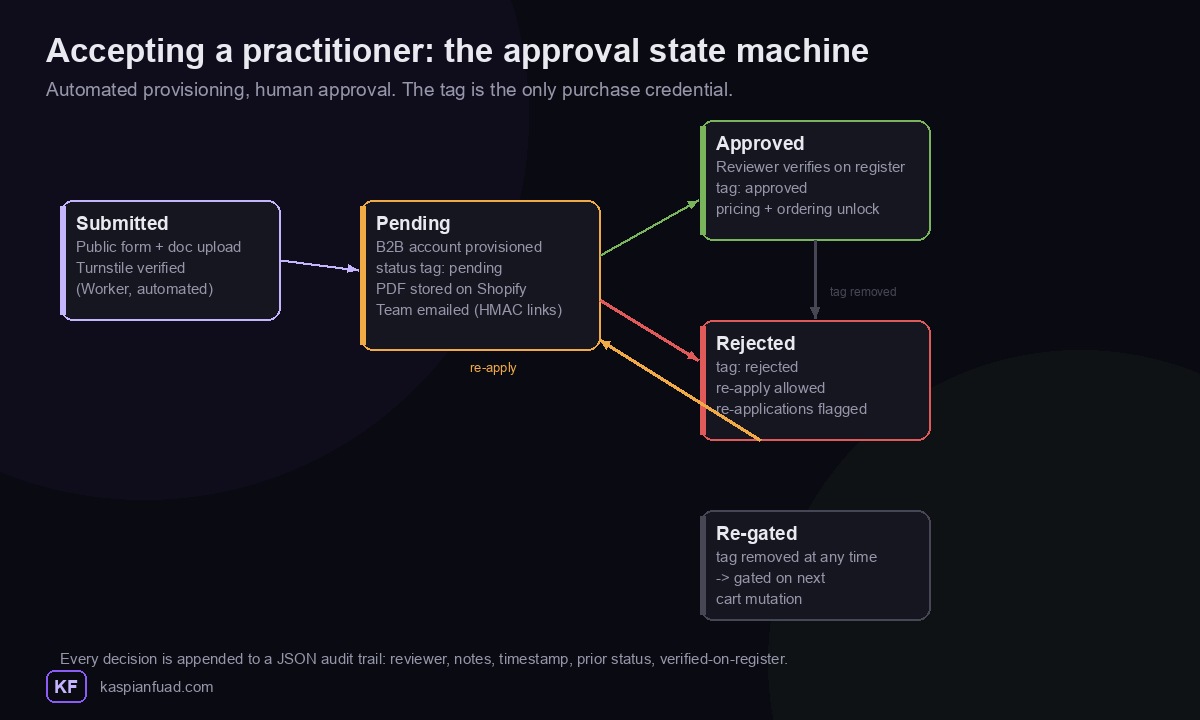
An applicant moves from submitted to pending the moment the registration Worker (described below) verifies the form and provisions their B2B account in a non-approved state. From there the reviewer console takes over, and the outcome is one of approved (pricing unlocks), rejected (re-application allowed and flagged), or, if an approval is ever withdrawn, straight back to gated.
Approval is a human decision, so it needed a human tool. I built the reviewer console as a custom admin UI extension (Preact, on the customer-details action target) for the pharmacist who signs off practitioners.
It reads the applicant’s uploaded credential documents straight from their form-submission metafields, pre-fills a search against the relevant UK professional registers with the applicant’s name, and enforces an audit trail by construction: the reviewer’s own name is mandatory, an explicit “I have verified the credential on the issuing register” checkbox is required before Approve enables, and every decision is appended to a JSON metafield history with the reviewer, notes, timestamp, previous status, and whether the credential was verified. Re-applications from previously rejected applicants are flagged.
Tag transitions are computed idempotently, strip all status tags, then add exactly one, so a customer can never end up holding two conflicting status tags at once. The registration flow behind it was re-architected mid-build: an initial {% form 'create_customer' %} approach was proven to silently discard custom fields under new customer accounts, so it was rebuilt on Shopify’s first-party B2B companies plus Shopify Forms, with Flow workflows driving the pending, approved and rejected lifecycle and the transactional emails.
Three custom apps, five extensions, three surfaces
Across the program I shipped three custom Shopify apps spanning five extensions, and every one is either extension-only or a Shopify-hosted Function. None runs a backend server. That is the central architectural choice: no OAuth scope creep, no third-party dashboard, no code the merchant does not use. The extensions span three surfaces, Checkout UI, the Functions runtime, and Admin UI.
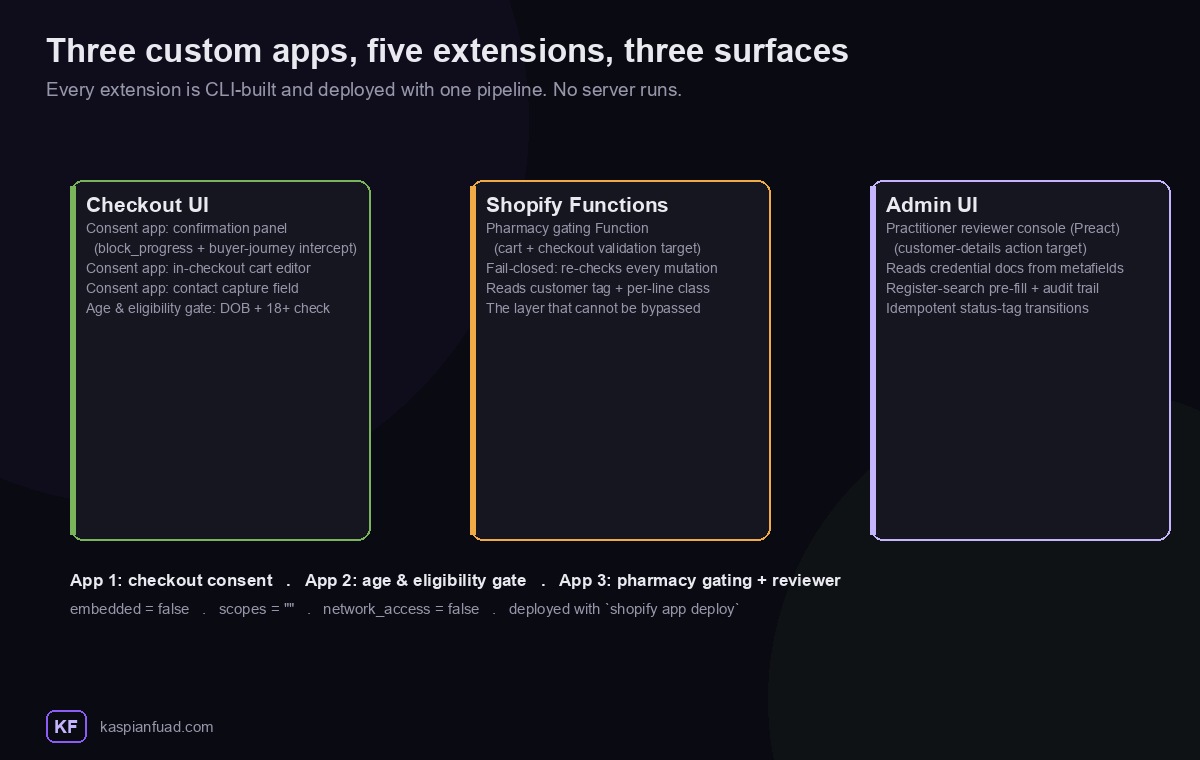
The three apps divide cleanly: App 1 is the checkout consent app, App 2 is an age-and-eligibility gate, and App 3 is the pharmacy gating app, which pairs the server-side Function above with the admin reviewer console below. That is the same app doing both halves of the gate: the Function that enforces it at checkout and the admin extension that decides who gets through.
The checkout consent app on the aesthetics storefront is a good example. It is extension-only (embedded = false, scopes = "", network_access = false) and fans out from a single deploy to three checkout targets: a required-confirmation panel, an in-checkout cart-line editor, and an optional capture field under the email input. The confirmation panel is the interesting one. Rather than trying to override the Continue button, which you cannot and should not do, it declares the block_progress capability and registers a checkout progress intercept (useBuyerJourneyIntercept) that hard-blocks each step transition until the required confirmations are made.
// Checkout UI extension: block progress until required confirmations are made
useBuyerJourneyIntercept(({ canBlockProgress }) => {
  return canBlockProgress && !allConfirmed
    ? { behavior: "block", reason: "Confirmation required", errors: [{ message: promptText }] }
    : { behavior: "allow" };
});
Each toggle is written to a cart attribute, so the confirmation persists onto the order in admin and into the confirmation email. Every label is merchant-configurable from the Checkout Editor, and placement is drag-and-drop rather than hardcoded. There is also a compliance-continuity detail I am proud of: the older theme-side JS gate stays live until this extension is enabled, then is retired, so the regulatory requirement is never uncovered for a single deploy.
App 2, the age-and-eligibility gate on the clinical surface, follows the same extension-only pattern with a single Checkout UI extension on the contact target: a date-of-birth field and an eligibility checkbox, with the same kind of checkout progress intercept refusing to let checkout complete until the shopper is both old enough and has confirmed. App 3, the pharmacy gating app, is the server-side Function from the section above paired with the reviewer console below, one app that both enforces the gate at checkout and administers who is allowed through it. All five extensions deploy from one pipeline with shopify app deploy, and because nothing runs a server, there is nothing to patch, scale, or breach.
The serverless backend: a stateless registration Worker
Practitioner registration needed real server-side logic, so it runs on a single Cloudflare Worker, module syntax, one runtime dependency (pdf-lib), and, deliberately, no database.
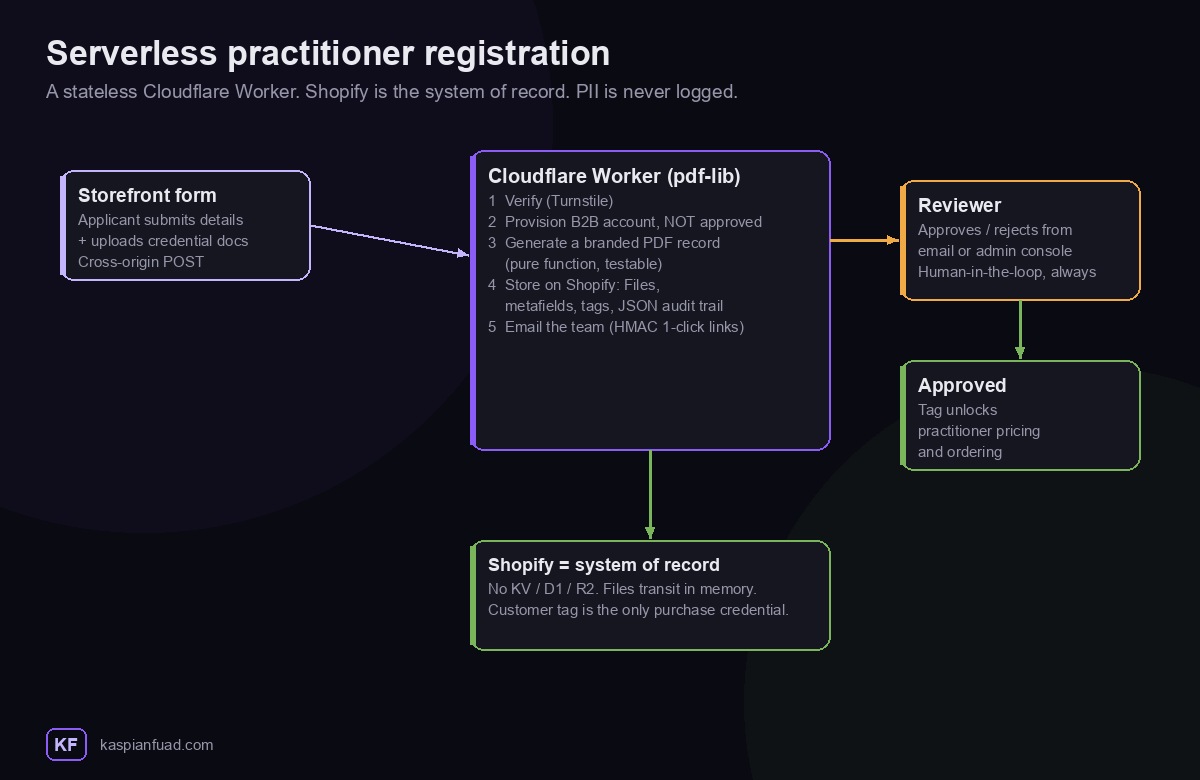
A prospective practitioner submits the public registration form and uploads credential documents. The Worker verifies the post with a challenge (Turnstile), provisions the applicant as a B2B account in a non-approved state, generates a branded PDF record of the application, stores everything on Shopify, and emails the team a review bundle with one-click approve and reject links. Only on a human approval does the account gain the tag that unlocks practitioner pricing and ordering. The Worker never grants ordering rights on its own.
The design decisions worth calling out:
- Stateless, Shopify as the system of record. No KV, no D1, no R2, no queue. Uploaded files transit in memory and are never persisted in the Worker. Everything the app needs to remember lives as Shopify customer and company metafields, Shopify Files, customer tags, and a JSON metafield audit trail.
- The PDF generator is a pure function. It takes the submitted data and returns bytes, with no network, no environment, and no side effects, so it renders byte-identically in the Worker and in a local test harness. That is a deliberate testability decision, not an accident.
- Signed action links. The emailed approve and reject links carry an HMAC in the query string as their sole credential, so a click alone cannot be forged, and there is a same-origin reviewer console behind its own auth.
- PII is never logged. Observability is on with full head sampling and an explicit rule never to log applicant data or credential files. The practitioner data model (name, professional registration number, profession, insurance confirmations) is handled as sensitive by construction.
Engineering the compliance in, not bolting it on
Regulated retail adds engineering constraints, not just legal ones. Two of them shaped the build.
First, the design system exists partly so that the elements a regulated storefront must show, or must not show, stay consistent across stores instead of being re-implemented three times and drifting. Second, and the part I am most pleased with, the repos ship with a pre-commit gate that fails the build on a maintained denylist of terms. A regulated storefront cannot commit a phrase it should not, because the commit is rejected before it ever reaches the theme. That is a regulatory control expressed as CI, not a checklist a human is trusted to run. The medical and advertising rules themselves belong to the client and their regulator. My job was to make the storefront enforce them by construction.
What made this hard
- Fail-closed is harder than fail-open. Every layer had to default to hiding commerce and prove exemption, and the server-side Function had to treat unreadable input as gated, which is the opposite of how most theme gating is written.
- Authentication is not authorization. Open OTP signup meant “logged in” had to mean nothing on its own. Getting that separation right, and re-gating instantly when a tag is removed, is the whole ballgame for a regulated B2B store.
- Upgrade-safety across three stores. Never forking the vendor theme, and namespacing every custom file, is a discipline that costs a little up front and saves the entire relationship later.
- Server-side truth with no server to babysit. Pushing the backend onto a stateless Worker with Shopify as the system of record meant no database to secure, back up, or breach, while still doing real work like PDF generation and signed approvals.
The takeaway
- Gate on the server, or you have not gated. Theme hiding is cosmetic; a Shopify Function on cart and checkout validation is the only layer a shopper cannot route around.
- Fail closed. Default every product and every cart line to gated, and treat unreadable input as gated too.
- Keep the vendor theme upgradeable. Namespace every custom file, never fork Horizon, and govern the exception list, so multi-store does not become multi-maintenance.
- Prefer extension-only apps. Checkout UI extensions and Shopify Functions do specific jobs at specific points with no server, no broad scopes, and no unused code.
- Let Shopify be the database. A stateless Worker with metafields, Files, tags, and an audit trail as the record of truth is less to secure and easier to trust than a bespoke backend.
For the conversion-and-speed side of my work, see the Enea Studio engineering case study (six sprints to all five Core Web Vitals green) and the WD Electronics Shopify Plus case study (a funnel rebuild that moved reached-checkout by 30%). I also wrote up the platform shift behind this build in checkout extensibility for non-Plus stores.
What it means if you are hiring for this
If you need Shopify Plus work at this level, custom checkout extensions, a B2B or gated store that holds up server-side, a multi-store design system, a custom app, or a Cloudflare Worker wired into Shopify, that is the work I do, solo, end to end. You can see how I work and what I charge, or book a call below and I will tell you straight whether it is a fit.
Building something in this territory? Book a Shopify Plus development call and bring the hard part. I would rather scope the gnarly integration than the landing page.