

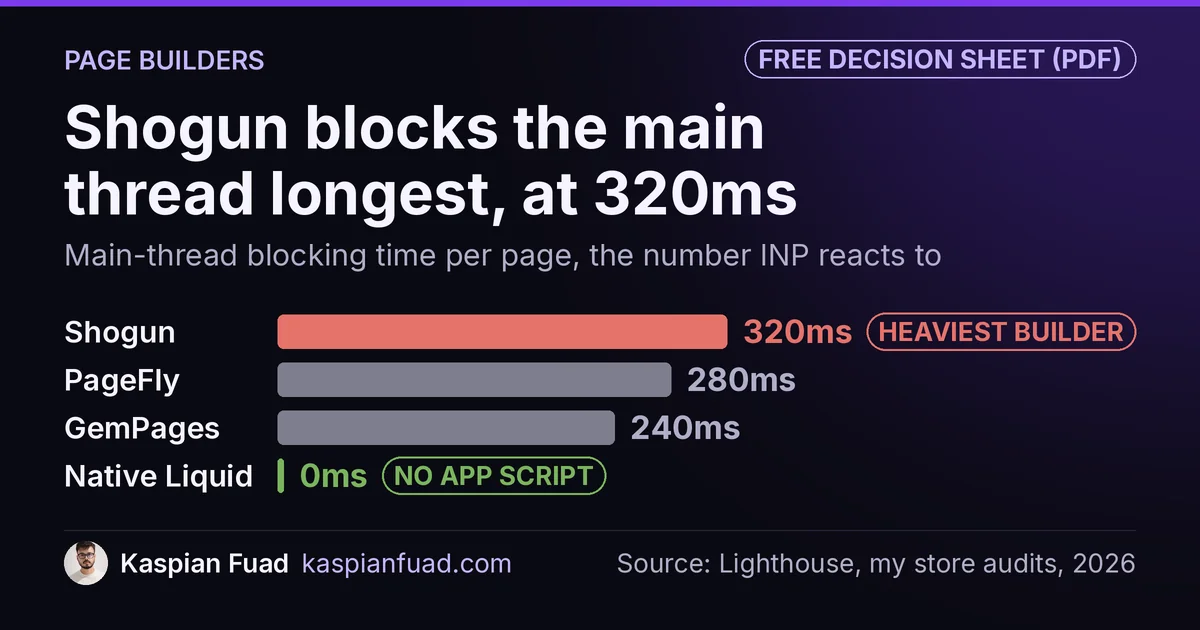
Search “GemPages vs Shogun” and the first result is Shogun’s own comparison page. It promises “lean, fast-loading content blocks” and gives no number. Here is the one I measured: Shogun blocks the main thread for 320ms on every page it renders, GemPages for 240ms.
I have audited 100+ Shopify stores in 12 years of development work. Every store paying $29 to $499 a month for GemPages, Shogun, or PageFly tells me the same thing: we need it for landing pages. In 7 of 10 audits, the math says they don’t. When it does, the pick is rarely the one the vendor comparison pages push.
TL;DR: Measured by blocking time, the metric Core Web Vitals scores, Shogun is the heaviest builder at 320ms, then PageFly at 280ms, GemPages at 240ms, EComposer at 220ms, and Replo at 180ms. Native Liquid sections add 0ms. On price, 25 published pages plus A/B testing costs $78 a month on GemPages (with its GemX app), $99 on PageFly, and $39 to $199 on Shogun depending on how many visitors you test. GemPages beats Shogun on both numbers. Below 6 new layouts a month, Liquid beats all three.
Download the Page Builder Decision Sheet (PDF)
Why this comparison matters for your store
- A 1-second mobile load penalty drops mobile conversion by up to 20% (Google 2017)
- Builder pricing climbs with page count on PageFly and with tested visitors on Shogun, so a $39 plan can quietly become a $199 or $499 one
- Migration off a page builder is page by page, because each page depends on the builder that made it
Which Shopify page builder is actually the slowest?
Shogun. It blocks the main thread for roughly 320ms on every page it renders, the heaviest of any builder I measure. If you have read the vendor comparison pages, that will surprise you, and the reason it surprises you is the interesting part.
There are two ways to measure “heavy”, and they disagree.
Payload is how much JavaScript the browser downloads. On payload, PageFly looks like the worst offender at roughly 340KB, while Shogun and GemPages look lighter at 260 to 300KB. That is the number vendors quote and the number most comparison posts repeat.
Blocking time is how long that JavaScript holds the main thread once it lands, so the page cannot respond to a tap. It is what feeds Interaction to Next Paint, one of the three Core Web Vitals Google ranks on. A small bundle doing heavy main-thread work blocks longer than a bigger bundle that defers, so payload tells you what you downloaded, not what it cost you.
On blocking time, the order flips. These come from Lighthouse third-party attribution across the stores I audit, and they are the same figures my free Shopify app detector hands back when you scan your own store.
| Page builder | Blocking time | Typical price | JS payload |
|---|---|---|---|
| Native Liquid sections | 0ms | $0 | 0KB |
| Replo | 180ms | free plan, paid from $99/mo billed annually | not measured |
| EComposer | 220ms | not verified | not measured |
| GemPages | 240ms | $29 to $199/mo | ~260-300KB |
| PageFly | 280ms | $24 to $99/mo | ~340KB |
| Shogun | 320ms | $39 to $499/mo | ~260-300KB |
Shogun ships less JavaScript than PageFly and still blocks the thread longer. If you chose Shogun because a comparison table called it the lighter app, you optimized for the metric Google does not score.
None of this makes Shogun a bad product. It has the best CRO tooling of the three, and I say so below. What it means is that the comparison pages leave out the number that decides your Core Web Vitals score, which is why I published the blocking figures rather than the payload ones.
GemPages vs Shogun: which one should you pick?
GemPages, for most stores. It is lighter and cheaper on the numbers that matter, and Shogun only pulls ahead on one feature.
| GemPages | Shogun | |
|---|---|---|
| Blocking time (my measurement) | 240ms | 320ms |
| Entry plan that publishes | $29/mo, unlimited pages | $39/mo, 25 pages |
| Unlimited pages | $29/mo | $199/mo |
| A/B testing | Separate GemX app, from $49/mo | Included, capped by monthly tested users |
| Top plan | $199/mo | $499/mo |
| App Store rating | 4.9 from 4,242 reviews | 4.8 from 1,966 reviews |
Prices are from the GemPages and Shogun App Store listings as of September 2026.
GemPages blocks the main thread 80ms less on every page it renders. On a mobile visitor tapping a button, that is the gap between an Interaction to Next Paint that stays under Google’s 200ms “good” line and one that crosses it once your reviews, chat, and analytics apps stack on top.
Shogun’s real edge is testing inside the builder. Every paid Shogun plan includes A/B testing and personalization, capped by monthly tested users (MTUs): 2,000 on Build, 10,000 on Grow, 50,000 on Advanced. If a marketer runs weekly landing page experiments and wants one login for build and test, Shogun is a defensible buy. If you plan to test campaign pages that see more than 2,000 visitors a month, which one paid-social push passes quickly, plan on Grow at $199 rather than Build at $39.
Pick GemPages if you build pages and test occasionally. Pick Shogun if testing is the job and you will pay for Grow. Pick neither if you have a developer and ship fewer than 6 layouts a month.
What does each page builder really cost per month?
The sticker price is the entry plan. The real bill is the plan you land on once you need 25 live pages and a way to test them. Here is that scenario priced from each app’s own listing.
| Scenario: 25 pages + A/B testing | Plan you need | Monthly cost |
|---|---|---|
| GemPages | Build $29 + GemX Page Optimize $49 | $78 |
| PageFly | Accelerate (unlimited pages, A/B testing) | $99 |
| Shogun, under 2,000 tested users | Build | $39 |
| Shogun, 2,000 to 10,000 tested users | Grow | $199 |
| Native Liquid sections + a free testing setup | Developer time only | $0 |
Three things the vendor pages leave out:
- GemPages does not put A/B testing in the builder. It lives in GemX, a separate app with its own subscription ($49 for 10 live experiments, $99 for unlimited). Budget both.
- PageFly’s $24 plan is 5 pages, not unlimited. PageFly charges $5 for each extra block of 5, so 25 pages on Builder runs $44 with no testing. Unlimited pages and A/B testing start at $99.
- Shogun’s $39 plan caps publishing at 25 pages and testing at 2,000 users. Past either line, the next step is $199. The free plan cannot publish a page at all.
Before you pay for testing at all, check whether your traffic can support it. My Shopify A/B testing cost breakdown has the sample-size table: at a 2% conversion rate, detecting a 10% lift needs roughly 78,000 visitors per variant.
The three builders, one by one
PageFly: cheapest entry, biggest JavaScript payload
PageFly has the largest review base of the three, 4.9 stars from 5,893 reviews. Free plan: 1 published page or section. Builder: $24 per month from 5 pages. Accelerate: $99 per month for unlimited pages, A/B testing, and funnels. Enterprise: $299.
Strength: template variety and the lowest entry price. Weakness: it downloads the most code of the three, roughly 340KB per page, and blocks the main thread for 280ms: heavy, but still below Shogun.
Shogun: the best built-in testing, the worst blocking time
Build: $39 per month for 25 pages. Grow: $199 per month for unlimited pages. Advanced: $499 per month adds content syncing between stores and custom code elements. Payload: 260 to 300KB, lighter than PageFly. Blocking time: 320ms, the heaviest of any builder I measure.
Those two facts sit together uncomfortably, and it is the blocking number your Core Web Vitals score reacts to, not the payload one.
None of this makes Shogun a bad product. It has the best built-in testing of the three. What it means is that the comparison pages leave out the number that decides your Core Web Vitals score.
GemPages: lightest of the big three, cheapest unlimited plan
Build: $29 per month for unlimited published pages. Optimize: $59 per month adds sales funnels and post-purchase upsells. Enterprise: $199 per month. Payload: 260 to 300KB. Blocking time: 240ms, the lightest of the big three.
GemPages ships an AI Image-to-Layout tool that converts a mockup into editable sections, useful for design-led teams. Testing sits in GemX, priced separately.
Native Liquid sections: $0 a month, 0KB third-party JS
Cost: $0 per month. Cost in dev hours: 30 to 60 minutes per section. You build sections in Liquid with JSON schema settings; merchants control them from the standard theme editor.
This is the approach I ship on every client store where mobile performance matters. On the Enea Studio engagement, all 5 Core Web Vitals pass green on CrUX field data, with mobile LCP at 2.1 seconds, INP at 129ms, and CLS at 0.05. Total custom JavaScript across the entire theme: under 15KB. No page builder app can match that, because no page builder app ships zero JavaScript.
Trade-off: a marketer cannot drag and drop a new landing page in 20 minutes. They file a ticket for a new section, which takes a developer 30 to 60 minutes. For stores launching 2 or 3 new layouts a quarter, that trade-off pays off. For stores launching 2 or 3 a week, it does not.
Shopify page builder comparison matrix
| PageFly | Shogun | GemPages | Native Sections | |
|---|---|---|---|---|
| Price/mo | Free / $24 / $99 / $299 | Free (no publishing) / $39 / $199 / $499 | Free / $29 / $59 / $199 | $0 (dev time only) |
| Blocking time | 280ms | 320ms (worst) | 240ms | 0ms |
| JS Overhead | ~340KB | ~260-300KB | ~260-300KB | 0KB |
| Customization Ceiling | High (in app limits) | High (in app limits) | High (in app limits) | Unlimited |
| Ease of Use | Drag-drop, no code | Drag-drop, no code | Drag-drop + AI assist | Requires Liquid |
| A/B Testing | Included on $99 Accelerate | Included, capped by MTUs | Separate GemX app, $49+ | Manual or free tools |
| Best For | Budget-tight teams | Test-heavy marketing teams | Most mid-market stores | Performance-first stores |
Where page builder apps actually earn their subscription cost
Apps win the math when team velocity matters more than per-page performance. Four scenarios where the spend is defensible.
Marketing teams shipping 5+ campaign pages a week
Waiting on a developer to build a Black Friday landing page, a product drop page, and three ad-specific pages in the same sprint is not realistic. Page builders ship those pages in hours, not days.
High-frequency landing page A/B testing
Shogun’s built-in tester is genuinely useful at 4 to 8 experiments a month, provided your traffic can reach significance. Custom Liquid plus a separate testing tool works too, but at that experiment velocity you burn developer hours faster than the subscription.
Disposable seasonal pages
If you build 20 landing pages for a 3-week holiday push and then archive them, throwaway sections are hard to justify as developer work.
Pre-revenue or sub-$100K stores without developer access
A free-tier page builder is a reasonable bridge. Worry about the JS tax once you have enough traffic for it to matter.
Where page builder apps quietly bleed margin
The subscription is not the real cost. Five places where the math turns against you.
The JavaScript tax on Core Web Vitals
A 260-340KB JS payload adds 0.6 to 2.4 seconds on 4G mobile. Google ranks on CrUX field data, so real users on real devices set your search position. If page speed drops from “good” to “needs improvement,” you lose ranking signal across your full URL surface, not just the builder pages.
Vendor lock-in
Cancel the builder and its pages stop working the way you built them, because each one depends on the app’s editor and runtime. There is no clean export from Shogun, GemPages, or PageFly to a native Liquid section.
Pricing that scales with growth
PageFly bills by page slot below its $99 plan. Shogun caps testing by monthly tested users. As the store grows, so does the bill. Native sections cost the same at 1k sessions and 1M.
Theme update fragility
Builder apps render markup on top of the theme. When Shopify updates Dawn or you switch themes, builder layouts break because the app’s CSS and DOM assumptions no longer match.
App bloat compounding
I audit stores running a reviews app + popup app + loyalty app + analytics app + page builder. Combined third-party JS routinely hits 1.2MB. You can measure that combined third-party JS on your own store instead of taking the anecdote on faith. The page builder was the single largest contributor in 8 of 14 cases I audited in 2025.
The Liquid hero section in 30 minutes
A functional hero section with merchant theme editor controls takes 30 to 60 minutes to build from scratch. The pattern is <style> + HTML + schema JSON. The structure:
{% comment %} sections/custom-hero.liquid {% endcomment %}
<section class="custom-hero" style="min-height:{{ section.settings.height }}px">
  {% if section.settings.image != blank %}
    {{ section.settings.image | image_url: width: 1920 | image_tag:
       loading: 'eager', sizes: '100vw', widths: '375, 750, 1100, 1920' }}
  {% endif %}
  <div class="custom-hero__content">
    <h2>{{ section.settings.heading }}</h2>
    <a href="{{ section.settings.cta_url }}">{{ section.settings.cta_text }}</a>
  </div>
</section>

{% schema %}{ "name": "Custom Hero", "settings": [
  { "type": "image_picker", "id": "image", "label": "Background" },
  { "type": "text", "id": "heading", "label": "Heading" },
  { "type": "text", "id": "cta_text", "label": "CTA text" },
  { "type": "url", "id": "cta_url", "label": "CTA URL" }
], "presets": [{ "name": "Custom Hero" }] }{% endschema %}
That section ships zero JavaScript, weighs under 2KB, and gives merchants 4 theme editor controls. For accordions, testimonial carousels, comparison tables, and countdown timers, see custom Liquid section examples for the full copy-paste set.
Compare what PageFly or Shogun ship for the same hero: 260 to 340KB of JS runtime, plus a CSS framework, plus their rendering layer. For a heading, a button, and an image.
How to decide: 3 variables that settle it
The right pick depends on developer access, page launch cadence, and how much your revenue depends on mobile traffic.
Build native Liquid sections if you have a developer on staff or retainer, you ship fewer than 4-6 new layouts a month, and mobile speed drives revenue. Upfront cost is higher; ongoing cost is zero.
Use a page builder app if you have no developer, your marketing team ships landing pages independently, and you publish 6+ layouts a month. Pick GemPages for the lightest blocking time and cheapest unlimited plan, Shogun when built-in testing is the job, or PageFly when you want A/B testing in one $99 bill.
Audit your current builder if you are unsure. Run Lighthouse on a builder page and a native page on the same store. If the builder page scores 15+ points lower on mobile, calculate whether the convenience is worth the ranking and CVR cost. The data settles the debate.
How to verify the impact on your store in 5 minutes
Three checks. Do them today before you renew or cancel anything.
- Lighthouse delta. Open PageSpeed Insights. Run a builder page (e.g.
/pages/landing-bf) and a native page (e.g./). Note the mobile score gap. - CrUX field data. Open Search Console > Core Web Vitals report. Filter URLs by the builder slug pattern. Compare LCP/INP/CLS to your site median.
- Conversion rate split. GA4 > Reports > Engagement > Pages and screens. Compare CVR on builder pages vs native template pages. A 2-percentage-point gap on your top 20 landing pages is the real builder bill.
If the builder pages score 15+ Lighthouse points lower AND show worse CrUX AND show measurably lower CVR, the subscription costs more than its price tag.
Migration path: weaning off a page builder app
Six steps. I have run this with clients across PDP rebuilds and full landing page migrations.
1. Inventory. List every page the app controls. Categorize: hero sections, landing pages, PDP customizations, collection layouts, blog templates. Count them.
2. Sort by traffic. Pull GA4 or Shopify Analytics. Migrate highest-traffic pages first because they carry the most JS penalty.
3. Build native replacements. For each page type, build a Liquid section that replicates the layout. Match content structure and merchant controls, not pixels.
4. Template suffix routing. Shopify lets you create page.native.liquid. Assign pages to the new template one at a time from admin. Both versions live simultaneously while you cut over.
5. Verify per page. Lighthouse + mobile/tablet/desktop QA + theme editor control test. Keep the app disabled (not uninstalled) for 2 weeks as a safety net.
6. Clean up leftovers. Builder apps leave snippet files, asset files, and config/settings_data.json entries. Grep snippets/ for pagefly-, shogun-, gempages- prefixes. Remove all of them so dead code stops loading on every request.
On a recent product configurator rebuild, this migration pattern delivered a 40-point Lighthouse improvement on the affected pages over two weeks.
What this costs your bottom line
The real cost is not the subscription. It is the compounding performance penalty on every page the app touches.
A 300KB JS payload that adds 1.5 seconds to mobile load on your top 20 landing pages affects every visitor to those pages. At $78 a month (GemPages plus GemX) over 12 months, the apps cost $936. Google research puts each added second of mobile load at up to a 20% conversion drop. On a $1M store with 30% of sessions touching builder pages, a 5% conversion drop on those pages costs $15,000 per year. The subscription is rounding error. To add up what your app stack actually costs against that, total your monthly and annual spend before the renew call.
That does not mean every store should rip out its page builder tomorrow. It means the renew decision deserves more analysis than “which one has the nicest drag-and-drop editor.”
Audit one high-traffic builder page this week. Build a native Liquid replacement. Deploy it with template suffix routing. Run both for 14 days. Let the Lighthouse, CrUX, and CVR data settle the call.
The takeaway
- Judge builders on blocking time, not payload. Shogun ships less code than PageFly and still blocks the thread longest, at 320ms.
- Scan your own store with a free app detector before you renew; the builder is usually the single heaviest app on the page.
- Default to native Liquid below 6 new layouts a month, a builder above it. That cadence is the real deciding variable.
- GemPages beats Shogun on blocking time (240ms vs 320ms) and price ($29 unlimited vs $199). Pick Shogun only when in-builder testing is the job.
- Price the real plan, not the entry plan: 25 pages plus testing is $78 on GemPages, $99 on PageFly, and up to $199 on Shogun.
I am Kaspian Fuad, a Shopify developer and CRO consultant. I measure app blocking time on real stores and rebuild builder pages as native Liquid sections; prices here were checked on each App Store listing on September 23, 2026. If your builder pages trail your theme pages on mobile, book a call and bring the PageSpeed numbers.