

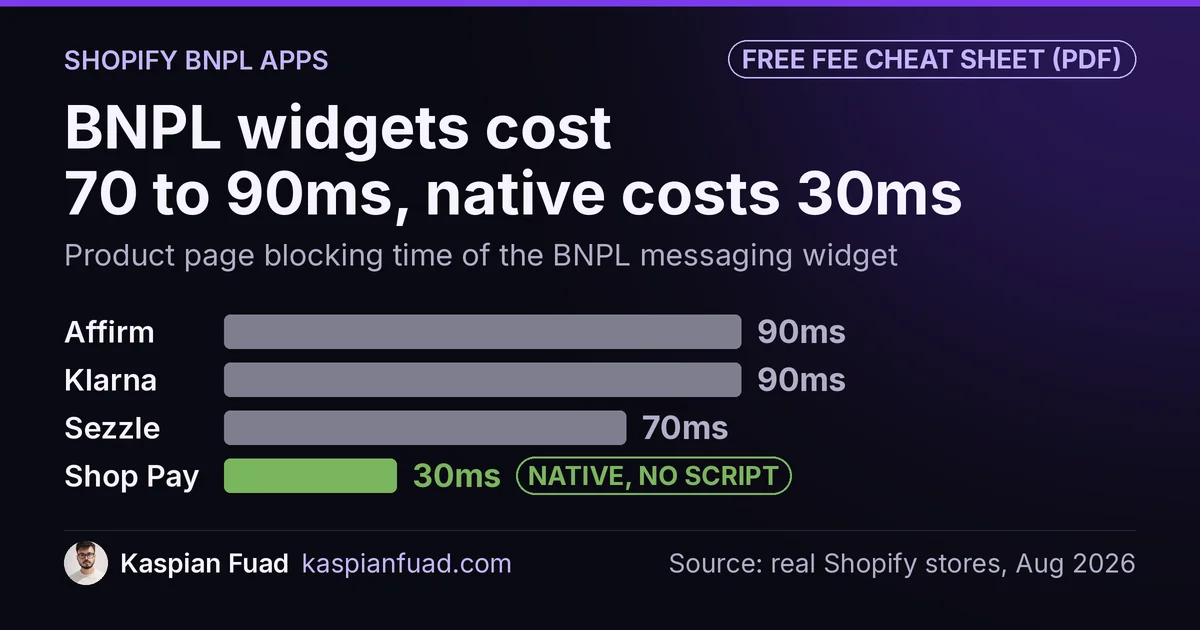
TL;DR: I measured the on-site “pay in 4” widget from six Shopify BNPL options. The messaging script alone costs 70ms to 90ms of blocking time on your product page. Shopify’s own Shop Pay Installments does the same job in 30ms, because it is native theme code, not a script. Fees cluster near 6% across all of them, so speed and region, not price, should decide your pick.
Every BNPL comparison I read argues about approval rates and consumer perks. None of them mention that the little “4 payments of $12.50” line on your product page is a third-party JavaScript file, and that stacking two or three of them quietly loads your store down.
So I measured it. Here is what six BNPL options cost your Shopify store, in fees and in milliseconds.
What do Shopify BNPL apps cost the merchant?
The fees are boring, and that is the point. They barely separate the providers.
| BNPL option | Blocking time | Merchant fee | Strong regions | How it is added |
|---|---|---|---|---|
| Shop Pay Installments | 30ms | Payments rate plus a premium (in admin) | US, CA, UK | Native, no app |
| Sezzle | 70ms | 6.1% plus $0.30 (published) | US, CA | App plus widget |
| Zip | 70ms | From 5.9% plus $0.30 (published) | AU, US | App plus widget |
| Afterpay | 80ms | About 3% to 7% (per agreement) | US, AU, UK, CA | App plus widget |
| Klarna | 90ms | Around 6% plus $0.30 (reported) | EU, UK, US | Gateway plus widget |
| Affirm | 90ms | Quote only (around 6% reported) | US, CA | App plus gateway |
Only two providers publish a hard rate. Sezzle’s own merchant agreement states 6.1% plus $0.30 per order, and Zip’s pricing page lists from 5.9% plus $0.30. Klarna, Afterpay, Affirm, and Shop Pay Installments all keep the merchant rate behind a login or a sales quote, and the figures third parties report for them cluster around 6%. Klarna’s own pricing page confirms the one thing that matters most: “You always get paid upfront and in full.” That holds across all six. The provider carries the repayment risk, and you get the money in one to three days, minus the fee.
So price is close to a wash. A store paying 6% to Klarna is not meaningfully better off switching to Affirm at 6%. The real differences sit elsewhere.
Do BNPL widgets slow down your Shopify store?
Yes, and the reason is specific. A BNPL integration has two separate parts, and people conflate them.
The first part is the payment method at checkout. That runs on the provider’s servers and costs your shopper’s browser nothing. The second part is the on-site messaging, the “as low as $12.50/mo” line on the product page. That is a client-side JavaScript widget, and it is the part that shows up in your Core Web Vitals.
Affirm’s own developer docs are blunt about it: you “embed the following snippet into the head section” of your template, which loads affirm.js, and then you call affirm.ui.refresh() whenever a price changes. That is a third-party script in your <head>, parsing and executing on the main thread, on the exact page where your shopper is deciding to buy. I broke down what that kind of main-thread work does to interactivity in my INP case study.
Shopify’s native Shop Pay Installments skips the script entirely. Its messaging renders through the payment_terms Liquid filter, which outputs plain HTML from the server. No affirm.js, no refresh call, no extra request. That is the whole reason it measured 30ms while the bolt-on widgets landed at 70ms to 90ms.
The number that should worry you is not any single widget. It is the stack. A store that runs Klarna, Afterpay, and Affirm messaging together to “give shoppers options” is loading three separate scripts from three origins. I see the same pattern with consent apps and on a beauty brand product page carrying 1,250ms of blocking time: the cost is rarely one app, it’s the pile.
Shop Pay Installments vs Klarna vs Afterpay vs Affirm: which fits your store?
Since fees are level and speed favors the native option, the pick comes down to where your customers are and who they already trust.
Shop Pay Installments is the default for a US, Canadian, or UK store. Affirm underwrites it, per Shopify’s help center, and a February 2025 agreement made Affirm the exclusive provider, with the UK going live in December 2025. It shows up inside the Shop Pay flow millions of shoppers already recognize, and it needs no extra app.
Klarna earns its place if you sell into Europe. It is strongest in the Nordics, Germany, and the UK, live across the EU and Australia. As of October 2026, Shopify Payments does not offer Klarna to US stores. If a real share of your traffic is European, Klarna is worth the widget.
Afterpay (Clearpay in the UK) owns a younger, Australian and US shopper base and is the common pick for fashion and beauty. Affirm as a standalone leans toward higher-ticket US and Canadian purchases, longer terms, and larger baskets.
Zip needs a 2026 caveat that older comparison posts miss. Zip has pulled out of the UK and is winding down New Zealand by August 2026, so its footprint is now essentially Australia and the US. Do not pick it for a market it is leaving.
Should you just use Shopify’s native Shop Pay Installments?
For most US, Canadian, and UK stores, yes, and then stop.
It is the lightest option I measured, it is built into checkout, and it rides on Shop Pay’s existing recognition. You avoid a third-party gateway, an extra app, and a script in your head tag. Activation is one screen: Settings, then Payments, then the Shopify Payments section, then check Shop Pay Installments. It requires Shopify Payments and Shop Pay to be on, and your store currency to match the region.
Add a second provider only when you can name the reason. Selling into Germany? Klarna. A big Australian following? Afterpay. That is a deliberate choice for a market, not a habit of bolting on every logo a shopper might recognize. If you do add one, turn on its messaging widget only where it earns a conversion, and leave it off the pages where it just adds weight.
What actually decides your BNPL pick?
Most BNPL advice sells you on approval rates and consumer perks. Those matter to your shopper. To your store’s performance and your margin, three things decide it.
- Region and customer base. This is the real variable. Fees are level, so put the provider your customers already use in front of them, and do not pay a widget tax for a market you barely serve.
- Native over bolt-on. Where Shop Pay Installments is available, it does the job with no script. That is a free Core Web Vitals win over any third-party equivalent.
- One or two, never three. Each messaging widget is another main-thread payload. The conversion case for BNPL, which providers pitch with self-reported and wildly inconsistent lift numbers, does not survive stacking three scripts on your product page.
One more thing worth knowing for 2026: the regulatory picture loosened. The CFPB withdrew its 2024 rule that treated pay-in-4 BNPL like a credit card on May 12, 2025, and has signaled it will not issue a replacement. That does not change your fees, but it does mean the compliance overhead some merchants feared has not arrived.
Want the full comparison to keep? I put the speed, fee, and region data for all six into a one-page reference.
Download the Shopify BNPL speed and fee table (PDF)
Before you add any BNPL widget, check what your product page already carries. My App Bloat Detector shows the scripts you are running, and my checkout abandonment guide covers the friction that costs more sales than a missing pay-in-4 option ever will.
The takeaway
- Measure the widget, not the brand. Third-party BNPL messaging costs 70ms to 90ms of blocking time; native Shop Pay Installments does it in 30ms.
- Fees are a wash. Nearly everyone is near 6% and pays you upfront, so do not choose on price.
- Pick by region. Shop Pay Installments for US, Canada, and UK; Klarna for the EU; Afterpay for Australia. Skip Zip outside AU and US in 2026.
- Go native where you can. Shop Pay Installments needs no app and no script, which is a free Core Web Vitals win.
- Never stack three. Each messaging widget is another main-thread payload, and the conversion case does not justify the pile.
I am Kaspian Fuad, a Shopify CRO consultant. I measure the speed cost of the apps most comparison sites only price, because the millisecond your shopper waits is the number that moves conversion.