

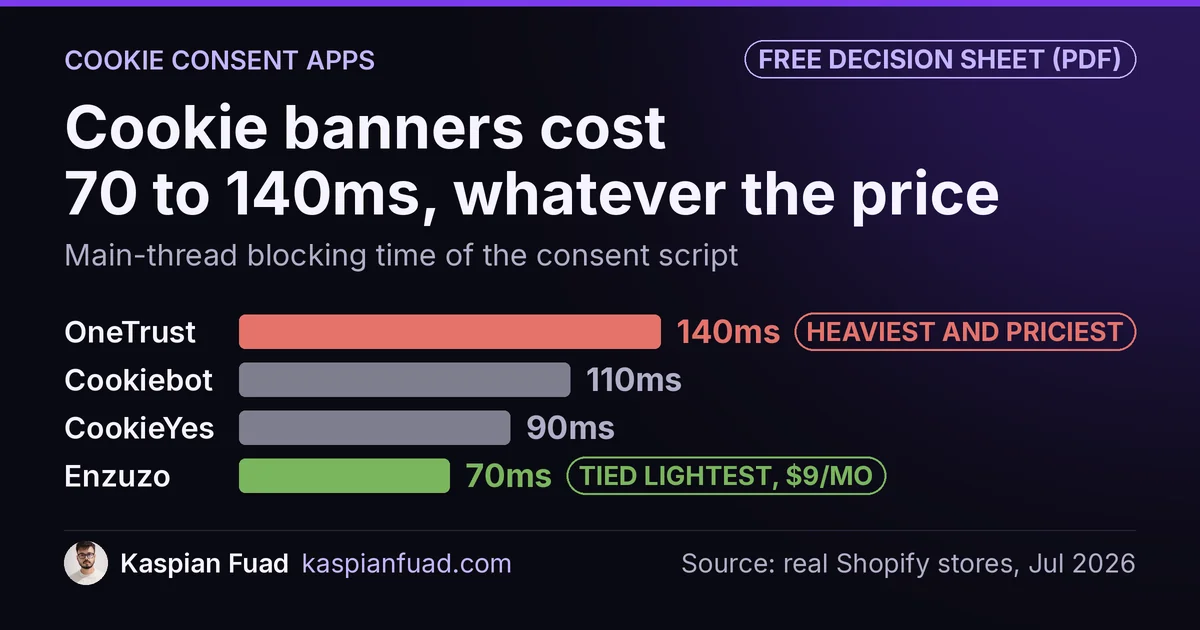
TL;DR: I ran the consent scripts from nine Shopify cookie banners through the same profiler. The legally required checkbox costs a store between 70ms and 140ms of main-thread blocking time. Price does not predict weight: the heaviest, OneTrust, is also the most expensive at roughly $10,000 a year, while iubenda blocks half as long for $5.99 a month. The real lever is not the vendor, it is your configuration.
A cookie banner is the one script almost every Shopify store is legally forced to run, and almost nobody measures what it costs them. Every comparison article I found ranks these apps on price, features, and compliance badges. None of them profile the thing that actually decides your Core Web Vitals score.
So I did. Here is what nine consent apps cost, in dollars and in milliseconds.
What do Shopify cookie consent apps cost in 2026?
I checked the live pricing on all nine in July 2026. The spread is close to 140x for the same basic job.
| App | Cheapest paid plan | Free tier | On App Store | Blocking time |
|---|---|---|---|---|
| iubenda | $5.99/mo | Yes | Yes | 80ms |
| Cookiebot | $6/mo (Essential) | Yes | Yes | 110ms |
| Consentmo | $9/mo (Standard) | Yes, forever | Yes | 80ms |
| Enzuzo | $9/mo (Starter) | Yes | Yes | 70ms |
| CookieYes | $10/mo (Basic) | Yes | Yes | 90ms |
| Termly | $14/mo (Starter) | Yes | No (script) | 70ms |
| Ketch | $150/mo (Starter) | Yes, under 5k visitors | Yes | 120ms |
| Osano | $199/mo (Plus) | Yes, under 5k visitors | Yes | 100ms |
| OneTrust | Quote only, ~$833/mo | No | No (connector) | 140ms |
The blocking-time figures are my own measurements across real Shopify stores, from the same library that powers my App Bloat Detector. Treat them as a proxy, not a lab certificate, and read the how it moves section before you rank vendors on them.
The pricing story is simpler. Six of the nine start free. The cheapest real paid plans, iubenda at $5.99 and Cookiebot at $6, cost less per month than the enterprise names cost per day. OneTrust dropped its self-serve tier and now quotes a reported platform minimum near $10,000 a year, so it prices most small merchants out before the conversation starts.
Notice what price does not tell you: OneTrust is the most expensive AND the heaviest at 140ms, but Cookiebot at $6 a month is heavier (110ms) than Enzuzo at $9 (70ms). Cheap does not mean light, and expensive does not mean fast.
Do cookie consent apps slow down your Shopify store?
They all add work to the browser, and the mechanism is well documented. Google’s own cookie notice best practices on web.dev spells out three costs.
First, most CMP snippets ship as a script in the <head>. If it is not marked async or defer, it blocks the parser, which delays your Largest Contentful Paint. Second, on mobile a large text banner can become the LCP element itself. Third, and this is the one people miss, the banner is Google’s named example of a “very common source of layout shifts.”
The worst cost hides behind the Accept button. When a shopper clicks Accept, every third-party tag the banner was holding fires at once. Google states plainly that this batch of processing on the click is a common cause of high Interaction to Next Paint. INP’s “good” threshold is 200ms, and a consent script that dumps Meta, TikTok, and GA4 tags into one interaction can eat most of that budget in a single click. I walked through fixing exactly this kind of main-thread stall in my INP case study.
The Core Web Vitals thresholds have not moved for 2026: LCP under 2.5s, INP under 200ms, CLS under 0.1, all at the 75th percentile.
Cookiebot vs CookieYes: which is lighter and cheaper?
This is the head-to-head most merchants actually search, so here is the honest answer.
CookieYes is lighter. Cookiebot is cheaper. CookieYes measured about 90ms of blocking time against Cookiebot’s 110ms, but Cookiebot’s Essential plan is $6 a month versus $10 for CookieYes Basic. Both are Google-certified CMPs, both automatically block trackers before consent, and both support Google Consent Mode v2, so on the compliance basics they are close to a wash.
Pick CookieYes if you are chasing a Core Web Vitals score and can spend the extra $4 a month. Pick Cookiebot if budget is the deciding factor and 20ms is not going to change your 75th-percentile INP. Either way, the setting that decides your real number is the same one, and it is not the logo.
What actually decides the speed cost?
Here is where most CRO advice gets consent apps wrong. It treats the vendor as the variable. The vendor is the small variable. Your configuration is the big one.
Three settings move the number far more than the brand:
- Auto-blocking and scanning. The “block everything until consent” mode has to hold every third-party tag, then re-insert them on Accept. That is the INP spike from earlier. It is also the mode most vendors turn on by default.
- How many pixels you gate. A store gating one analytics tag pays a fraction of what a store gating six ad pixels pays, on the identical app.
- Where the snippet loads. A synchronous tag in the
<head>blocks rendering. The same script deferred, with the third-party domain preconnected, often disappears from your LCP path entirely.
Google’s Consent Mode v2 guide explains why the CMP tends to sit early and synchronous: the consent signal must resolve before your marketing tags fire, so the script is architecturally pushed to the front of the load. That position is exactly what produces render-blocking. You can soften it with the wait_for_update timeout, but you cannot pretend the ordering does not exist.
This is the same finding I reached comparing Shopify search apps: the setting in your editor decides the speed cost, not the vendor on the invoice.
One fair credit: Consentmo publishes its own Shopify speed benchmark, testing LCP and load time on a Dawn demo store. It is vendor-run and covers only three apps, but it is the rare comparison that measures anything at all. Most do not.
Is Shopify’s free cookie banner good enough?
Shopify ships a free native banner under Settings, then Customer privacy, built on its Customer Privacy API. For some stores it is genuinely all you need. For most, it is not, and Shopify says so itself.
The native banner governs Shopify-specific tools: Shopify’s own cookies, Shopify Pixels, and checkout. Shopify’s docs state that manually installed or app-based third-party pixels “may need a third-party cookie banner or add custom logic” to honor consent. So the moment you add a Meta pixel, a TikTok pixel, or a Klaviyo tracker, the free banner stops covering your actual tracking.
It also exposes only four broad consent categories, has no IAB TCF support, and does no automatic script scanning. Shopify’s help center notes the native banner works with Google Consent Mode v2, though it does not publish a clean ship date, so I would not build a compliance claim on the exact version depth without testing your own tags.
The rule of thumb: if the only tracking on your store is Shopify’s own, start native and save the subscription. If you run any third-party pixel, which nearly every DTC store does, you need a real CMP.
Do you legally need a cookie banner?
Short answer: if you get EU traffic and run non-essential cookies, yes. The California angle is more nuanced than most posts admit, and getting it wrong is a real liability.
Under GDPR and the EU ePrivacy Directive, consent is opt-in and there is no revenue or size threshold. The trigger is a single visitor physically in the EU or EEA loading a non-essential cookie. A US store with no EU presence is still covered the moment it runs GA4 or an ad pixel against a shopper standing in Germany. The fines scale with global turnover: up to 4% of worldwide annual turnover under Article 83.
California’s CCPA works differently, and this is where I see stores over-buy. It only applies once a business crosses a threshold: roughly $26.6 million in revenue, or the data of 100,000 consumers, or half its revenue from selling data. Below that, a Shopify store is not covered by CCPA no matter how much California traffic it gets. And even when it does apply, CCPA wants an opt-out link (“Do Not Sell or Share My Personal Information”) and honoring the Global Privacy Control signal. It does not require an opt-in banner at all.
So the banner obligation is driven by your EU visitors, not your California ones. Do not let a vendor sell you a consent pop-up “because of California.” The same fear-driven upsell shows up with accessibility overlays, which I cover in the accessiBe vs UserWay vs AudioEye comparison.
Which cookie consent app should you pick?
Match the tool to your actual stack, not to the fear.
- Only Shopify-native tracking: use the free native banner and pay nothing.
- Small store, third-party pixels, tight budget: iubenda at $5.99 or Consentmo’s free-forever tier. Consentmo carries the Built for Shopify badge, supports Consent Mode v2, and measured a light 80ms.
- Speed-first: CookieYes (90ms) over Cookiebot (110ms), or Enzuzo at 70ms.
- Shopify Plus with IAB TCF or per-vendor needs: the enterprise tier earns its weight, but budget for both the $150 to $833 a month and the 120ms to 140ms it adds.
Whatever you install, treat the defaults as a starting point, not a setting. Turn off scanning you do not use, gate only the pixels you run, defer the script, and measure. The banner you configure well beats the banner you paid the most for.
Want the full table to keep? I put the speed and price data for all nine apps into a one-page reference.
Download the cookie consent app speed and price table (PDF)
Before you switch apps, run your current store through my technical audit checklist so you know your baseline. A 30ms banner saving means nothing if a heavier problem is hiding upstream.
The takeaway
- Measure the banner, not the badge. Consent apps cost 70ms to 140ms of blocking time, and price does not predict which is heaviest.
- Configure before you switch. Auto-blocking, the number of gated pixels, and script placement move your number more than the vendor does.
- Start with Shopify’s free banner only if your sole tracking is Shopify’s own tools, then add a CMP when you add third-party pixels.
- Buy on your stack, not on fear. iubenda and Consentmo cover most stores cheaply; save OneTrust and Osano for Plus stores that genuinely need IAB TCF.
- Get the law right. EU traffic triggers the opt-in banner with no revenue floor; California’s CCPA is an opt-out link above a size threshold, not a banner.
I am Kaspian Fuad, a Shopify CRO consultant. I measure the speed cost of the apps most comparison sites only price, because the millisecond your shopper waits is the number that moves conversion.