

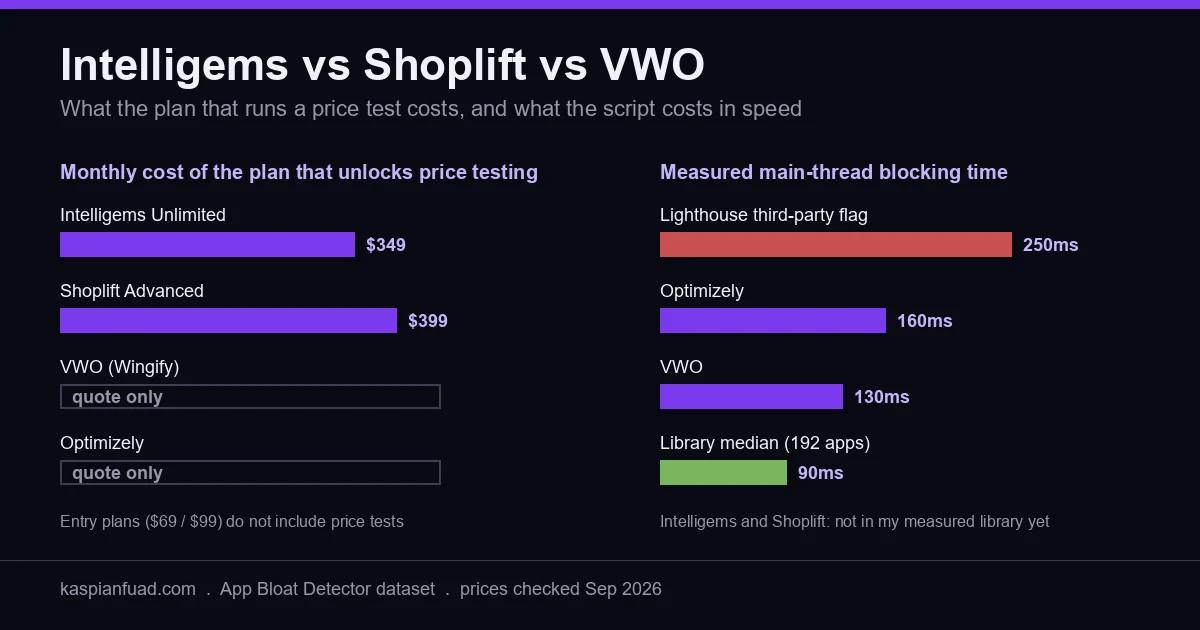
TL;DR: The $69 Intelligems plan and the $99 Shoplift plan do not include price testing. That seat starts at $349 a month on Intelligems (Unlimited) and $399 on Shoplift (Advanced). VWO and Optimizely are quote-only. Every tool costs you speed through its anti-flicker step, and I measured VWO at 130ms and Optimizely at 160ms of blocking time. Before any of it, check whether you have the traffic to detect the lift you are hoping for. Most stores under $1M a year do not.
Most of the first page of Google for “Intelligems vs Shoplift” is written by Intelligems, by Shoplift, or by a rival testing vendor grading itself. All of them compare the $69 and $99 headline plans. Neither of those plans runs a price test, which is the first test most DTC owners want.
So here is the comparison with the numbers the vendor pages leave out: the seat that runs your test, the speed it costs, and the traffic you need before any of it pays.
Intelligems vs Shoplift vs VWO: what does each one actually test?
They are three different tools wearing the same label, which is why the price comparison goes wrong before it starts.
Intelligems is a Shopify-native profit testing tool. It runs price, discount, shipping threshold, checkout, and post-purchase tests, and it reports profit per visitor using your own COGS, not just conversion rate. It has been on the App Store since December 2021 and sits at 4.8 stars across 194 reviews.
Shoplift is a Shopify-native storefront testing tool. It tests templates, themes, and URLs, launches tests from inside the theme customizer, and ships a one-click “Apply Winner.” It sits at 4.8 stars across 135 reviews. Price testing exists, but only from the Advanced plan up. Before paying for either, Shopify’s own native Rollouts A/B testing covers simple theme tests for free.
VWO and Optimizely are general experimentation platforms built for any website. They offer visual editors, multivariate tests, feature flags, and enterprise approval workflows. Neither is built around Shopify’s variant and price model. Both are priced by quote.
I use the same lens here as on the apps vs custom development decision: what is the job, what does the seat that does that job cost, and what does it cost the storefront in speed.
What does A/B testing on Shopify cost per month?
More than the headline, because the headline plan on both Shopify tools excludes the test most owners want to run first.
| Tool | Entry plan | Plan that unlocks price testing | Priced on | Trial |
|---|---|---|---|---|
| Intelligems | $69/mo Smart Content | $349/mo Unlimited (App Store band) | Order volume | 14 days |
| Shoplift | $99/mo Core (from $74) | $399/mo Advanced (from $299) | Monthly unique visitors | 14 days |
| VWO (Wingify) | Quote | Quote | Traffic and tier | 30 days |
| Optimizely | Quote | Quote | “Individually packaged” | Demo |
On Intelligems, the App Store listing puts Smart Pricing inside Unlimited at $349 a month. Smart Merchandise at $112.10 tests discount types, quantity breaks, and bundles, but not the base price. The vendor’s own pricing page tells a bigger story: Unlimited is shown at $1,279 a month for up to 200,000 orders with a 3-month minimum, discounted from a $2,894 list price. The App Store number is the entry order band. Budget for the band you are actually in.
On Shoplift, price testing starts on Advanced, which lists at $399 a month and starts at $299 depending on your monthly unique visitors. Core at $99 gets you template, theme, and URL tests with Bayesian reporting and mobile versus desktop segmentation. That is a real plan for layout work. It is not a price testing plan.
VWO stopped being the cheap option a while ago. In January 2026 VWO and AB Tasty joined forces, and the product now sells as the Wingify Platform. The pricing page lists Growth, Pro, and Enterprise with no dollar figures and a “Schedule a Demo” button. There is a 30-day trial, not a free plan. If a chatbot or a 2024 blog post tells you VWO has a free tier for your store, it is quoting the old product.
Optimizely says every plan is “individually packaged.” No public price at all.
So the honest cost comparison for a DTC store that wants to test prices is $349 against $399 a month, before order-volume scaling. Both are cheaper than a bad pricing decision. Both are more than the App Store card suggests.
Does an A/B testing script slow down your Shopify store?
Yes, and unlike most app weight this cost is intentional.
A testing tool has to decide which variant a visitor sees before the visitor sees anything. If it decides late, the shopper watches the original page swap to the variant. That swap is flicker, and it corrupts the test because one arm looks broken. So every tool ships an anti-flicker step that holds the page until the decision lands.
Shopify’s performance team describes the mechanism plainly. Anti-flicker snippets “forcibly hide the page until some trigger point defined in JavaScript,” per Sia Karamalegos in Shopify’s debugging guide. And the theme performance docs give the instruction most stores never follow: “Remove A/B test anti-flicker snippets when no tests are running, and end completed tests immediately to remove their performance cost.”
The vendors say the same thing in their own words:
- Intelligems tells you not to async or defer its script, offers an element-only mode that hides just the price elements, and a page mode that hides everything. Its performance doc admits the render-blocking option works “at the cost of slightly higher FCP and LCP times.”
- Shoplift’s FAQ claims “approximately a 2-point reduction” in PageSpeed Insights with a built-in anti-flicker system.
- Optimizely’s snippet guide spells out the trade: synchronous means “the browser will not show anything (a white screen) until all the external resources are fully loaded,” asynchronous “can lead to flickering.”
- Wingify’s SmartCode doc warns that tag managers load it asynchronously, “which can cause page flicker on test pages.”
Here is what that trade costs in the metric Google scores. From the dataset behind my Shopify App Bloat Detector:
| Script | Measured blocking time | Against the 90ms library median |
|---|---|---|
| VWO | ~130ms | 1.4x |
| Optimizely | ~160ms | 1.8x |
| Intelligems | Not in my library yet | Vendor: render-blocking mode raises FCP and LCP |
| Shoplift | Not in my library yet | Vendor: ~2 PageSpeed points |
Blocking time is main-thread work that stops the page answering a tap. It feeds INP, where a good score is 200ms or under, and Lighthouse flags any third-party script that blocks for 250ms or more. A 160ms testing script on top of a 250ms reviews app and a 140ms cart drawer is how a passing store goes red during a test and nobody connects the two.
I will not put a number on Intelligems or Shoplift that I have not measured in isolation. I have run Intelligems on a client store (more on that below), but that test was measuring a bundle app, not the testing script, so I have no clean figure for it. Your result depends on the anti-flicker mode you pick and on what else is already blocking the thread. The Lighthouse versus CrUX gap matters here too: measure the field data before and after installing, not one lab run.
The practical rule: use the narrowest anti-flicker mode the test allows, end tests the day they conclude, and remove the snippet when nothing is running. Shopify says the last part in its own docs. Almost nobody does it.
Do you have enough traffic to A/B test yet?
This is the question the vendor comparison pages skip, and it decides whether any of the money above is worth spending.
A test can only detect a lift that is large relative to your traffic. I ran the standard two-proportion calculation (the same math behind Evan Miller’s calculator) at 95% confidence and 80% power:
| Baseline conversion rate | Lift you want to detect | Sessions needed per variant |
|---|---|---|
| 2.0% | 5% relative (2.0% to 2.1%) | ~310,000 |
| 2.0% | 10% relative (2.0% to 2.2%) | ~78,000 |
| 2.0% | 20% relative (2.0% to 2.4%) | ~19,800 |
| 1.5% | 10% relative | ~105,000 |
| 3.0% | 10% relative | ~51,500 |
Now put a real store in it. About $2M a year at an $80 average order is roughly 2,080 orders a month. At a 2% conversion rate that is about 104,000 sessions a month. A 10% lift test needs 156,000 sessions across two arms, so that store gets a clean answer in about six weeks. That works.
Scale it down. A $500K store on the same numbers has about 26,000 sessions a month. The same test takes six months. By then the season has changed, the ad mix has changed, and the result means nothing. Shoplift’s own FAQ says most tests need “at least 10,000 visitors per variant and 14 days,” and the table shows what that budget buys: it detects a 20% lift on a 2% baseline and misses anything smaller.
That is why my advice under about $1M a year is fix first, test later. The high-traffic, low-conversion diagnostic and the product page fix order find the broken things that do not need a test to prove: the wrong-variant add to cart, the price flash, the 0.11 CLS on the cart. On the Scandinavian furniture store that went from 0.11% mobile conversion to a 51% sales lift, not one change was A/B tested. The baseline was too broken and the traffic too thin. We fixed, measured week over week, and moved on.
The one test I did run is the exception that proves the rule. On a premium DTC brand I suspected the bundle app was hurting the product page, so we ran a 12-day 50/50 split on Intelligems with 2,000+ visitors per arm. The app-off arm won by 38% on revenue per visitor and 43% on net revenue. Two thousand visitors per arm only caught that because the effect was huge. A 10% lift would have been invisible at that sample.
Which Shopify A/B testing tool should you pick?
Pick by the question you need answered, then check the traffic table above before you pay.
Pick Intelligems if the question is money: base price, discount depth, free shipping threshold, checkout offer. It reports profit per visitor, it is the only one of the three built around price tests on Shopify variants, and the App Store band starts at $349 a month for that seat. Confirm your order-volume band before signing, because the vendor page starts a lot higher.
Pick Shoplift if the question is layout: a new product page template, a theme version, a landing page. The $99 Core plan covers that, tests launch from the customizer without a developer, and “Apply Winner” ships the result. Move to Advanced at $399 only when a price test earns it.
Pick VWO or Optimizely if you are running an experimentation program across more than a Shopify storefront, with a team, an analyst, and a procurement process. For a single DTC store they are heavier scripts (130ms and 160ms measured) priced by quote for features a Shopify merchant rarely uses.
Pick none of them yet if you are under about $1M a year, or if the store already has a known speed or conversion bug. Spend the $349 on fixing what is broken first. When the baseline is clean and the traffic is there, testing becomes the best money in CRO. That is also the point where a CRO retainer starts paying for itself, because someone has to design, QA, and read the tests.
Whichever tool you choose, verify it in five minutes after install. Open PageSpeed Insights, run the product page, and read the third-party summary for the new script. Load the page with JavaScript disabled: if it stays blank, the anti-flicker is holding the whole page, not the elements under test. Then check the Core Web Vitals field data 28 days later, because the lab run only shows one load.
I built the decision sheet I send founders before they buy a testing tool: the traffic table, the price-test seat costs, the flicker settings per tool, and the cleanup checklist for when a test ends.
Download the Shopify A/B Testing Decision Sheet (PDF)
The takeaway
- Budget for the plan that runs your test, not the headline: price testing starts at $349 on Intelligems and $399 on Shoplift.
- Treat VWO and Optimizely as enterprise quotes; the free VWO tier is gone with the Wingify merger.
- Expect a speed cost from every tool, because anti-flicker holds the page on purpose; I measured VWO at 130ms and Optimizely at 160ms.
- Run the sample-size math before you pay: a 10% lift on a 2% baseline needs about 78,000 sessions per arm.
- Fix the known conversion bugs first if you are under $1M a year, then test when the traffic can carry it.
Kaspian Fuad is a Shopify developer and CRO specialist. The blocking-time numbers above come from his own measurements across 192 Shopify apps, published in the App Bloat Detector, and the prices were checked against the live App Store listings and vendor pricing pages on September 20, 2026.