

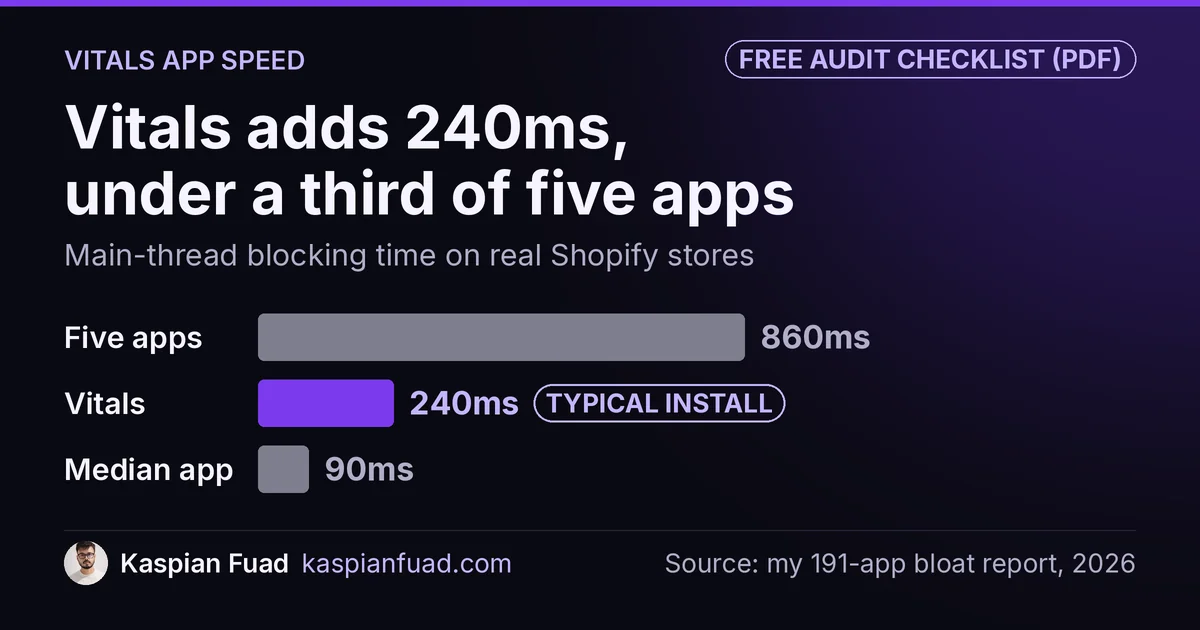
TL;DR: Vitals’ own page says installing it has “a very small impact” on speed. I measured a typical install at 240ms of blocking time in my report of 191 apps. Both are true. Vitals is heavier than the median app (90ms), but lighter than the five separate apps it can replace (860ms). The real question is not “Vitals yes or no,” it is how many of its 40-plus modules you run, and whether it is replacing apps or stacking on top of them.
Nearly every store I audit has Vitals installed. It is one of the most popular apps on Shopify, with 2,792 reviews at 4.9 stars. And on nearly every one of those audits, the owner asks the same question: is this thing slowing me down?
Here is the honest answer, with the number the review pages leave out.
How much does the Vitals app slow down your store?
I measured a Vitals install at roughly 240ms of main-thread blocking time. That figure comes from my 191-app bloat report, measured on real stores, not a lab.
To put 240ms in context, the median app in that report costs 90ms, so Vitals runs close to three times the typical single app. That sounds damning until you look at the other side. A normal store that skips Vitals does not run zero apps. It runs a reviews app, an upsell app, a currency converter, a cookie banner, and a sticky cart, and that five-app stack measured around 860ms together. Vitals bundles all of those jobs into one install.
So the fair framing is the one on the chart above. Vitals is heavier than one app and much lighter than five. Where it sits for your store depends entirely on what it is replacing.
Why “very small impact” and 240ms can both be true
Vitals is not hiding anything. Its own performance page states plainly that “installing Vitals on your Shopify store has a very small impact on your site’s speed,” and adds that this is measured “with a high number of apps activated.” I take them at their word. The gap is in what got measured.
Their test ran on a fresh Dawn theme with Vitals as the only thing installed, scored with Lighthouse, with 28 modules switched on. That is a clean-room Lighthouse score. My 240ms is main-thread blocking time on a live store that already carries a theme, a pixel or two, and whatever else the merchant added. A clean-room score and a real-world blocking-time number are different measurements, and neither one is wrong.
The Built for Shopify badge on the listing is worth reading the same careful way. Its Web Vitals requirement measures how the app behaves inside the Shopify admin, the back office you log into, not the storefront your customer taps. Its only storefront rule is that an app must not drop your Lighthouse score by more than ten points. The badge is real and Vitals earned it, but it was never a promise about storefront blocking time.
Is Vitals lighter than the apps it replaces?
This is the question that actually decides it, and most comparison posts skip it.
If Vitals is doing the work of five or six separate apps on your store, it is almost certainly the lighter choice. One app embed loading from one origin beats five apps each fetching their own scripts. The vendor’s real argument is consolidation, and on that point they are right.
The trap is the opposite case. I regularly open a store running Vitals for reviews and upsells, and also running a separate reviews app, a separate cookie banner, and a separate currency app that duplicate modules Vitals already includes. Now the store pays for both. That is not a Vitals problem, it is a stacking problem, and it is the single most common cause of the bloat I find.
So the number that matters is not Vitals’ 240ms in isolation. It is your total, which I show you how to check with my App Bloat Detector. If you would rather check by hand, these are three free ways to see every app a store loads.
How do you find the Vitals app’s real cost on your store?
You do not have to trust my number or theirs. You can measure your own in ten minutes, and it is the most useful thing you will do for your store’s speed this week.
Vitals loads through a Shopify Online Store 2.0 app embed, which means you can toggle it without uninstalling anything. On a duplicate of your live theme:
- Open the theme customizer, go to App embeds, and switch Vitals off. Save.
- Run Lighthouse or WebPageTest on a product page, not the homepage, and note the blocking time and LCP.
- Switch Vitals back on, save, and run the exact same test.
- The difference is your real cost, on your theme, with your other apps in play.
If that gap is small, keep Vitals and move on. If it is large, the next step is to trim modules you do not use and measure again, then work through the rest of my speed-up guide. Vitals does not publish how its bundle loads module by module, so I will not promise a fixed saving per toggle. Turning off what you do not use can only help, and now you can prove it either way. I walk through the same measure-first method in my INP case study.
Should you keep Vitals or switch?
Match the tool to how much of it you use.
- You use five or more modules, and Vitals replaces separate apps: keep it. Consolidation is the win, and you are already on the lighter side.
- You use one or two features: a single lean app for that job is usually lighter than carrying the whole suite. A dedicated reviews app or cookie banner will beat Vitals if that is all you need.
- You run Vitals and duplicate apps: fix this first. Pick one path per job. This is the free win most stores are sitting on.
- You are on the fence: run the toggle test above before you decide anything. A measured number beats a vendor claim and beats mine.
Pricing rarely changes this call, but for reference Vitals pricing runs from $29.99 a month on Hobby up to $299.99 on Plus, with the same feature set on every tier and the difference being usage limits and support. You are choosing on speed and fit, not price.
Want to run the audit yourself? I put the 10-minute toggle test and a module-by-module checklist into a one-page reference.
Download the Vitals app speed audit checklist (PDF)
The takeaway
- Vitals costs about 240ms of blocking time on a real store, heavier than the median app but lighter than the five separate apps it can replace.
- The vendor’s “very small impact” is fair, it just measured a clean-room Lighthouse score, not real-world blocking time on your live theme.
- Built for Shopify is not a storefront-speed guarantee, its storefront bar is only a ten-point Lighthouse drop.
- Consolidation is the real case for Vitals, so never run it alongside separate apps that duplicate its modules.
- Measure your own store. Toggle the app embed off and on, test a product page, and let your number decide.
I am Kaspian Fuad, a Shopify CRO consultant. I measure the speed cost of the apps most comparison sites only rate, because the millisecond your shopper waits is the number that moves conversion.