

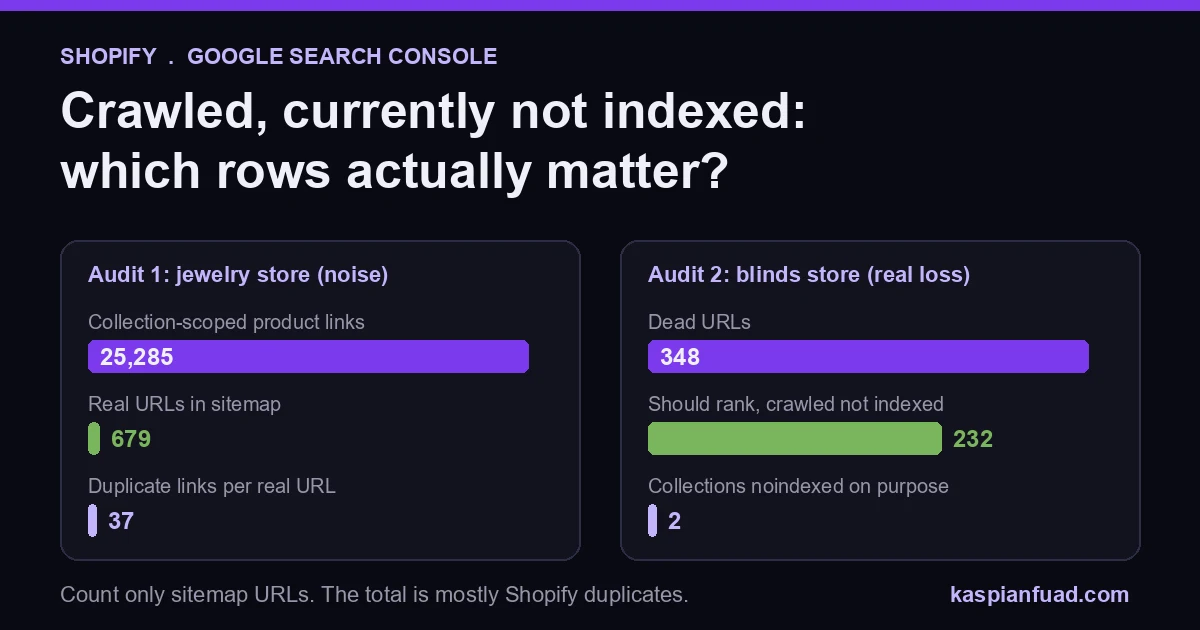
TL;DR: Most Shopify URLs in “Crawled, currently not indexed” are supposed to be there. Shopify generates duplicate paths (collection-scoped products, ?variant=, filters) that canonicalize to one page. The only rows that matter are canonical URLs from your sitemap. On one store that was 232 pages. On another, the theme printed 25,285 duplicate-path links for a 679-URL catalog.
I asked ChatGPT the question a $2M store owner would ask: hundreds of pages in these two statuses, normal or not, and should I hire someone? Its answer was sensible and generic. It said hundreds of these “are not automatically a problem” and told me to sort URLs into buckets.
It cited Google’s help pages and Shopify’s. It could not show what those buckets look like on a real Shopify store, or how many URLs land in each. So here are two stores I audited, and the triage I actually run.
Download the Shopify not-indexed triage sheet (PDF)
Why this matters for your store
- A canonical product that is not indexed cannot rank, so every sale it would have made from Google is gone.
- Panic over the report total sends owners to “fix” URLs that were never meant to rank, which burns budget on nothing.
- The two statuses need opposite fixes, so treating them the same wastes the first month.
What does Crawled, currently not indexed mean on Shopify?
Google’s Page indexing report help defines it in one line: the page was crawled “but not indexed. It may or may not be indexed in the future; no need to resubmit this URL for crawling.”
Read that last clause again. Google fetched the page, looked at it, and decided it did not earn a slot. Hitting Request Indexing ten times does not change the decision. Google’s recrawl guide says requesting a recrawl multiple times for the same URL “won’t get it crawled any faster.” Changing the page does.
Its sibling is different. “Discovered, currently not indexed” means Google found the URL but has not crawled it yet. Google’s wording is that it “wanted to crawl the URL but this was expected to overload the site; therefore Google rescheduled the crawl.”
Shopify’s servers are fast, so on a small store I read Discovered as a priority signal, not a capacity one. Google found the link somewhere, and nothing about the site told it the page was worth fetching soon. That is usually an internal linking problem.
The same help page says the thing every owner should hear first: “You should not expect all URLs on your site to be indexed, only the canonical pages.” Hold onto the word canonical. It is the whole diagnosis.
Why does Shopify create so many URLs that should never be indexed?
Shopify is generous with URLs. One product can be reached at many addresses, and only one of them is the real one. I checked this on Allbirds’ live Shopify store before writing: a product loaded at /collections/all/products/<handle> and at /products/<handle>?variant=1 both output a canonical tag pointing to plain /products/<handle>.
That is Shopify working correctly. Google sees the extra paths, reads the canonical, and parks them under a not-indexed status. Here is where each Shopify URL shape should land:
| Shopify URL shape | Example | Should it be indexed? | Status you will usually see |
|---|---|---|---|
| Canonical product | /products/oak-blind |
Yes | Indexed (if not, fix it) |
| Collection-scoped product | /collections/blinds/products/oak-blind |
No | Alternate with canonical, or crawled not indexed |
| Variant parameter | /products/oak-blind?variant=4471 |
No | Duplicate or crawled not indexed |
| Single filter | /collections/blinds?filter.v.color=white |
Usually no | Crawled not indexed |
| Tag or multi-filter combo | /collections/blinds/white+oak |
No | Blocked by robots.txt |
| Canonical collection | /collections/blinds |
Yes | Indexed (if not, fix it) |
| Search and policies | /search?q=oak, /policies/refund-policy |
No | Blocked by robots.txt |
One detail most guides get wrong. Shopify’s default robots.txt blocks tag combinations (/collections/*+*), sort_by, /search and /policies/, and it blocks URLs that stack two or more filters (*/collections/*filter*&*filter*). It does not block a single filter. I confirmed both rules in Allbirds’ live robots.txt. So single-filter URLs get crawled, and they pile up in the report.
Gymshark goes further and adds Disallow: /collections/*/products* to its own file. That is a custom edit, not a Shopify default. Your store almost certainly crawls those paths. You can add rules like that through the robots.txt.liquid template, but a canonical fix in the theme is the safer first move.
What did two real Shopify audits find?
Store 1: a luxury jewelry store with 679 real URLs
When I audited Enea Studio, the sitemap held 679 URLs: 476 products, 191 collections, 10 pages and 2 articles. Every one returned 200. That is the entire set of URLs that should be indexed.
The theme, though, was printing collection-scoped product links in its product cards, through the within: collection filter: 25,285 of them. That works out to about 37 duplicate-path links for every URL that deserved to rank. The site had no meta robots tags at all, so every ?filter. and ?sort_by combination was open to crawl.
The canonical tags were correct. That is why the store was not “broken”. But Google was being handed tens of thousands of paths to decide about, and canonical is a hint. Google’s own guide calls rel=canonical “a strong signal”, not a command. The fix pointed the grid links at /products/<handle> and added a conditional noindex on filtered collection views.
Store 2: a custom blinds store with 232 pages that should have ranked
On the blinds store whose traffic dropped 70%, the report showed 232 pages under Crawled, currently not indexed that should have been indexed. These were not variant paths. They were canonical pages: too similar to each other, thin on copy, and weakly linked.
The same audit found 348 dead URLs and two collection pages that had been noindexed on purpose. The indexing problem was one of five causes, not the whole story. The full write-up is in the case study.
Those two stores show the two shapes you will meet. On the jewelry store the excluded rows were mostly noise the theme created. On the blinds store they were real pages losing money. The count alone could not tell them apart.
How many not indexed pages is too many?
Ignore the total. A store with 2,000 excluded URLs can be perfectly healthy if they are all filter and variant paths.
Count only canonical URLs: the ones in your sitemap. Shopify’s sitemap is generated automatically and lists your products, collections, pages and blog posts, so it is already the list of URLs that should rank. My working rule is that if more than about 10% of sitemap URLs sit in either not-indexed status for over a month, it is a real problem. Under that, check your top sellers individually and move on.
The fastest way to get that number: open Search Console, go to Indexing, then Pages, and change the filter at the top from “All known pages” to “All submitted pages”. The not-indexed list now shows only sitemap URLs. That single dropdown turns a scary report into a short one.
How do I fix the pages that should be indexed?
Do the triage in this order. It takes about 10 minutes on a store under 1,000 products.
- Filter the Pages report to “All submitted pages”, as above.
- Open Crawled, currently not indexed and export the list.
- Sort the export by URL shape. Anything that is not
/products/<handle>,/collections/<handle>,/pages/or/blogs/is noise; delete those rows. - Mark what is left against revenue: best sellers, high-margin products, collections with search demand.
- Inspect three of the marked URLs in URL Inspection. Check the Google-selected canonical matches yours.
- Repeat for Discovered, currently not indexed.
Then fix by status. For Crawled pages, make them distinct: rewrite manufacturer copy, merge near-identical products into variants, and add a real description to bare collections. For Discovered pages, link to them: from the main menu, from a parent collection, from a related blog post. A product only reachable through a sitemap is a product Google has no reason to hurry for.
If URL Inspection shows Google picked a different canonical than yours, you have a template problem, not a content one. The canonical and variant URL guide has the Liquid. You can also paste your robots.txt into the robots and crawler checker to confirm nothing important is blocked.
How do I verify the fix worked?
Three checks, five minutes each.
- In URL Inspection, run Test Live URL on a fixed page and confirm the canonical and indexability are what you expect. Then request indexing once.
- In the Pages report, click Validate Fix on the status. Google says validation “typically takes up to about two weeks”.
- Re-run the submitted-pages count after 30 days. The number of sitemap URLs not indexed should fall. If it does not, the pages still are not distinct enough.
When should I hire someone for Shopify indexing?
If your excluded URLs are filter, variant and collection-scoped paths, you do not need to hire anyone. You need to stop looking at the total.
Hire help when canonical products or collections are excluded and you cannot see why, or when Google keeps choosing a different canonical than yours. The diagnosis is about 4 to 10 senior hours. At my published $50 an hour rate that is $200 to $500, and it should end in a URL-level list, not a generic checklist. The technical audit checklist shows what else I check in the same pass.
The takeaway
- Filter the Pages report to submitted pages before you count anything.
- Ignore collection-scoped,
?variant=and filter URLs that canonicalize correctly. - Rewrite or merge canonical pages stuck in Crawled, because resubmitting changes nothing.
- Link to pages stuck in Discovered from menus, parent collections and posts.
- Escalate only when sitemap URLs stay excluded for a month or Google overrides your canonical.
I am Kaspian Fuad, a Shopify developer and CRO consultant. I publish the real counts from my audits, including the boring ones. If your Search Console shows canonical products as not indexed, send me your store URL and a screenshot of the Pages report, and I will tell you which rows actually matter.