

Factory Direct Blinds
7-sprint CRO and development partnership for a US-based custom window blinds store. Mobile PageSpeed 38 to 81, 62% ATC gap diagnosis, measurement protection upsell, structured data deployment, GSC recovery audit, and a ground-up rebuild of a 6,221-line legacy product builder.
The Client
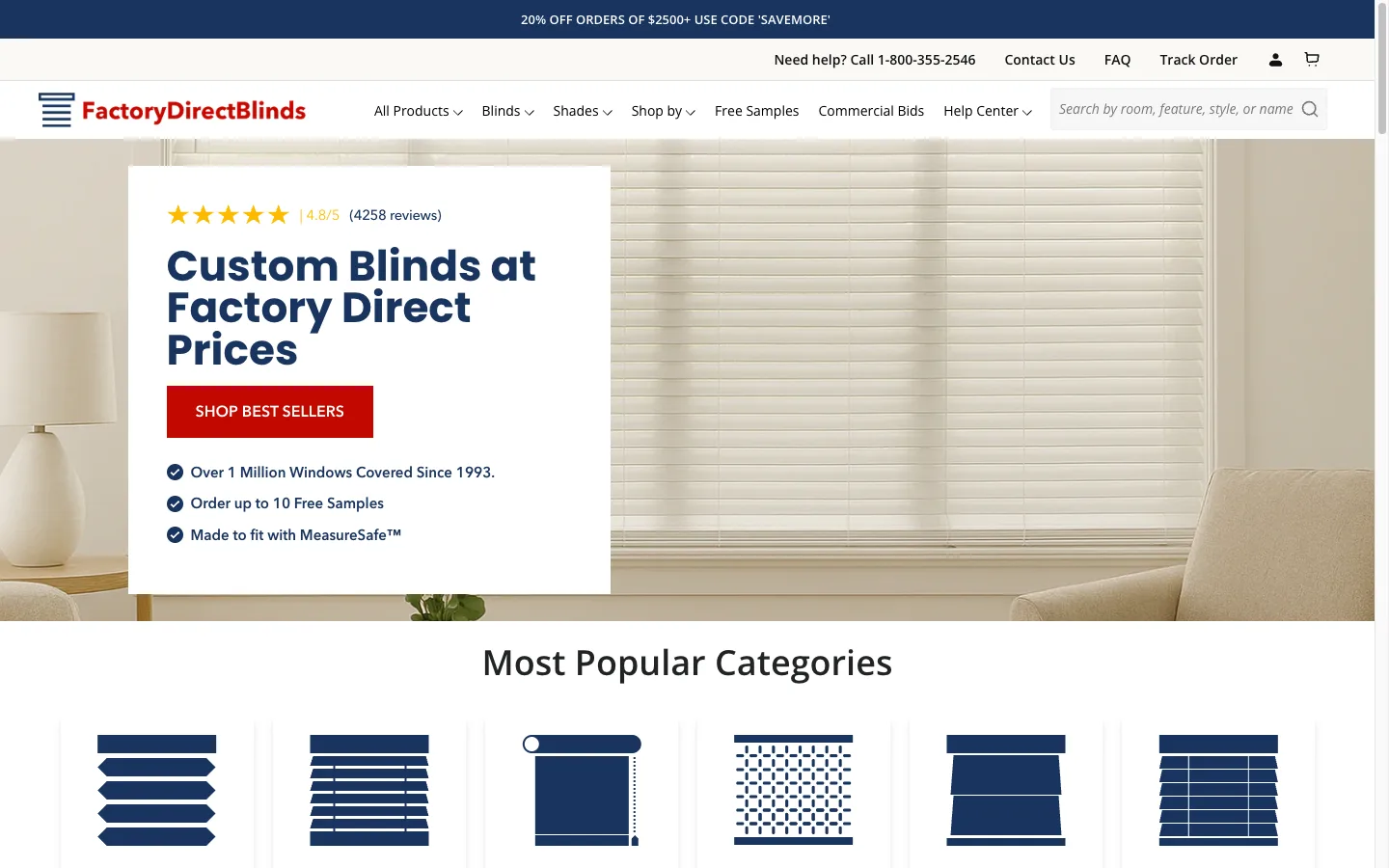
Factory Direct Blinds is a US-based ecommerce store selling custom-made window blinds and shades. Every product is made to measure, which creates conversion challenges that standard Shopify CRO advice does not address: customers need confidence in their measurements, the product builder must handle complex configurations without overwhelming users, and mobile experience matters because that is where most customers start browsing before committing to a purchase on desktop.
This engagement ran across 6 sprints over 4 months, covering CRO auditing, custom Liquid development, Core Web Vitals optimization, structured data implementation, and organic traffic recovery.
Sprint 1: Full-Funnel CRO Audit
The initial audit uncovered the problems driving the project scope.
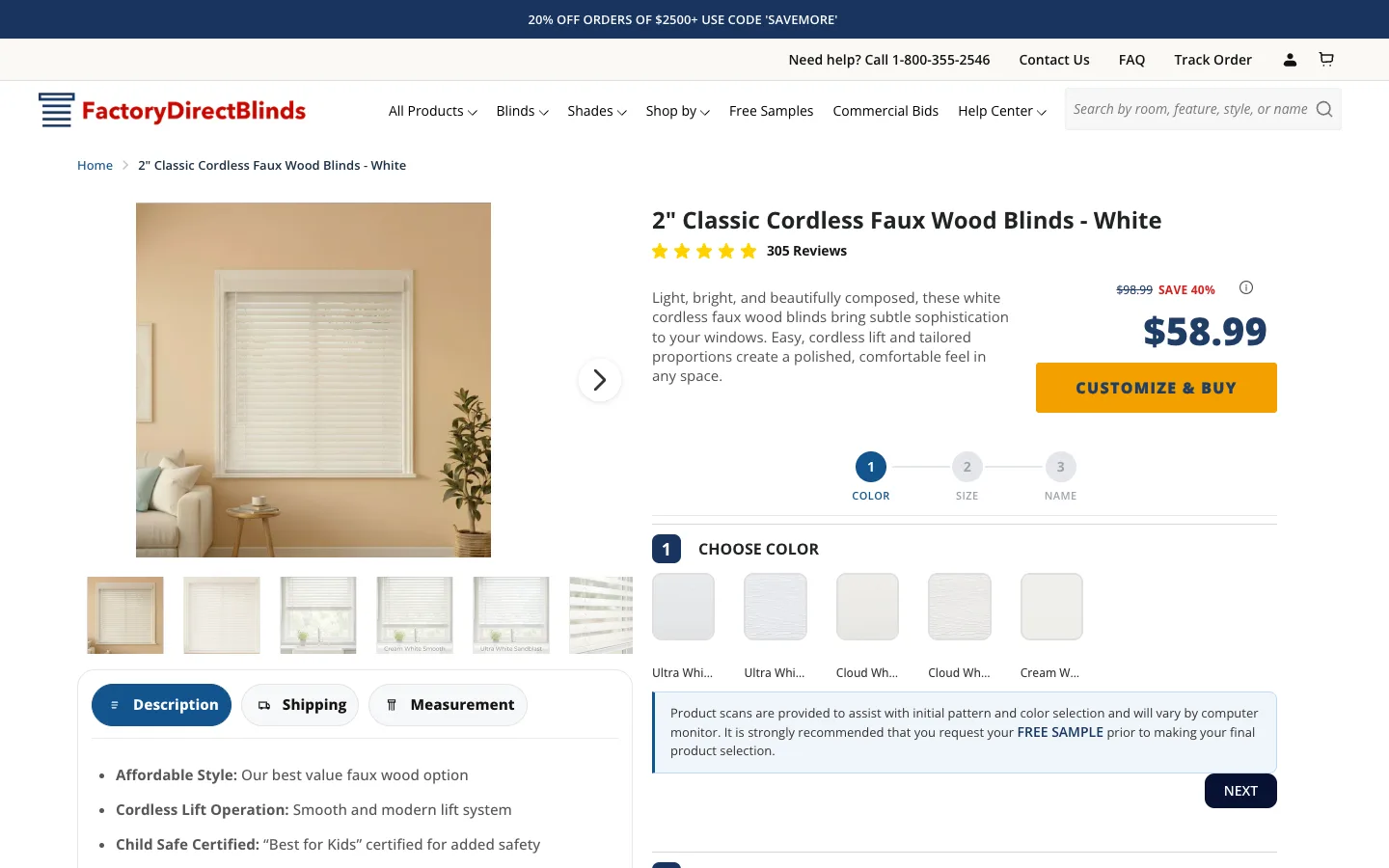
62% mobile-to-desktop add-to-cart gap. Mobile shoppers were abandoning the product builder at dramatically higher rates than desktop users. The builder UI was designed for wide screens and became nearly unusable on mobile, with tiny touch targets, options stacked in confusing ways, and pricing information hidden behind extra taps.
22-second mobile LCP. The site took 22 seconds to render meaningful content on mobile. Google’s threshold for “good” LCP is 2.5 seconds. At 22 seconds, the majority of mobile visitors left before the page finished loading.
Mobile PageSpeed score of 38. Desktop scored 48. Both failed Core Web Vitals, which meant the site was not eligible for Google’s “good page experience” ranking signal.
Measurement anxiety as the primary conversion blocker. Unlike standard ecommerce where the product arrives as pictured, made-to-measure blinds require the customer to provide exact measurements. If they measure wrong, the product does not fit. This anxiety was not addressed anywhere in the purchase flow.
Missing structured data. Collection pages had no CollectionPage or BreadcrumbList schema. Blog posts (which drove 52,000+ organic clicks across 233 URLs) had zero Article or BlogPosting schema. Product schema existed but was incomplete.
I delivered an ICE-scored roadmap prioritizing fixes by revenue impact, implementation effort, and confidence level. The roadmap organized work into focused sprints rather than attempting everything at once.
Sprint 2-3: Measurement Protection System
The measurement anxiety problem was the highest-impact item on the roadmap. No amount of checkout optimization or speed improvement would matter if customers were too afraid to commit to measurements.
MeasureSafe Guarantee Upsell
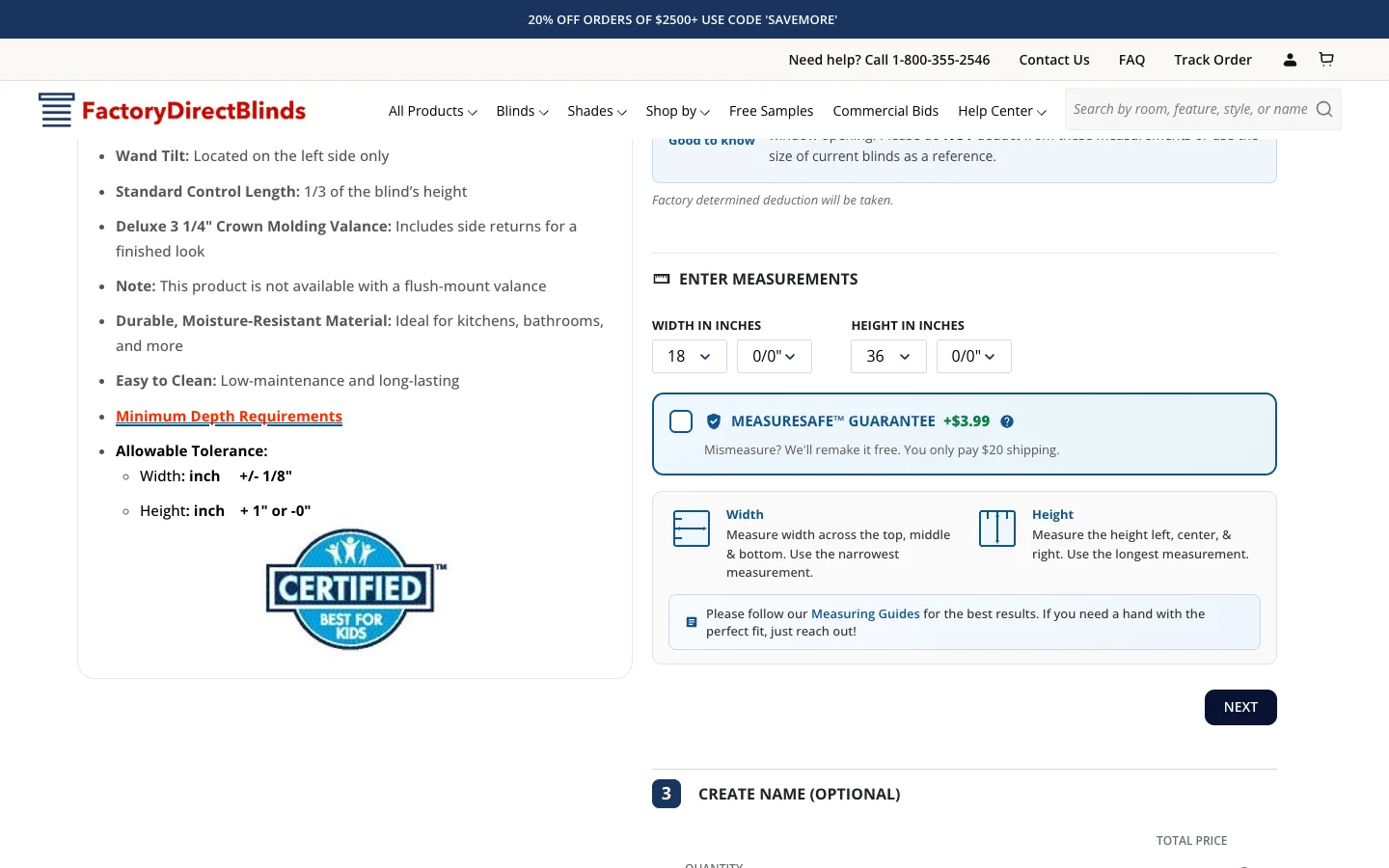
I designed and built a measurement protection upsell system integrated directly into the product builder:
- Checkbox integration at the point of highest friction. The upsell appears during the measurement input step, not as a cart add-on. This is where the anxiety peaks and where the guarantee has maximum impact.
- Trust shield iconography with clear value proposition. The messaging reframes the cost from “additional fee” to “smart protection” by showing the cost of a full replacement without protection versus the small cost of the guarantee.
- Tooltip with full policy summary. Customers can read the complete coverage details without leaving the builder flow. No modal, no page navigation, just an expandable tooltip.
- Automatic cart line item showing which product is protected, with a link to the full guarantee page for customers who want more detail.
- Mobile-responsive design that does not add clutter to the already complex builder interface on small screens.
The guarantee page itself was built as a dedicated landing page with sections covering how it works (3-step process), a cost comparison table (with vs without protection), coverage details in plain language, and an FAQ section targeting anxiety-driven search queries like “what happens if I measure my blinds wrong” and “can custom blinds be returned if wrong size.”
Visual Measurement Guide System
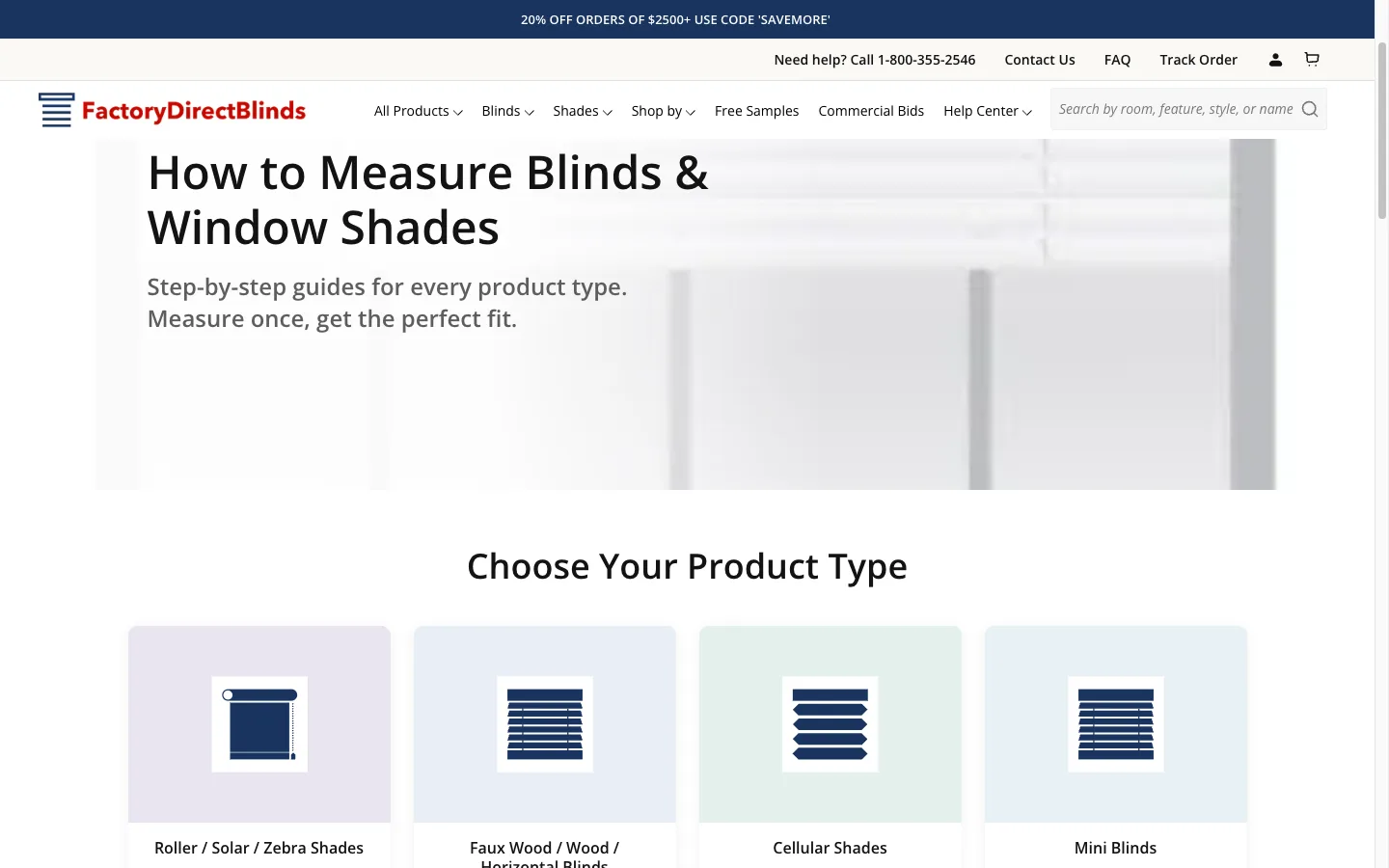
To reduce measurement errors at the source:
- Product-type-specific instructions. Roller blinds, venetians, and cellular shades all have different measurement requirements. Each product type has its own guide with specific diagrams.
- Width and height measurement icons with step-by-step instructions for each product category.
- Modal-based PDF viewer so customers can reference guides without navigating away from the builder.
- Mobile-optimized layout with tap-to-expand sections instead of trying to show everything at once.
Sprint 3: Structured Data Deployment
The blog was the store’s strongest content asset (52,000+ clicks, outperforming collection pages on CTR) but had zero structured data.
What Was Deployed
- CollectionPage + ItemList schema on all collection pages, giving Google structured product lists with names, URLs, images, and positions.
- BreadcrumbList schema on all page types, providing clear navigation hierarchy (Home > Collection > Product).
- FAQPage schema on the FAQ page and relevant collection pages.
- Organization schema with @id referencing for entity consistency across the site.
All schema used @id references to connect entities rather than duplicating data. The Organization entity defined once in the site header was referenced by every Article and Collection schema via @id, building a connected knowledge graph that Google can parse efficiently.
Schema Conflict Resolution
A third-party SEO app (Booster SEO) was outputting its own Organization schema on every page, creating duplicate entities. The app used the older http://schema.org protocol and had empty sameAs arrays, while our implementation used https://schema.org with proper social links. The recommendation was to disable the Booster SEO schema in app settings and keep the custom implementation.
Sprint 4: Product Builder Overhaul and Mobile UX
This sprint directly addressed the 62% mobile ATC gap.
Product Builder Redesign
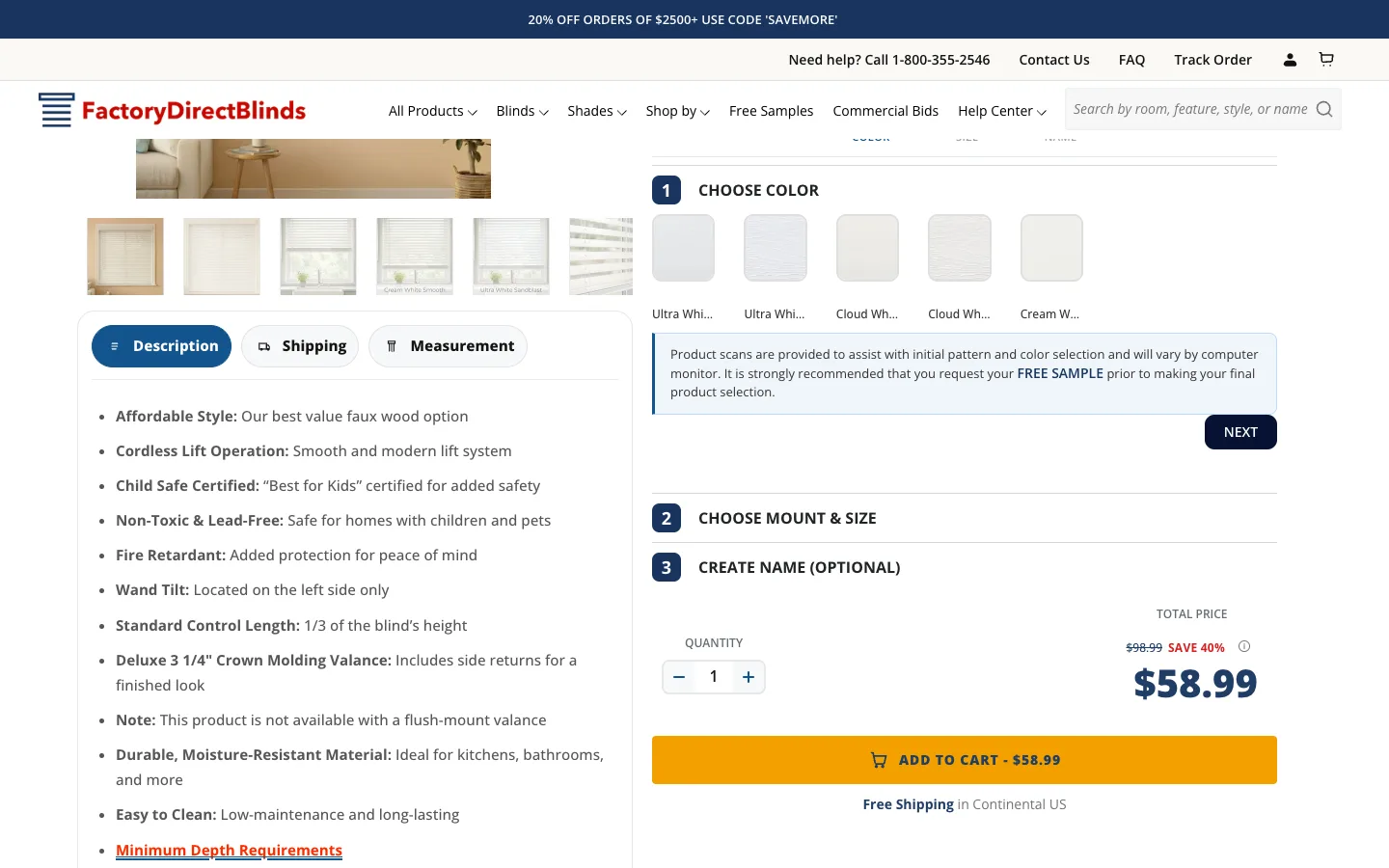
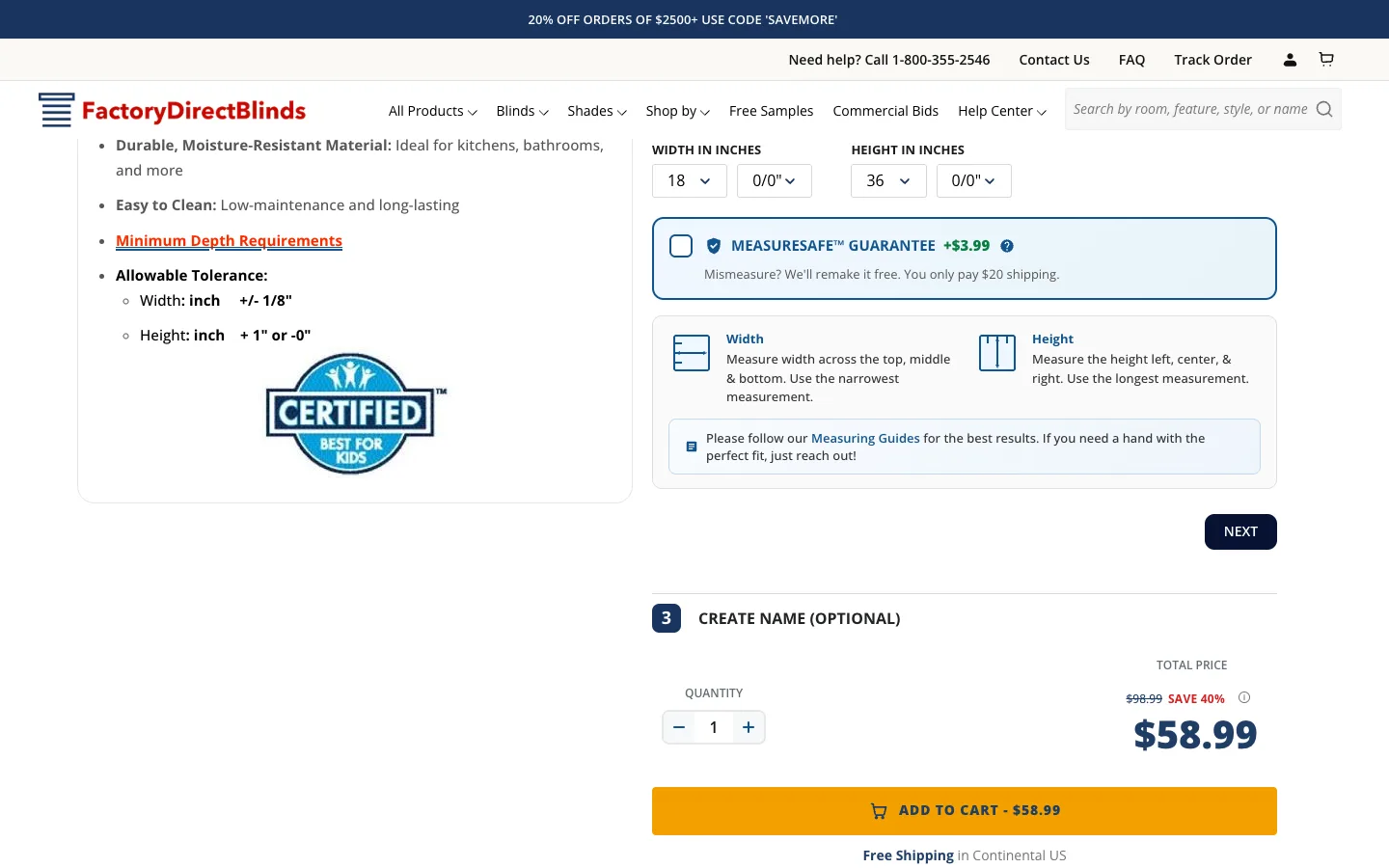
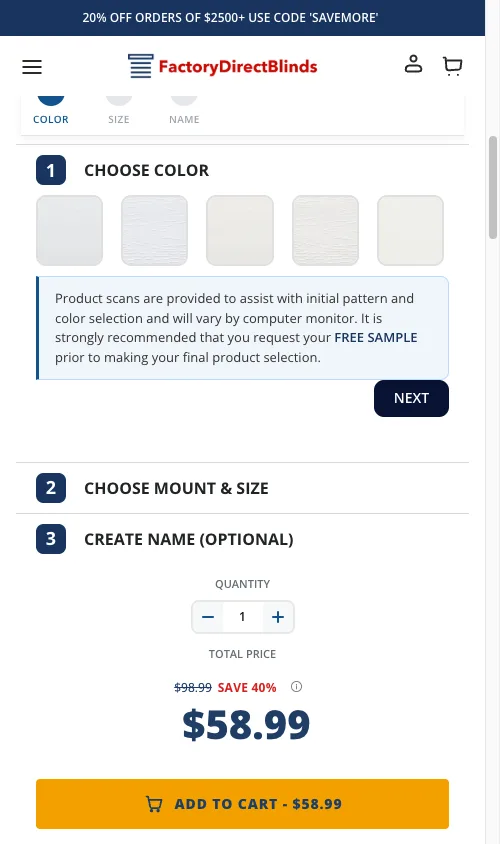
The core change was implementing progressive disclosure instead of showing all configuration options simultaneously:
- Step-by-step flow. Options appear one at a time: material, color, size, mounting type, extras. Each step is focused and manageable.
- Real-time price updates as customers configure options, so there are no surprises at the end.
- Pricing tooltip showing the cost breakdown without opening a new view or modal.
- Mobile-first layout with proper touch targets (minimum 44px per Apple HIG) and readable text at mobile font sizes.
Mobile Header Cleanup
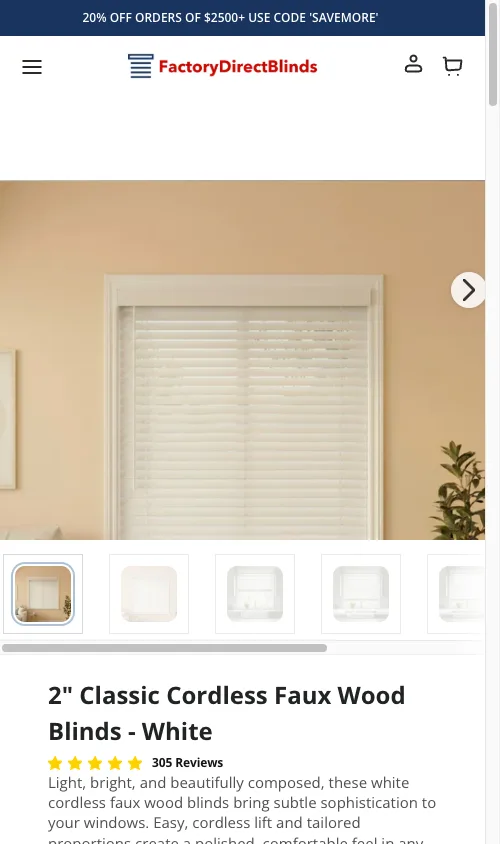
The site’s header consumed significant above-fold space on mobile:
- Reduced header height to reclaim vertical space for the product builder.
- Simplified navigation for the mobile shopping context.
- Implemented a sticky add-to-cart bar that appears when the main ATC button scrolls out of view.
Safety Lessons Learned
The product builder file (product-template-builder.liquid) was the highest-risk file in the entire theme. It contained 5+ layers of conflicting CSS for gallery images, inline JavaScript for Slick slider initialization, mobile reorder scripts, and CLS prevention code.
Over the course of this project, we documented 8 specific incidents where changes to this file broke the live or staging site:
- Moving
sliderInit()out of asetTimeoutbroke all sliders because jQuery/Slick dependencies were not ready - Changing Slick
asNavForconfiguration silently broke thumbnail navigation - Adding
aspect-ratio: 1/1forced landscape room scene images into square boxes - A pricing tooltip
<div>inside a<p>tag caused invalid HTML that broke layout on both PDP and collection pages - Header spacer doubling from a conflict between JavaScript-created spacers and CSS padding
Each incident was documented with the root cause and a “never do this” rule to prevent recurrence. The principle: additive changes (inserting a new snippet {% render %} call, or {% include %} if the legacy template still uses it for parent-scope inheritance) are safe. Modifying existing CSS or JavaScript in this file is not safe without full cross-browser testing on Chrome Desktop, Safari iOS, and Chrome Mobile.
Sprint 5: Core Web Vitals Optimization
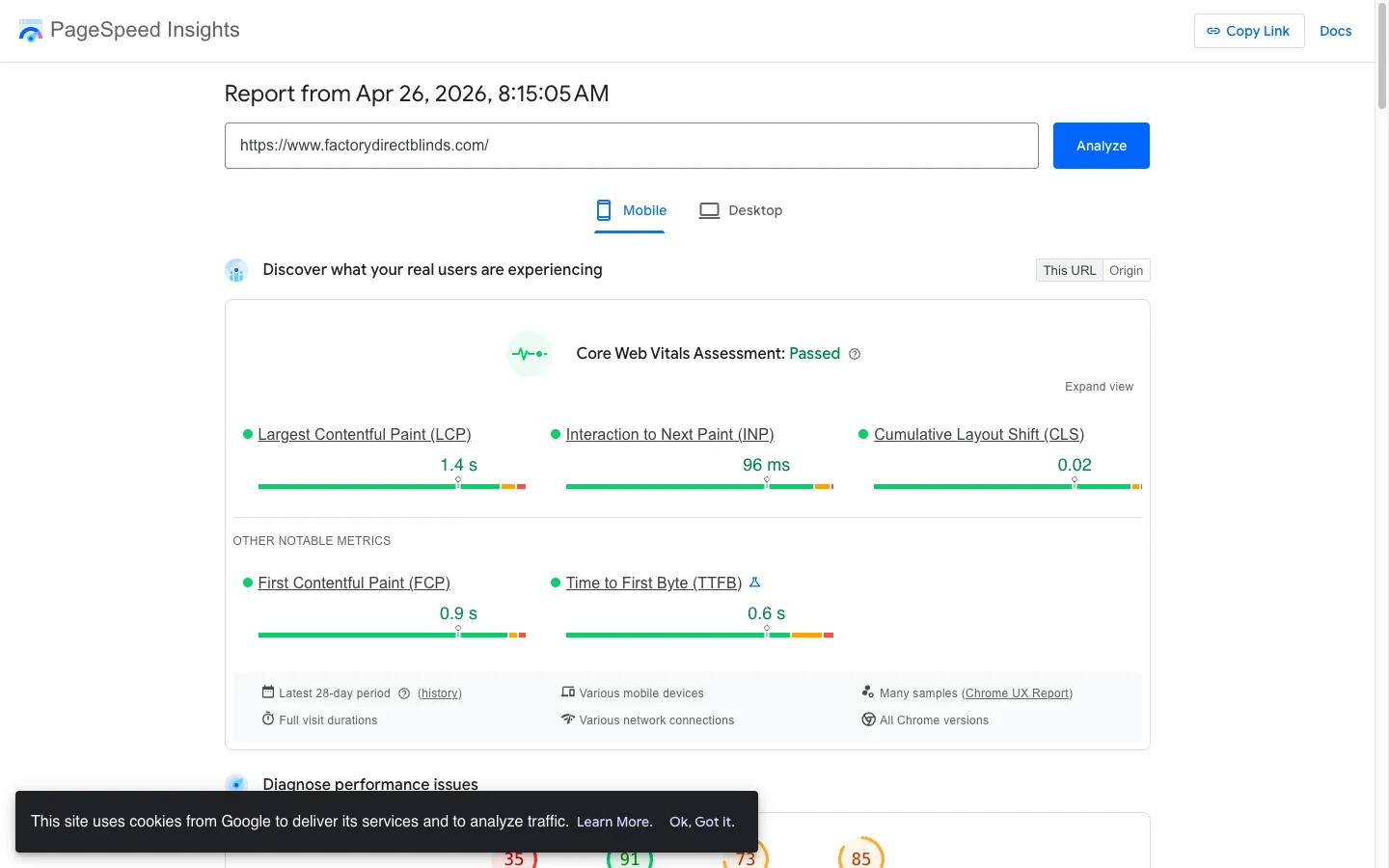
A focused performance optimization that transformed the site’s speed metrics.
Mobile Performance Results
| Metric | Before | After | Improvement |
|---|---|---|---|
| Performance Score | 38 | 81 | +113% |
| LCP (Largest Contentful Paint) | 22.0s | 2.7s | -88% |
| TBT (Total Blocking Time) | 2,290ms | 480ms | -79% |
| Speed Index | 5.9s | 3.5s | -41% |
Desktop Performance Results
| Metric | Before | After | Improvement |
|---|---|---|---|
| Performance Score | 48 | 99 | +106% |
| TBT | 460ms | 0-10ms | Near-zero blocking |
What Was Optimized
Image loading strategy. Above-fold images switched from lazy to eager loading. Proper srcset and sizes attributes added so browsers download the correct image size for each viewport. Hero images constrained to 1200px max instead of serving full 3000px originals.
Third-party script audit. Identified non-critical scripts (analytics, chat widgets, marketing pixels) and deferred them using defer and async attributes. Removed unused app code that was loading on every page type.
CSS render-blocking elimination. Inlined critical above-fold CSS directly in the <head>. Deferred non-critical stylesheets using the media="print" onload pattern with a <noscript> fallback.
Font loading optimization. Implemented font-display: swap with preconnect and preload hints for Google Fonts. Fonts now load asynchronously without blocking first paint.
Conditional asset loading. The product builder JavaScript and CSS were loading on every page type, including collection pages and blog posts where they were never used. Wrapped asset loading in template conditionals so they only load on product pages.
These improvements directly impact both SEO (Google uses Core Web Vitals as a ranking factor) and conversions. Research consistently shows that every 1-second improvement in mobile load time increases conversions by 5-7%. You can run a first-visit mobile speed scan on your own store to see where its cold load lands against these same LCP, TBT, and Speed Index thresholds.
Sprint 6: GSC Audit and Organic Traffic Recovery
The store’s organic traffic had declined 70%+ over 7 months. The GSC audit identified 5 compounding root causes:
Two core collection pages accidentally noindexed. A prior SEO decision to consolidate ranking power by noindexing two collection pages had the opposite effect. Both pages had significant impression volume. One has since been 301-redirected, the other had its noindex removed and has been re-indexed by Google.
Crawl budget waste. 28% of spot-checked redirect URLs were broken, including paths left behind when a third-party app was removed. Key trust pages (about-us, shipping-information) returned 404 errors. Google was spending crawl budget on dead URLs instead of indexing important content.
Thin pages launched during a core update. 40+ new pages with minimal content were published during Google’s December 2025 Core Update, which likely triggered quality signals.
186 keywords sitting on page 2. These keywords had 2.69 million combined impressions at positions 11-20. Moving even a fraction of these to page 1 would produce significant traffic gains.
No link building since ownership change. The domain had a DA of 38 with 1,500 backlinks while direct competitors had DA 39-44 with 6,000+ backlinks.
I delivered a 30-day prioritized action plan with specific deadlines, owner assignments, and linked spreadsheets for the 404 URL audit (348 URLs), the Crawled-Not-Indexed audit (232 pages that should be indexed), and a full keyword-to-landing-page map (207 commercial + 14 informational keywords).
What Was Already Working
The blog was the site’s strongest content asset: 52,000+ clicks across 233 URLs, outperforming collection pages on CTR (0.73% vs 0.37%). Product schema was driving 45,000+ clicks from 8.6 million impressions via merchant listings. Server performance was excellent (TTFB under 100ms). The foundation was solid. The technical issues on top of it were fixable.
Sprint 7: Product Builder v2 Rebuild (6,221 Lines of Legacy jQuery)
By April 2026, the original product builder had become the single largest liability in the codebase. One JavaScript file. 6,221 lines of jQuery IIFE. It handled every product type in the catalog: roller shades, cellular shades, horizontal blinds, zebra shades, roman shades, wood blinds. Every change touched the same shared file.
The incident log told the story:
- 5 major PDP breakages across Sprints 2 to 4, each documented in the client’s incident log
- 9 separate bugs tracked during Sprint 4B alone
- 2 active cart bugs costing sales, with 3 customer complaints in 2 days
- 30 to 60 minutes to update pricing on a single product (editing 100+ Shopify variants per product)
- Developer required for any surcharge or oversize fee change
- Zero color tier support (products with multiple fabric grades required messy workarounds)
Worse, the builder had known Safari-only bugs that only reproduced on real iPhone devices. Chrome DevTools mobile emulation passed. The client had lost trust in the builder’s stability.
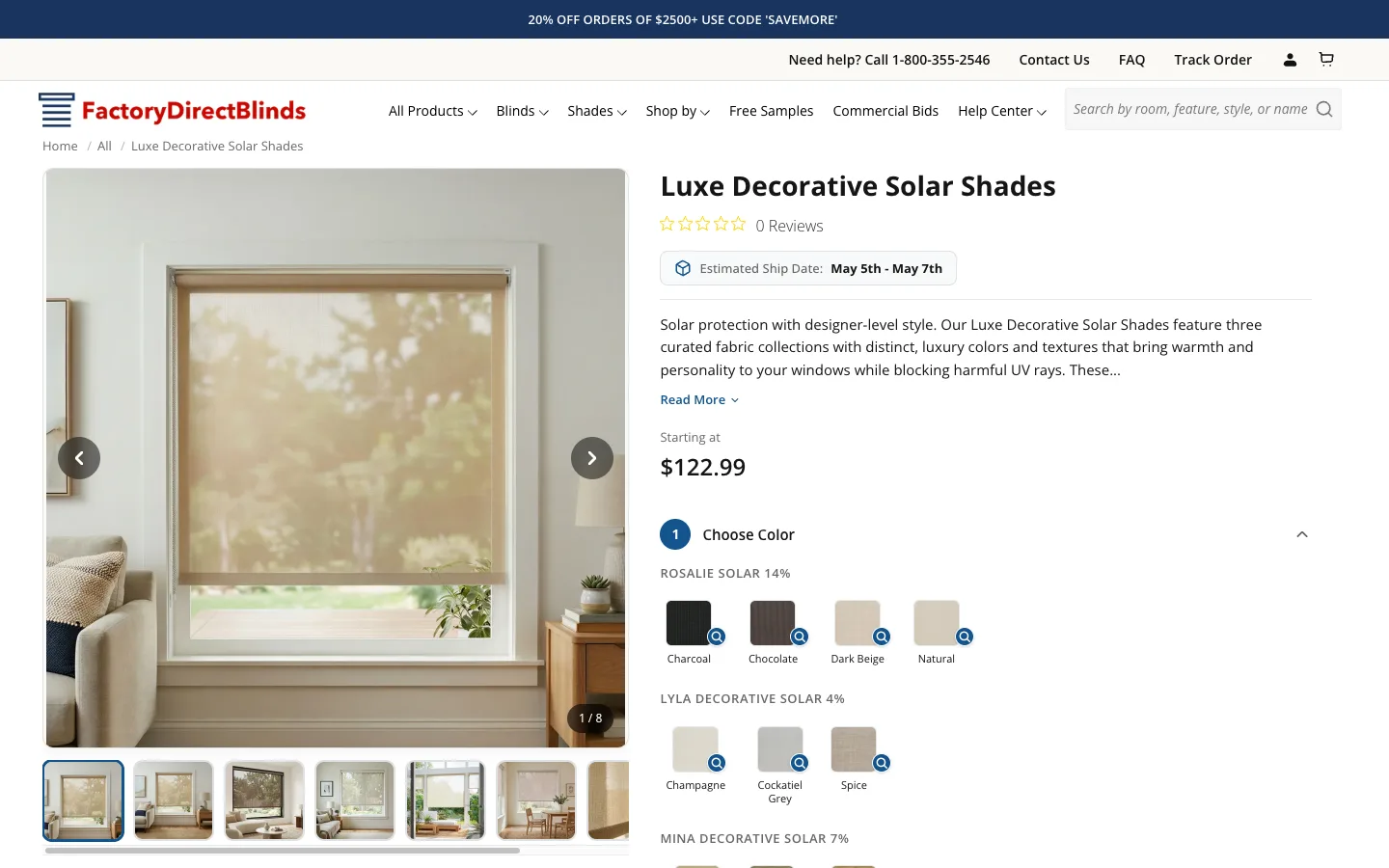
The Brief
The client proposed an incremental migration: build a new, modular version of the product builder for 12 new roller and solar shade products from a supplier called Mariak. Keep the existing builder running for all other products. Once the new architecture proved itself, migrate remaining product types one at a time.
Key requirements: zero risk to existing products, dynamic pricing with 2D width-by-height matrices, no developer needed for routine updates, EDI compatibility (orders flow through LogicBroker to the supplier), Safari-safe rendering, and Lighthouse mobile score must stay at 80+.
The Architecture: Modular Core + Per-Product Modules
I designed a modular architecture with one shared core and per-product-type modules. The goal was to make every product type independently testable, updatable, and rollback-able.
builder-core.js (~540 lines): zero product-specific logic. Exposes window.BuilderCore with six responsibilities: state manager (40-line observer pattern, no React), pricing engine (2D matrix lookup with round-up interpolation, 1D width-based addons, flat surcharges, oversize thresholds), cart integration (sequential async Promise chain for EDI-compatible bundle creation), event bus, scoped DOM utilities, and 1/8 inch fraction support.
builder-roller.js (~1,500 lines): all roller and solar specific logic. Initializes a 5-step configurator (Choose Color, Choose Mount and Size, Choose Control Style, Choose Roll Direction, Choose Valance). Accordion navigation gates future steps until the current one is valid. Color changes cascade downstream, invalidating steps 2 through 5 if the new color has different size limits or pricing.
builder-v2.css (~1,400 lines): isolated BEM-scoped CSS. Every selector starts with .builder-v2. Zero use of !important. Image gallery uses native CSS scroll-snap on mobile (no Slick, which had timing issues on Safari).
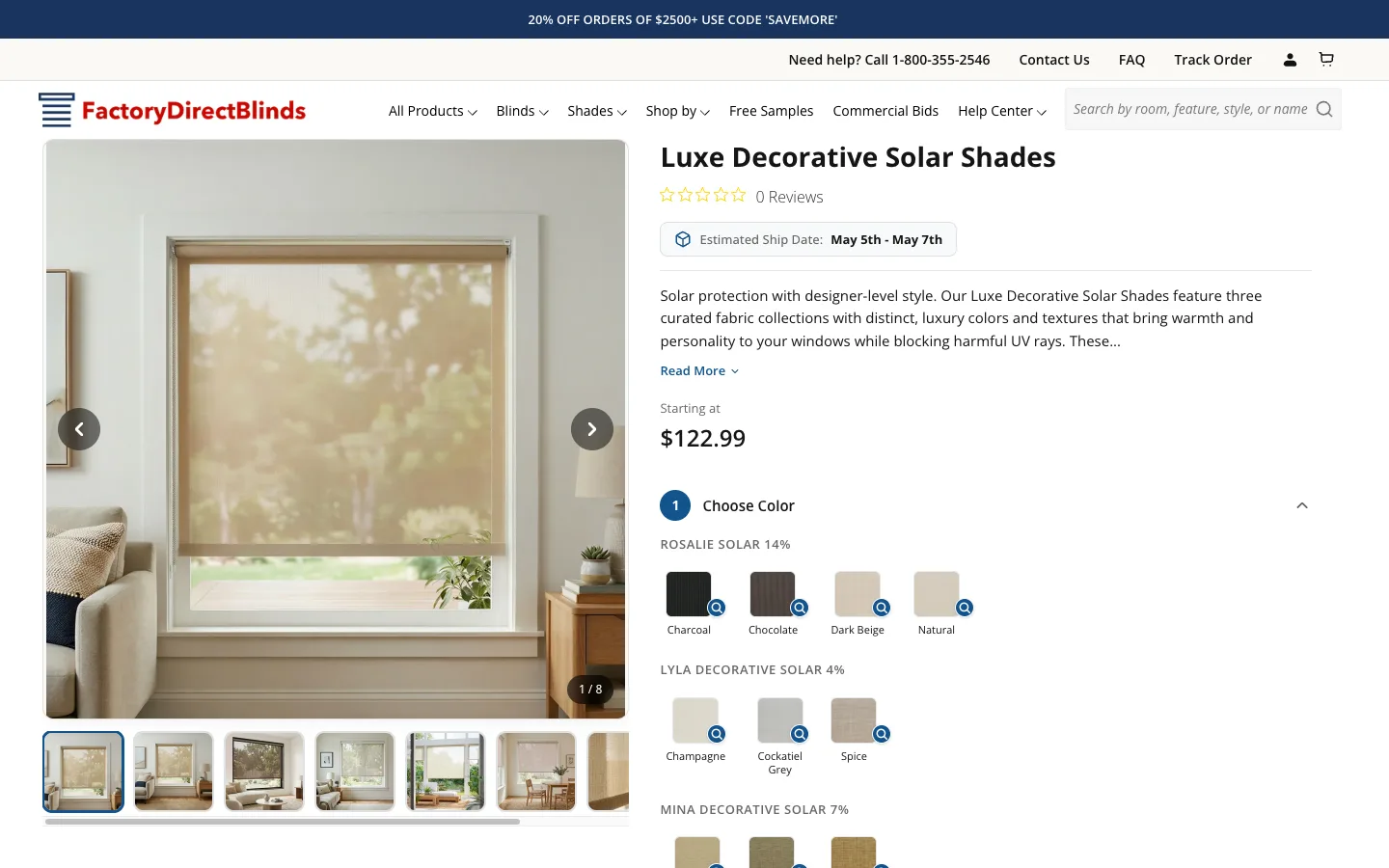

Future product types (cellular, horizontal, mini, zebra, wood) will follow the same pattern: one file per product type, all consuming the same builder-core.js. A migration going wrong only affects that one product type.
The Dynamic Pricing Engine
The pricing engine supports multiple color groups per product (a single parent can have 5 different fabric tiers, each with its own colors and price matrix), 2D matrix lookup with round-up-to-tier interpolation (30x40 inches rounds up to 36x48 at the supplier’s actual price point), width-based valance addon lookup, flat-fee control surcharges ($129 motorized, $18.15 cordless), and oversize thresholds (width > 96" OR height > 120" adds $100).
The entire pricing logic is 200 lines of JavaScript with no dependencies.
Making Pricing Management Accessible (The Biggest Win)
The biggest force multiplier of the rebuild wasn’t in the customer-facing UI. It was moving all pricing from scattered Shopify variants into a single JSON metafield per product.
In the old system, updating pricing required editing 100+ Shopify variants per product (one for every width-by-height combo). A single price update from the supplier could take 30 to 60 minutes per product. Any surcharge or oversize fee change required a developer.
In the new system, all pricing lives in product.metafields.custom.builder_pricing. The JSON structure has four sections: color groups with price tiers, addons for valance pricing, surcharges for control styles, and oversize thresholds. The client now updates a full product’s pricing in 5 to 10 minutes. No developer needed. Shopify’s built-in metafield version history enables instant rollback.
I delivered a 14-section How-to-Manage document covering every pricing update scenario: updating base prices from supplier spreadsheets, adding new colors, removing colors, adding new fabric tiers, changing surcharges, updating valance pricing, testing changes before going live, emergency rollback, and common mistakes to avoid.
The Safari Containing Block Trap
I hit one particularly nasty bug while building the image lightbox. The lightbox was position: fixed; inset: 0; z-index: 9999 with a dark semi-transparent overlay. It worked locally but failed on the client’s site: the overlay only covered part of the viewport.
The root cause was in the client’s theme CSS, not my code:
@media only screen and (min-width: 768px) {
  .page-container {
    transform: translate3d(0, 0, 0);
  }
}
When any ancestor has transform, filter, perspective, or will-change set, all position: fixed descendants become positioned relative to that ancestor instead of the viewport. The theme’s .page-container had a transform applied for GPU acceleration, and my lightbox was being clipped inside the page-container bounds.
The fix: on initialization, move the lightbox element to document.body via document.body.appendChild(lightbox). One line of code. This pulls it out of the transformed ancestor chain entirely.
Chrome DevTools doesn’t warn you about this. MDN documents it, but most developers learn it the hard way. Logged to the incident knowledge base so future builds skip the 4-hour debugging cycle.
Zero-Risk Coexistence Strategy
The new and old builders coexist perfectly:
- Template assignment. The new builder loads only when a product uses
product.builder-v2.liquidor a pre-configured JSON template. Any other template loads the old builder. - Script and CSS guards. The
load-js.liquidandload-css.liquidsnippets checktemplate.suffixbefore loading v2 assets. Old products never see the new JS or CSS files. - DOM isolation. The new builder targets
.builder-v2wrapper class. The old targets.builderWrapper. Even if both loaded accidentally, they target different DOM elements. - CSS scoping. Every v2 CSS rule starts with
.builder-v2. No global overrides except one scoped:has(.builder-v2)rule. - Rollback. To roll back a single product from v2 to the old builder, reassign its template in Shopify admin. Instant. No code changes, no data loss.
Delivery
Phase 1 shipped in 24 hours of focused work over 5 days. Full 5-step configurator, dynamic pricing engine, cart integration with EDI compatibility, desktop gallery with lightbox zoom, mobile gallery with scroll-snap, product specifications section, shipping timeline, Yotpo reviews integration with SSR offload, and the first Mariak product fully configured with production pricing data. Under the Notion mid-range estimate of about 35 hours.
Client feedback after seeing the staging build: “Looks like a great starting point. Clean and snappy.” After the polish round: “Really good. I will test it end to end once images are in.”
Results (End of Sprint 7)
- Zero regressions on existing PDPs (all 6 product types still use the old builder, untouched)
- Full Phase 1 scope shipped to staging branch
- First product fully configured with production-ready pricing data
- Client can update pricing without a developer for the new product line
- Rollback is one click (reassign the product template)
- Safari tested on real iOS device, no rendering bugs
- Pricing update time reduced from 30-60 minutes (developer task) to 5-10 minutes (client self-serve)
Phase 2 will roll out the remaining 11 supplier products using the same template (config and pricing data only, no new code). Phase 3 will migrate existing product types one per week with minimum 1 week of live testing between migrations.
Sprint 8: Builder 2.0 Phase 3 Migration Scope (May 2026)
After Phase 1 shipped 12 supplier products on Builder 2.0, the Phase 3 work focused on migrating the legacy product types off the 6,221-line jQuery monolith and onto the modular architecture. The scope was rebuilt from scratch after a catalog audit found four product types missing from the original Phase 3 notes.
What the audit added to scope
Four live product types were running on the legacy product-builder.js and were absent from the original Phase 3 plan:
- Hardwood Blinds (1 parent, Mariak vendor, “2 inch Hardwood Cordless Horizontal Blinds”)
- Pleated Shades (4 parents, Phase II vendor, includes Top-Down/Bottom-Up variants)
- Bamboo and Woven Wood Shades (3 parents, Phase II vendor, includes TDBU variants)
- Sheer Shades (2 parents, Phase II vendor, “Lumi Light Diffusing/Dimming Sheer Shades”)
The revised migration order leads with the cheapest pilot (Mini Blinds at 4 hours) to build the 2-on-1 headrail architecture once, then reuses that architecture across every type that needs it. Subsequent migrations cost 3-5 hours each.
Phase 3 envelope, by product type
| Order | Product type | Hours | Justification |
|---|---|---|---|
| 1 | Mini Blinds | 4 | Sets the migration template + builds 2-on-1 headrail architecture once |
| 2 | Roller Phase II non-Mariak | 3 | Config swap, identical builder logic to Mariak Roller |
| 3 | Sheer Shades | 3 | Light dimming/diffusing, similar to Roller pattern |
| 4 | Hardwood Blinds | 3 | Real wood version of Faux Wood, reuses 2-on-1 |
| 5 | Faux Wood Blinds | 4 | Bigger option set, reuses 2-on-1 |
| 6 | Roman Shades | 4 | Cord-loop and motorisation lock rules |
| 7 | Zebra Shades | 4 | Special cord-loop exemptions |
| 8 | Pleated Shades (incl TDBU) | 4 | TDBU adds one new state field |
| 9 | Vertical Blinds | 5 | Vertical louvers, stack direction, wand control |
| 10 | Cellular Shades (incl TDBU) | 5 | TDBU + 2-on-1 reuse |
| 11 | Bamboo and Woven Wood Shades (incl TDBU) | 4 | TDBU + woven texture handling |
| 12 | Bulk pricing JSON population (all types, ~90 parents) | 1 | Single GraphQL metafieldsSet script |
| Total | 44 |
The +1 hour bulk pricing line replaces a manual operation that would have taken 30 to 60 minutes per parent product. After each per-type build proves the pricing JSON schema on one representative parent, all the other parent products of the same type get populated via a single Admin GraphQL metafieldsSet mutation. ~90 parent products across 11 types in roughly an hour.
Sprint 9: Builder 2.0 Color Order SOP (May 2026)
The Builder 2.0 architecture decoupled visual sort order from theme code. Color order on a Builder 2.0 PDP comes from one of two places: the builder_pricing metafield on the parent product (most products), or the parent collection sort order (a small number of fallback products). I shipped a 14-section SOP to the merchant that covers all three editing paths, JSON validation rules, the comma rule, rollback procedure, decision tree, and an FAQ for common gotchas.
The merchant can now reorder colors on any PDP in about 5 minutes per product without a developer. The document includes:
- Quick lookup table mapping every product family to its edit path (A:
builder_pricingmetafield, B: nested underopennessfor Solar parents, C: collection sort order fallback) - Worked examples for each path with before-and-after JSON snippets
- Always-back-up-first warning block with the exact recovery steps if a save breaks the PDP
- JSON validation requirement via jsonlint.com before saving (the metafield editor accepts invalid JSON and the storefront silently breaks otherwise)
- Verification checklist post-edit covering swatch count, price recalculation, openness levels for Solar
- Rollback procedure for the worst case
- Developer reference at the bottom for engineers who pick this up later
The SOP turns a former 30-minute developer ticket into a 5-minute merchant self-serve action. Same pattern as the pricing-management win in Sprint 7, applied to the color-order problem.
Sprints 10-12: Blog SEO, a Second Builder Engine, and a Reviews Migration (May-June 2026)
The engagement runs as an ongoing retainer. After Phase 3 scoping, the work moved across three fronts: content SEO at scale, a second product-builder engine for a different product family, and a full reviews-platform migration done without losing a single rich-result star.
Blog SEO at scale: 166 articles, structured data that survives edits
The blog had 166 articles carrying Article schema but little to help them rank or earn rich results. In a single bulk pass over the Shopify Admin API, I shipped a Key Takeaways block to every article, an FAQ block to the ones that lacked one, and FAQPage JSON-LD across all 166. The schema renders through a dedicated article metafield and snippet rather than being pasted into the body, so it survives any future manual edit. Every article was exported to a local CSV first for a clean rollback path, each write was throttled and logged, and the QA sweep ran Google’s Rich Results Test to confirm FAQPage eligibility. The one trap, a related-products carousel that injects itself before a configured H2, was handled by bumping that setting to account for the new Key Takeaways heading.
Builder 3.0: forking the engine for horizontal blinds
Builder 2.0 was written for the roller-shade family (roller, solar, zebra, cellular) and its option set: control type, roll direction, valance, and add-on checkboxes. Horizontal blinds (faux wood, mini, hardwood, roman, pleated) need a different set entirely: wand control, valance style and position, a two-on-one headrail that splits a single order into a paired bundle, and hardware add-ons. Bolting those into the live roller engine would mix two product families into one file and put working products at regression risk.
So Builder 3.0 is a clean fork. Horizontal blinds get their own engine in a separate file, the roller engine stays untouched, and both share a common core for pricing math, fraction handling, and DOM helpers. Each family migrates one at a time behind a template suffix, gated by an independent multi-pass code review and a Safari mobile check, with one-click rollback. The product builder that used to be the most fragile part of the codebase is now two isolated engines where a bug in one cannot reach the other.
Yotpo to Judge.me: a reviews migration with zero rich-result gap
The store ran reviews on Yotpo, wired into roughly twenty theme files across eight surfaces: product pages, every card and grid star badge, three homepage sections, a collection reviews block, the MeasureSafe badge, and the aggregate count. A platform swap that just removes Yotpo would blank the star ratings Google reads, and the organic rich-result stars with them.
The migration preserves continuity at every step. The rating structured data is repointed, not removed, so Google never sees a gap. The two custom review sections built on Yotpo’s API are rewritten rather than swapped. The card files with no fallback are migrated first so nothing breaks mid-cutover, and both apps run in parallel while the markup is verified before Yotpo is pulled last. Judge.me also writes the review text into the page markup, which Yotpo did not, adding rich-result eligibility in normal search on top of the on-site display. Post-purchase review-request emails and a Google Shopping product-ratings path complete the move.
Sprints 13-15: Phase 3 Builder 2.0 Migrations Go Live (June 2026)
The Phase 3 envelope scoped in Sprint 8 stopped being a plan in June. Product families started moving off the 6,221-line legacy builder onto Builder 2.0, one type at a time, each migrated on a duplicate and verified before it touched the live configurator.
Vertical blinds went first: eight Mariak-vendor parent products migrated off the legacy builder onto the 2.0 engine and its shared pricing core. Roman (style 9000) and Sheer (9054) followed, with their fold-code mappings built and feeding live, so the EDI order still carries the exact fabric and fold the factory needs to cut. Honeycomb and Cellular moved on the builder side with no factory feed by design, which meant zero integration work and a clean storefront migration.
The split that keeps this safe is the same one from Sprint 7: a shared modular core with per-family isolation, so migrating vertical blinds cannot regress roller or solar shades. Faux Wood Premier and Signature, plus mini blinds, stay on the legacy builder until the Builder 3.0 horizontal engine is ready for them, because forcing a vertical-first engine onto a horizontal product is the kind of shortcut that breaks a live store. Every migrated type is a config exercise now, not a rebuild. That is exactly what Sprint 7 was for.
Results Summary
| What | Outcome |
|---|---|
| Mobile PageSpeed | 38 to 81 (+113%) |
| Desktop PageSpeed | 48 to 99 (+106%) |
| Mobile LCP | 22.0s to 2.7s (-88%) |
| Mobile ATC Gap | 62% gap diagnosed and addressed |
| Structured Data | CollectionPage, BreadcrumbList, FAQPage, Organization deployed |
| Schema on Blog | 233 blog URLs now eligible for Article rich results |
| GSC Recovery | 5 root causes identified, 30-day action plan delivered |
| Page 2 Keywords | 186 keywords with 2.69M impressions mapped to landing pages |
| Builder Rebuild | 6,221-line jQuery legacy to modular core + per-type modules |
| Pricing Update Time | 30-60 min (dev task) to 5-10 min (client self-serve) |
| Phase 3 Scope (May 2) | 11 product types, 44-hour envelope, 4 audit-found types added |
| Color Order SOP (May 3) | Merchant self-serve, 5 min per product, 14 sections + decision tree + rollback |
| Blog SEO Rollout (May) | Key Takeaways + FAQ + FAQPage schema across 166 articles via Admin API bulk write |
| Builder 3.0 (May) | Horizontal-blinds engine forked from the roller engine, shared core, per-family isolation |
| Reviews Migration (June) | Yotpo to Judge.me across ~20 files and 8 surfaces, rating markup preserved (no rich-result gap) |
| Phase 3 Migrations (June) | Vertical (8 Mariak parents), Roman 9000, Sheer 9054, and Cellular moved onto Builder 2.0 with fold-code EDI mappings live |
Key Takeaway
Made-to-measure products have unique CRO challenges that generic optimization advice does not address. The combination of reducing measurement anxiety (MeasureSafe guarantee), simplifying complex configuration (product builder progressive disclosure), eliminating performance bottlenecks (Core Web Vitals sprint), and fixing technical SEO foundations (structured data + GSC recovery) created compounding improvements across the entire funnel.
Each sprint built on the previous one. The CRO audit informed the builder redesign. The builder redesign exposed the performance problem. The performance fix made the structured data more impactful because Google could now crawl pages efficiently. The GSC audit ensured the improved pages were actually being indexed and ranking. And Sprint 7 closed the loop: the measurement protection upsell, mobile UX, and Core Web Vitals work in Sprints 2-5 would keep regressing as long as a 6,221-line jQuery monolith handled every product type. Replacing it with a modular architecture turned the product builder from the biggest liability into the safest part of the codebase.
For the technical approach behind the structured data implementation, the mobile sticky ATC pattern, and the performance optimization techniques, see the linked blog posts. For comparable engineering-heavy engagements, see the Enea Studio 6-sprint case study covering technical SEO and all-green Core Web Vitals on luxury jewelry, or the Scandinavian furniture marketplace sprint for trust-led CRO on a 0.11% CVR store.
What Changed for the Merchant
Factory Direct Blinds went from a mobile experience that 60% of visitors abandoned during page load (22-second LCP, score of 38) to a Lighthouse 81 mobile and 99 desktop store with measurement protection priced into the funnel and a modular product builder the team can extend without a developer. The 30 to 60 minute pricing-update task became a 5 to 10 minute self-serve action via a single JSON metafield per product. Phase 2 onboarding of the remaining 11 supplier products is now a config exercise rather than an engineering one. The retainer has since carried into content SEO at scale (structured data across 166 blog articles), a second builder engine that isolates a whole new product family from the live one, and a reviews-platform migration engineered so the store’s Google rich-result stars never blink out. It is a working partnership now, not a project: each sprint compounds on the last and the next-highest-impact change gets scoped, shipped, and verified every week.
Dealing with similar challenges on your Shopify store? Book a free strategy call and I’ll walk through your biggest conversion opportunities.