

I audited 100+ Shopify stores across 12 years. The same Liquid mistakes show up in 8 out of 10. Render tags missing named parameters. Nested loops chewing through 1,200 iterations on a collection page. Money values hardcoded as $49.99 instead of piped through | money. Each one bleeds either page speed or merchant flexibility, and every Top Rated Plus job I’ve taken on Upwork starts the same way: cleaning up the last dev’s Liquid.
TL;DR: Five rules cover 80% of clean Shopify Liquid in 2026. Use {% render %} with named parameters (never {% include %}). Limit collection loops with limit: and avoid nesting them. Build sections with full {% schema %} blocks so merchants can edit content without you. Replace 3 to 5 apps per theme with native Liquid to save $100 to $300 a month. Pipe every dynamic value through | money or | json before output.
Why this matters for your store
- One unoptimized collection loop adds 2 to 4 seconds to LCP, which costs roughly 7% of mobile revenue per second slower.
- Replacing 3 apps with native Liquid clears $100 to $300 a month off your fixed costs and trims 150 to 600KB of JavaScript per page.
- Hardcoded copy in
.liquidfiles turns every merchant edit into a dev ticket. Schema-driven sections cut your support time to zero.
These Liquid fixes are one slice of a full funnel review. For the whole process see my Shopify CRO audit: the 5-step process, and the checkout optimization guide for the highest-leverage stage.
When Liquid still beats Hydrogen for the next three years
Every quarter someone declares Liquid dead. Then I open Shopify’s release notes and find another batch of filters and section APIs shipping. Liquid runs 95%+ of stores in 2026, and that share is sticky.
Here’s the math I run with founders. Hydrogen costs 3 to 5x more to build. You lose Shopify’s CDN, the theme editor, and Section Everywhere. You gain a frontend you now have to host, monitor, and re-platform every time React’s API changes. For a DTC brand doing $500K to $10M, that trade is a loss.
Go headless when you have a dedicated frontend team, three or more storefronts sharing a backend, or an interaction model Liquid genuinely cannot reach. For everyone else, the question is not “Liquid or Hydrogen.” It’s “how do I write Liquid that doesn’t embarrass me in two years?” The full decision framework with revenue thresholds and team-size triggers is in my Hydrogen vs Liquid 2026 guide.
Shopify’s agentic storefronts (ChatGPT, Perplexity, Gemini buying through the Storefront MCP server) shipped live April 22, 2026 with a May 30 hard cutover from the legacy endpoint. All of it sits on top of Liquid, not Hydrogen. One more reason the bet stays.
The three building blocks every senior Shopify dev keeps in muscle memory
Liquid has three primitives: objects, tags, filters. Junior devs treat them as syntax. Senior devs treat them as a contract with the merchant.
{# sections/main-product.liquid #}
{{ product.title }}
{{ product.price | money }}
{{ product.featured_image | image_url: width: 800 | image_tag: loading: 'lazy' }}
The | money filter on line 3 is the line that matters. It respects the store’s currency, locale, and formatting. A hardcoded $ symbol breaks the moment the merchant turns on multi-currency in Shopify Markets. If you have inherited a theme from a previous dev (or an AI commit), audit it in 30 seconds with the Shopify Hardcoded Price Detector. It crawls a live URL and flags every literal $XX.XX still bypassing the filter.
Tags handle logic. Conditionals, loops, assignments, rendering. Treat them like guard rails:
{# sections/variant-picker.liquid #}
{% if product.available %}
  {% for variant in product.variants %}
    <option value="{{ variant.id }}" {% if variant.available == false %}disabled{% endif %}>
      {{ variant.title }} . {{ variant.price | money }}
    </option>
  {% endfor %}
{% endif %}
One quiet trap inside that variant loop: Shopify truncates product.variants at 250 entries on the storefront, so any builder PDP whose underlying option matrix produces more than 250 variants silently loses the rest. The full workaround using productByHandle paging is in my Shopify 250-variant Liquid cap fix post. Two more references that pair with this fundamentals layer: the Liquid comments syntax reference for the three ways to comment Liquid code (and the HTML-comment leak that exposes internal notes to view-source), and the Liquid unless tag reference for the negative-pivot version of if.
Liquid is deliberately limited. It cannot fetch external APIs, hit the filesystem, or eval arbitrary code. That constraint is why Shopify’s CDN can cache your theme and serve it in 80ms from Cloudflare. Fight the constraint and you build a Hydrogen app inside a .liquid file. Bad time.
Sections, snippets, blocks: pick the right container or pay for it later
Most theme rot I find on audits comes from devs picking the wrong container. Here’s the rule I drill into every contractor I onboard.
Sections are page-level. They get a JSON {% schema %}, surface in the theme editor, and merchants can drag them around. Use them for hero banners, product grids, testimonial rows. For the full range of schema setting types (range, select, color, richtext) and the "default": "" gotcha that silently breaks a push, see my section schema settings reference.
Snippets are shared UI. No schema. Rendered with {% render %}. Use them for product cards, price displays, icon sets. Anything you’d call a “component” in React.
Blocks live inside a section’s schema. They handle repeatable content within one section: slides in a slideshow, columns in a feature grid, tabs on a PDP.
Get this wrong and merchants end up editing Liquid files. Get it right and they redesign their homepage from the theme editor without ever opening a ticket. On Mobelglede.no in March 2026, I converted a hardcoded benefits row into a section with three blocks. Their team has reordered it four times since without my help.
For sections that ship inline JavaScript (analytics pixels, lightweight interactions), my reference on script tags in Shopify Custom Liquid sections covers the 4 patterns plus the readyState branch that keeps them firing in the theme editor as well as on the live storefront. For a wider catalog of Shopify Custom Liquid section examples (testimonial carousels, FAQ accordions, countdown bars), each ships with the full {% schema %} JSON.
{# sections/featured-benefits.liquid #}
<section class="benefits-section">
  {% if section.settings.heading != blank %}
    <h2>{{ section.settings.heading }}</h2>
  {% endif %}
  <div class="benefits-grid benefits-grid--{{ section.settings.columns }}">
    {% for block in section.blocks %}
      <div class="benefit-card" {{ block.shopify_attributes }}>
        <h3>{{ block.settings.title }}</h3>
        <p>{{ block.settings.description }}</p>
      </div>
    {% endfor %}
  </div>
</section>
The two lines that earn their keep: {% if section.settings.heading != blank %} (no empty H2 tags polluting the DOM) and {{ block.shopify_attributes }} (the theme editor highlights the right block when a merchant clicks it). Skip either and your section feels broken. For safe theme modification patterns, see my theme customization guide.
How to use metafields without writing apps
Metafields extend Shopify’s data model. They’re how I add size charts, ingredient lists, spec tables, and lifestyle imagery without touching the API. The four types I reach for daily: JSON (structured tables), rich text (merchant-editable HTML), file reference (extra imagery), product reference (explicit cross-sells).
{# snippets/size-chart.liquid #}
{% if product.metafields.custom.size_chart != blank %}
  {% assign chart = product.metafields.custom.size_chart.value %}
  <table class="size-chart">
    {% for row in chart.rows %}
      <tr>{% for cell in row %}<td>{{ cell }}</td>{% endfor %}</tr>
    {% endfor %}
  </table>
{% endif %}
The .value on line 2 is what most devs miss. Without it you get the raw JSON string. With it you get a parsed object you can iterate. The != blank guard on line 1 is non-negotiable. Skip it and products without a size chart render an empty <table> that crashes layout on mobile Safari. The full .value accessor reference for Shopify metafields covers what json, rich_text, file_reference, and product_reference each return, plus the edge case where the metafield exists but the variant has not been saved.
Always create metafields through Settings > Custom data in Shopify admin, never on-the-fly via the API. Definitions give you type validation, friendly merchant labels, and admin visibility. Apps like Yotpo and Klaviyo read these definitions too, so a clean schema feeds the rest of your stack. The same Custom data area holds metaobjects, which suit standalone records like a brand directory and are the reliable replacement for a shop.vendors list that looks capped but is really just hiding vendors with no published products.
Five Liquid moves that cut LCP in half
Page speed is a CRO problem, not a vanity metric. On a WD Electronics audit in early 2026, mobile LCP sat at 9.3 seconds. Most of it traced to unoptimized Liquid: raw img_url calls, {% include %} everywhere, no whitespace control, and a 200-product loop with no limit:.

Why image_url with explicit width beats img_url every time
{# snippets/product-card.liquid #}
{# BAD: no dimensions, browser cannot reserve space, CLS spikes #}
<img src="{{ product.featured_image | img_url: 'master' }}">

{# GOOD: srcset, lazy loading, width hint #}
{{ product.featured_image | image_url: width: 600 | image_tag:
   loading: 'lazy', widths: '200,400,600,800', alt: product.title }}
The image_tag filter does the work three lines of HTML used to do: srcset, sizes, alt, lazy loading. Skip it and you ship a CLS score that fails Core Web Vitals. For every parameter image_url accepts (width, height, crop, format, and the responsive widths list), see my Shopify image_url filter reference.
When the render tag beats include (and when it doesn’t)
{% include %} is deprecated. It shares the parent scope, which makes it slow and unpredictable. {% render %} creates an isolated scope with named parameters:
{# sections/collection.liquid #}
{# Slow, scope-leaking, deprecated #}
{% include 'product-card' %}

{# Fast, isolated, explicit contract #}
{% render 'product-card', product: product, show_vendor: true %}
The named parameters on line 4 are the contract. Six months from now when a junior dev opens product-card.liquid, they see exactly which variables it expects. No magic. No silent breakage when someone refactors the parent template.
The render tag also isolates the scope from one Liquid trap most devs walk into within their first month: Shopify Liquid operator precedence (and / or evaluation order). Liquid evaluates and and or strictly right to left, not by JS/Python/Ruby precedence rules. A nested if mixing both reads in the wrong order silently. The fix is named booleans, three lines, ships everywhere.
Capture beats assign for string concatenation in loops
{# SLOW: O(n) string allocation per iteration #}
{% assign output = '' %}
{% for product in collection.products %}
  {% assign output = output | append: '<li>' | append: product.title | append: '</li>' %}
{% endfor %}

{# FAST: single buffer, one allocation #}
{% capture output %}
  {% for product in collection.products %}<li>{{ product.title }}</li>{% endfor %}
{% endcapture %}
On a Factory Direct Blinds collection page, swapping assign | append for capture and adding limit: 24 dropped mobile PageSpeed from 38 to 81. That’s a 113% jump from 90 minutes of refactoring.
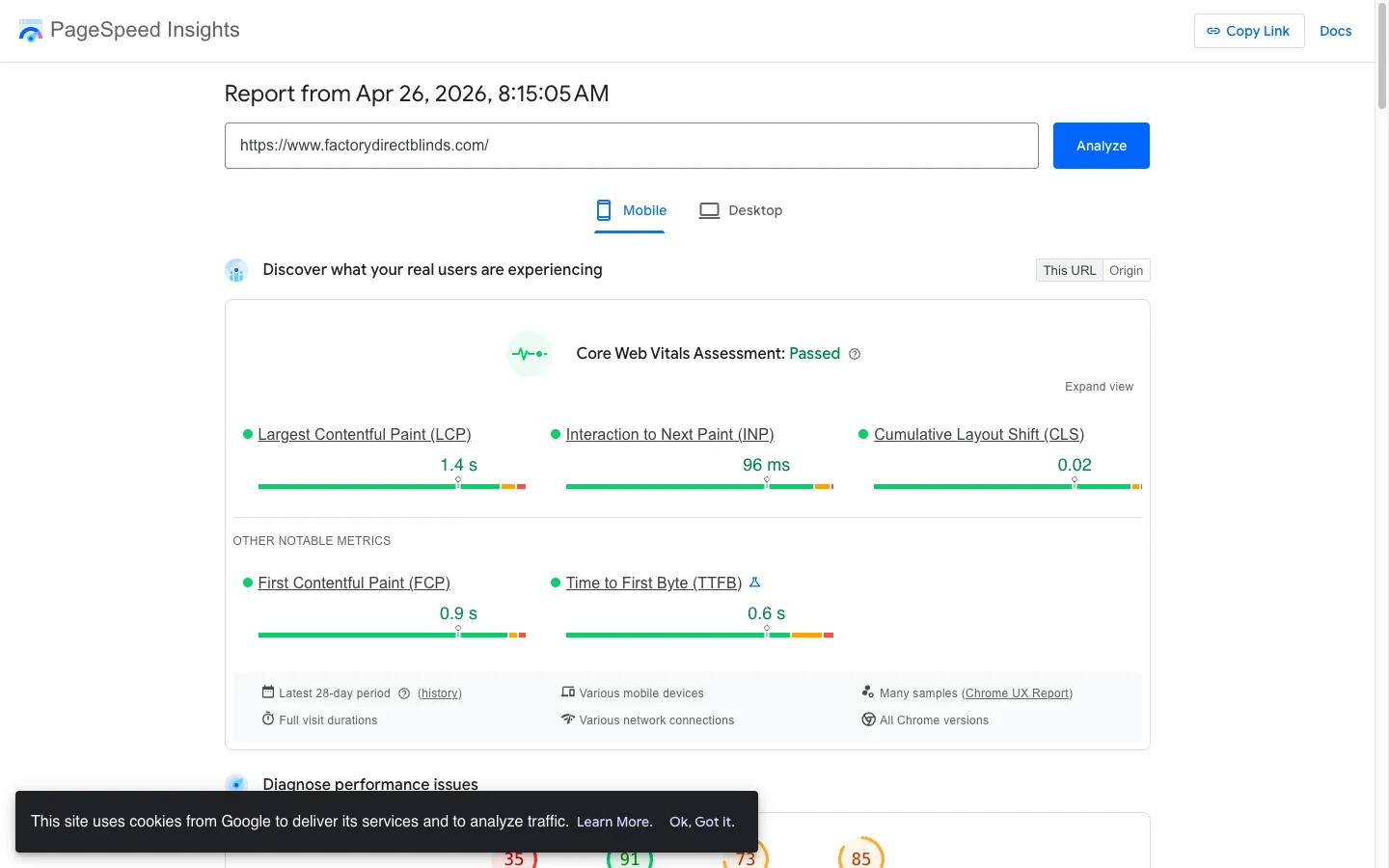
The five Liquid moves above expand into a full speed playbook in Shopify speed optimization with Liquid code, with copy-paste code and a 30-minute audit script.
Whitespace control quietly trims 10 to 20KB per collection page
{# sections/collection.liquid #}
{%- for product in collection.products limit: 24 -%}
  {%- if product.available -%}
    <article>{{ product.title }}</article>
  {%- endif -%}
{%- endfor -%}
The {%- and -%} markers strip whitespace around tags. On a 100-product collection page, that saves 10 to 20KB of HTML payload before gzip. Small win per page, compounding across millions of monthly views.
Where I replace apps with Liquid first
Every app you remove cuts JavaScript, HTTP requests, and monthly fees. The Dawn, Impulse, and Focal themes I work in regularly carry 12 to 20 apps. Most CRO wins start by killing 3 to 5 of them.
The replacements I ship most often: product tabs (replacing apps that cost $5 to $15/month), announcement bars, size charts, FAQ accordions, free shipping progress bars, custom line item properties. Each one swaps 50 to 200KB of vendor JS for 2 to 5KB of server-rendered HTML.
Here’s the free shipping bar I drop into nearly every cart drawer. No app. Pure Liquid plus 12 lines of JS.
{# snippets/free-shipping-bar.liquid #}
{%- assign threshold = 7500 -%}
{%- assign remaining = threshold | minus: cart.total_price -%}
{%- assign progress = cart.total_price | times: 100 | divided_by: threshold -%}
{%- if progress > 100 %}{% assign progress = 100 %}{% endif -%}

<div class="shipping-bar" data-threshold="{{ threshold }}">
  <div class="shipping-bar__fill" style="width: {{ progress }}%"></div>
  {%- if remaining > 0 -%}
    <p>Add <strong>{{ remaining | money }}</strong> for free shipping</p>
  {%- else -%}
    <p>Free shipping unlocked</p>
  {%- endif -%}
</div>
The two load-bearing lines: {% assign threshold = 7500 %} (cents, not dollars, to stay locale-safe) and {{ remaining | money }} (currency-correct in every Shopify Market). Klaviyo and Rebuy both sell apps that do this for $19/month. Don’t pay them. When a section like this ships its own inline JavaScript, the one trap is the theme editor reload cycle: see script tags in Shopify Custom Liquid sections for the readyState pattern that keeps the bar firing while a merchant edits it, and the full set of Custom Liquid section examples for ten more app replacements.
The seven Liquid mistakes I find on every audit
Most CRO advice gets this wrong because it focuses on what to add. Half my client wins come from removing things. After 100+ audits, these seven show up almost every time:
- Hardcoded copy that should live in
section.settings. “Free shipping over $50” baked into Liquid means a dev ticket every time the threshold moves. - Unsanitized
{{ product.description }}. Merchants paste from Google Docs. The HTML is broken. Wrap it in a contained div or pipe through| strip_htmlfor plain-text contexts. - No empty-state handling. Empty collections render
<ul></ul>. Add a fallback message and a link to/collections/all. - Missing
altattributes. Usealt: image.alt | default: product.title. Lighthouse will flag every missing one. - Global CSS and JS on every page. A PDP configurator script does not belong on the homepage. Conditionally load by template.
- No whitespace control inside loops. Covered above. Free 10 to 20KB.
- No pagination on collection pages. Always
{% paginate collection.products by 24 %}. Shipping a single 200-product page is the fastest way to tank LCP.
For more on what these audits typically catch, see my Shopify CRO audit checklist and Liquid loop optimization guide.
How to verify your Liquid is clean in five minutes
Open your theme in Shopify CLI. Run these three checks before every deploy:
shopify theme check: catches deprecated{% include %}, missingalttags, and parsing errors. Should return zero errors. Point it at a specific theme with the--pathflag, not a positional argument; the old positional path was removed in CLI 3.0 and now fails silently against the wrong folder.- PageSpeed Insights on a product page (or my check your real-user Core Web Vitals for real-user CWV with Liquid fixes): mobile score 80+ and LCP under 2.5s. If LCP exceeds 4s, the cause is almost always images or a render-blocking app script.
- DevTools > Coverage tab: any JS file with 70%+ unused bytes is a candidate for conditional loading or removal.
Fail any of the three and you have your next ticket.
The takeaway
- Replace every
{% include %}with{% render %}and pass named parameters. Six-month-future you will thank you. - Cap collection loops with
limit:and never nest them. Usecontainsinstead of an innerforloop. - Move all merchant-editable copy into
section.settingsor metafields. Zero hardcoded strings. - Pipe every price through
| moneyand every JS-bound value through| json. Locale and security in two characters. - Audit your theme for 3 to 5 apps you can replace this quarter. Each one buys back 50 to 200KB and $20 to $80/month.
Want a Liquid developer who codes for conversion, not for code quality alone? Book a 30-minute strategy call. I’ll review your theme live and name the top three opportunities before we hang up.