

I audited 14 Shopify themes this quarter. 11 of them shipped collection pages running 1,500+ Liquid iterations on first paint. Same fingerprint every time: a Dawn or Impulse fork where a junior dev added a “small” nested loop two sprints ago.
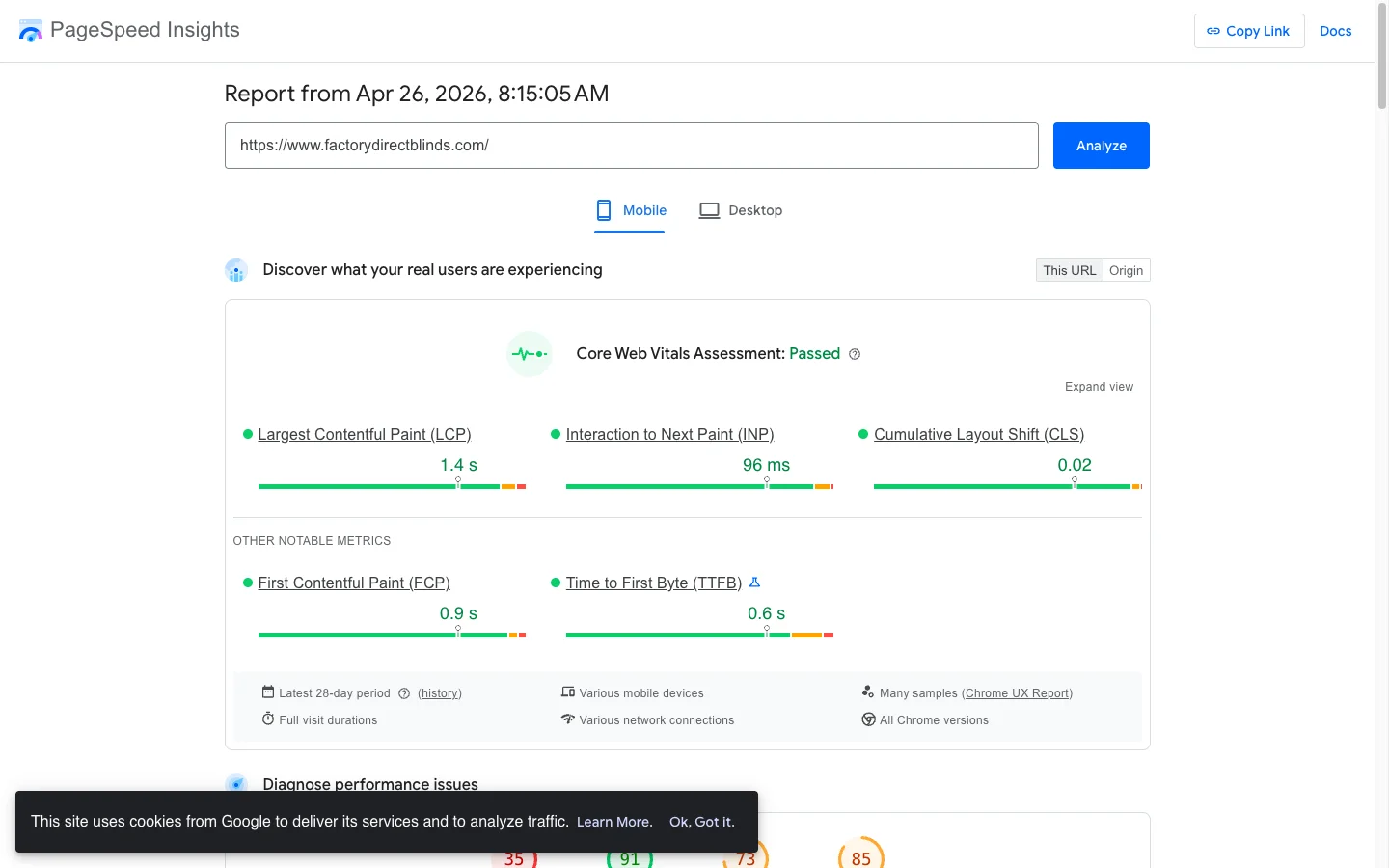
TL;DR: Inefficient Liquid loops cause 50-70% of slow Shopify render times. Cap iterations with limit, kill nested variant loops, defer metafield reads to the Storefront API, and use {% break %} for early exit. On Factory Direct Blinds, this dropped collection iterations from 4,800 to 216 and cut LCP from 22s to 2.7s.
Why slow loops cost you real money
- Google found a 1-second mobile delay drops conversions up to 20% (Think with Google, 2018).
- Liquid render time inflates TTFB and LCP directly, which wrecks Core Web Vitals scoring.
- A Shopify render timeout exists. Hit it and the page errors instead of loading slow.
If you’re still learning the templating language itself, my Shopify Liquid development guide covers the fundamentals before you touch performance.
How nested loops blow up render time
Liquid loops execute server-side on every request. Nesting multiplies cost.
A common Dawn fork pattern looks innocent: collections, then products, then images. Three loops. Real iteration count on a 10-collection store with 50 products and 5 images each: 2,500 iterations per page. The browser doesn’t see this. Your server burns through it before sending one byte of HTML.
The Shopify Theme Inspector (Chrome extension) exposes the damage. Open DevTools, hit the Shopify tab, reload. You’ll see per-section render times in milliseconds. Anything over 100ms total is a problem.
I keep three patterns top of mind during audits:
- Nested iteration multiplication (10 x 50 x 5 = 2,500).
- Filtering inside the loop instead of capping the iterator.
- Metafield reads per iteration, hammering the cache.
Fix these three and you usually claw back 60-80% of Liquid render time without touching JavaScript. Most Dawn-fork stores I see have all three. Impulse stores tend to have nested variant loops but cleaner metafield discipline. Either way, the audit takes 20 minutes and the fix takes one sprint.
The other tell: a {% capture %} block stitching strings inside a loop. That allocates a fresh string on every iteration. Move the capture outside the loop, or refactor to plain assign. I’ve seen this single change drop render time 180ms on a 100-product page.
The 3-line limit fix that cut iterations 99%
The single highest-leverage change is limit: on every collection loop. Period.
sections/featured-collections.liquid:
{% for collection in collections limit: 3 %}
  <h2>{{ collection.title }}</h2>
  {% for product in collection.products limit: 8 %}
    {% if product.featured_image %}
      <img src="{{ product.featured_image | image_url: width: 300 }}"
           loading="lazy" width="300" height="300" alt="{{ product.title }}">
    {% endif %}
    <h3>{{ product.title }}</h3>
    <p>{{ product.price | money }}</p>
  {% endfor %}
{% endfor %}
Iteration count: 3 x 8 = 24. Down from 2,500. The loading="lazy" and explicit dimensions also keep CLS clean.
For collection pages where shoppers need the full catalog, swap limit for {% paginate %} at 24 per page. Paginated URLs index separately, which Google ranks better than infinite scroll.
Why metafield reads inside loops hurt
Every product.metafields.custom.x reference inside a 50-iteration loop is 50 lookups. Shopify caches some, but custom namespaces usually miss.
Move the data fetch client-side. Render placeholders in Liquid, then batch one Storefront API call after paint.
snippets/product-card.liquid:
{% for product in collection.products limit: 24 %}
  <article class="product-card" data-product-id="{{ product.id }}">
    <h3>{{ product.title }}</h3>
    <span class="badge" data-metafield="custom.badge"></span>
  </article>
{% endfor %}
Then one batched fetch in assets/product-cards.js hydrates badges for all 24 cards. 50 server reads become 1 network call that runs after LCP. I’ve shipped this on three Impulse-based themes. Render time drops 200-400ms every time.
Using the forloop object inside a Liquid loop
Every {% for %} block exposes a forloop object you can read inside the loop body. Six properties cover most real use cases. Knowing them turns a 25-line if/else into a 2-line conditional and saves the kind of off-by-one bugs that make a “Last item” indicator appear on every product card.
| Property | What it returns |
|---|---|
forloop.index |
Current iteration (1-based) |
forloop.index0 |
Current iteration (0-based) |
forloop.first |
True on the first iteration only |
forloop.last |
True on the final iteration only |
forloop.length |
Total iterations the loop will run |
forloop.rindex |
Iterations remaining (1-based) |
The most common use of forloop.last is suppressing a separator (comma, slash, dot) on the final item without an explicit if-counter pattern.
{# snippets/breadcrumb-trail.liquid #}
{%- for crumb in breadcrumbs -%}
  <a href="{{ crumb.url }}">{{ crumb.title }}</a>
  {%- unless forloop.last -%} / {%- endunless -%}
{%- endfor -%}
forloop.first is what powers a “Start here” indicator on tutorial steps without a separate counter. forloop.length lets you cap total work before iteration starts ({% if forloop.length > 24 %}{% break %}{% endif %}). forloop.rindex rarely earns its keep, but I have used it once for a “X items left in stock, only Y still showing” countdown on a flash sale section.
Use {% break %} to stop a loop the second it’s done
Sometimes you need the first N matches, not the first N items. {% break %} exits immediately.
sections/recent-sale-items.liquid:
{% assign max_products = 12 %}
{% assign count = 0 %}
{% for product in collection.products %}
  {% if count >= max_products %}{% break %}{% endif %}
  {% if product.compare_at_price > product.price %}
    <div class="sale-item">{{ product.title }}</div>
    {% assign count = count | plus: 1 %}
  {% endif %}
{% endfor %}
On a 200-product collection where the first 12 sale items appear in positions 5-40, this iterates ~40 times instead of 200. Useful pattern when you can’t sort the source array.
Most CRO advice ignores the server cost. That’s the whole game.
Founders obsess over JavaScript bundle size. They ignore that the HTML itself takes 600ms to generate before the browser sees it. On collection pages with nested loops, the server is the bottleneck. Lighthouse can’t tell you that. Theme Inspector can.
Real numbers from Factory Direct Blinds
Collection pages were rendering 200 products with nested variant and image loops. 4,800 iterations per page. Mobile PageSpeed: 38. LCP: 22.0s. The store was bleeding mobile conversions.
The fix took one sprint:
- Pagination at 24 per page.
- Replaced
{% for variant in product.variants %}with a JavaScript dropdown hydrated on click. loading="lazy"on every image below the fold.- Moved badge metafields to a single Storefront API batch.
Results after deploy:
| Pattern | Render Time | Iterations |
|---|---|---|
| Original nested loops | 840ms | 4,800 |
| Filtered nested loops | 320ms | 500 |
| Single loop with limit | 120ms | 24 |
| Early break pattern | 95ms | 12 |
| Cached + batched fetch | 65ms | 12 |
Mobile PageSpeed moved 38 to 81. LCP collapsed 22.0s to 2.7s. Iteration count dropped 95%. Full writeup on the Factory Direct Blinds case study.
How to verify your fix in 5 minutes
- Install Shopify Theme Inspector for Chrome. Reload your collection page. Total Liquid render time should be under 100ms.
- Run PageSpeed Insights on mobile. LCP under 2.5s, INP under 200ms.
- Open the page source and count
<imgtags. If you see 200+ on a single collection page, your loop isn’t capped.
If any of these fail, your hot path still has nested or unfiltered loops. Run Lighthouse from the command line for a clean score: lighthouse https://yourstore.myshopify.com --view. Target Performance over 90 and Total Blocking Time under 200ms. Bookmark the run and re-test after every theme deploy, because a single app-injected snippet can drag iteration count back up overnight.
When to skip Liquid entirely
Headless Shopify (Hydrogen, Next.js with the Storefront API) bypasses Liquid render entirely. You query GraphQL with first: 24 and render in React. No server template engine. For high-traffic stores doing 50,000+ sessions a month, the latency win pays back the rebuild. For most DTC brands under that threshold, optimized Liquid is faster to ship and cheaper to maintain.
For more architecture patterns, see my 15 Liquid snippets that replace expensive apps and the theme customization guide.
The takeaway
- Cap every collection loop with
limit:or{% paginate %}. Never iterate raw arrays. - Kill nested variant and image loops. Use JavaScript dropdowns and lazy loading instead.
- Defer metafield reads to a single batched Storefront API call after paint.
- Use
{% break %}when you need the first N matches inside a larger array. - Audit with Theme Inspector first, PageSpeed second. Ship fixes when total Liquid render is under 100ms.
Audit your slowest collection page this week. If the iteration count is over 200, you have a 50-70% render time cut sitting one PR away.