

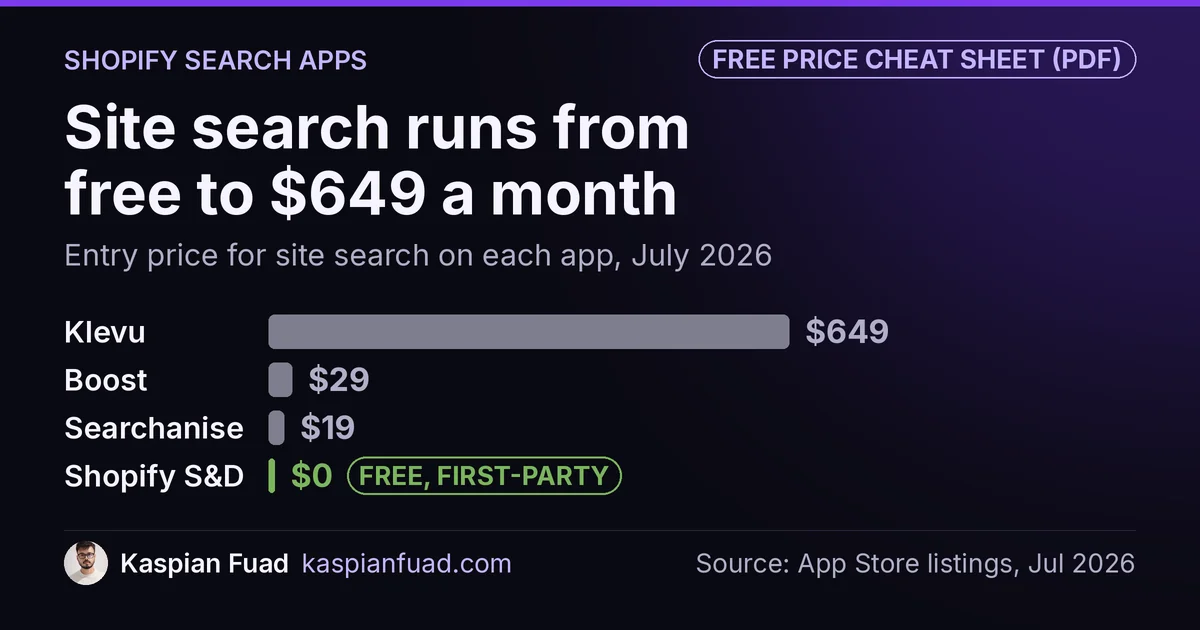
Shopify’s own search app is free. Klevu charges $649 a month for site search. Same basic job: help someone find a product.
TL;DR: I checked the live pricing on all of them in July 2026. It runs from free to $649 a month. On speed, search and filter apps typically land somewhere between 80ms and 140ms of blocking time, but I’m not going to rank vendors on that, and I’ll explain why. The thing that actually moves the number is a setting in your theme editor, not the logo on the app.
Download the search app comparison (PDF)
Site search is worth getting right. People who search on your store are a small slice of visitors and a big slice of revenue, which I covered in the on-site search post.
So the question isn’t whether to invest. It’s what you’re actually buying.
What do Shopify search apps cost in 2026?
Checked on the live listings this week.
| App | Entry price | Free plan? |
|---|---|---|
| Shopify Search & Discovery | Free | Yes, genuinely |
| Searchanise | $19 | Yes, under 25 products |
| Boost AI Search | $29 | No |
| Doofinder | $61 | No |
| Klevu | $449 | No |
| Athos (was Searchspring) | Not published | No |
That’s a wide spread for one job.
A few things worth pulling out.
Shopify’s Search & Discovery is free and first-party, so it adds no third-party script to your storefront. It does filters, synonyms, boosts and recommendations. Its rating is 2.8 stars from 453 reviews though, and the complaints are consistent: not enough filter control, slow reindexing on large catalogues. It’s free, so the cost of trying it is an afternoon, and my free setup checklist keeps that afternoon short.
Searchanise is the cheapest real step up. $19 a month, and it has a proper free tier that works on a live store if you’re under 25 products. Prices climb by product count to $349.
Boost has no free plan, just a 21-day trial, and it prices on your monthly sales volume rather than your catalogue size. $29 to start, and the top band reaches around $1,499. If your revenue grows, this bill grows with it whether or not you use more of the app.
Klevu is the enterprise end. $449 for recommendations, $549 for category merchandising, $649 for site search. No free plan.
Doofinder has a quirk worth knowing. Its App Store plans read $61, $186 and $436 a month. Its own website lists $49, $149 and $349 for the same tiers. Install through Shopify and you pay the App Store number, so check both pages before you commit.
What happened to Searchspring?
It’s gone, at least by that name. The old listing 404s now and the live one is Athos: Unified Discovery. Klevu is being folded into Athos Commerce too.
Athos doesn’t publish prices anymore. Every plan is a Request Pricing button.
That matters for two reasons. Any comparison still quoting Searchspring’s old numbers is stale, and there are a lot of those ranking right now. And when two of the bigger names in a category merge, you’re buying into a roadmap that’s mid-reshuffle. Not a reason to avoid them, just something to ask about on the call.
Do search apps slow down your store?
Yes, they add work to the browser. But I want to be straight about what my numbers can and can’t tell you.
Across the search and filter apps in my App Speed Index, the typical cost lands roughly between 80ms and 140ms of main-thread blocking time. Blocking time is just the browser being busy running code instead of answering taps. For context, Lighthouse flags third-party code at 250ms, and that budget is shared across every app on your store.
Now the honest part. Those figures are typical values I’ve recorded on real stores, not a controlled lab test where I swapped one app at a time on an identical store. Different themes, different catalogue sizes, different app stacks. So an 80ms to 140ms range for the category is fair. Ranking one vendor above another on a 20ms gap is not, and I’m not going to do it just because it would make a tidier table.
Other categories are different. When I compared session recorders the gap was 50ms to 200ms, four times, which survives that kind of messiness. A 60ms spread doesn’t.
Is hosted search lighter than a filter app?
This is the part I got wrong before I checked, so it’s worth writing down.
I assumed the hosted engines like Algolia would be lighter on the browser, because they rank and count filters on their own servers instead of your shopper’s phone. That sounds right. It’s also not a difference, because they all do that.
Boost’s API returns a fully built filter tree from its servers, and even has a setting to skip rebuilding it when someone just changes page. Doofinder returns filter counts ready to render. Searchanise and Klevu index your catalogue on their own infrastructure and answer from it. Counting filters in the shopper’s browser is basically not a thing in this category.
And the app with the “fast” reputation is not shipping the smallest browser bundle. Algolia renders through InstantSearch.js, one of the larger rendering libraries in this group, and its Shopify setup asks you to switch off your theme’s product grid so its own block can render the collection page instead.
My own data makes the same point. The lightest reading in that category belongs to a filter app that writes product data straight into the browser from Liquid, which is the most browser-heavy design of the lot. If the tidy story were true, that one should have been the worst.
So “hosted search” doesn’t mean “light”.
What actually decides the speed cost
How much of the page the app re-renders in the browser. That’s it.
An app that adds a search dropdown to your header does a little work. The same app configured to take over your collection page, so the grid is drawn by JavaScript instead of arriving ready-made from Shopify, does a lot more. Same vendor, same subscription, very different cost.
Which means this is mostly your call, not theirs. Three things I’d do:
- Turn on only what you use. Want better autocomplete? Enable that block and leave your theme’s collection grid alone. Most of the cost lives in the takeover, not the search box.
- Cut your filter groups. Eighteen filter groups on a 5,000-product collection is a different job from four. Merchandising decisions are performance decisions here.
- Measure before and after. Run the page through Lighthouse or the CruxGrader with the setting off, then on. That’s the only number that describes your store rather than mine.
Then check the whole stack with the App Bloat Detector, because search is sharing that 250ms budget with your reviews, chat and upsell apps.
The takeaway
- Prices run from free to $649 a month for the same core job, so start at the free end and pay when you hit a wall you can name.
- Shopify’s Search & Discovery is free and first-party. Rated 2.8 stars, but it costs an afternoon to find out if it’s enough. Setup guide here.
- Searchspring is now Athos, and Klevu is joining it. Any comparison quoting old Searchspring pricing is out of date.
- They all rank and filter on their own servers. Hosted search doesn’t mean a lighter browser.
- Your settings decide the speed cost, mainly whether the app re-renders your collection page. That’s a theme-editor decision.
I’m Kaspian Fuad, a Shopify CRO consultant. Prices here came from each vendor’s live listing in July 2026. The blocking-time figures are typical values from real stores, published as a category range rather than a vendor ranking, and the full app library is public at the App Speed Index.