

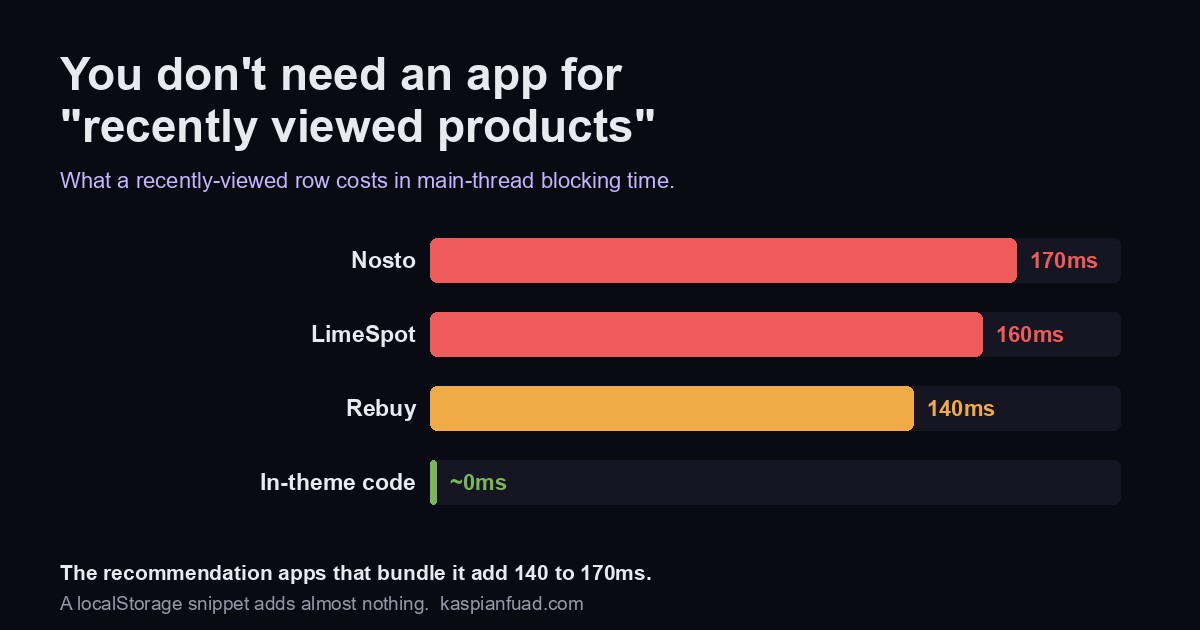
TL;DR: Shopify has no native recently viewed products feature, and the recommendation apps that include one (Nosto, LimeSpot, Rebuy) added 140ms to 170ms of blocking time in my measurements, plus a monthly fee. You do not need any of that for one row. Here is the full copy-paste code: a single theme section that records each product to the browser’s localStorage as a shopper browses, then renders a recently viewed row from that stored data with no app and no network request. About 30 lines.
Recently viewed is one of the highest-value, lowest-effort merchandising surfaces on a product page. It helps a shopper get back to the item they were comparing, which is exactly the moment a sale is won or lost. A widely cited McKinsey figure puts 35 percent of Amazon purchases as coming from recommendations generally. You can capture a slice of that on Shopify without installing anything.
Does Shopify have recently viewed products built in?
No, and it is worth being precise about why, because the confusion sends people to the App Store unnecessarily. Shopify has a Product Recommendations API, but its own docs are explicit that it returns “related products for a given product,” keyed to a product ID with an intent of related or complementary. The theme guide confirms it: “Only related recommendations are auto-generated by Shopify.” None of it touches a visitor’s own browsing history.
That is the key distinction. Related products are computed from the catalog. Recently viewed is computed from one shopper’s session, which Shopify does not track for you on the storefront. So there is no toggle and no API parameter that returns it. The list has to be built on the client, in the browser, as the visitor moves from product to product. That sounds like a job for an app. It is not.
Why not just use a recommendation app?
Because you would be buying an entire personalization platform to get a single row. Recently viewed is a named widget inside the big recommendation apps: it is documented in Rebuy as a widget “based on a customer’s own browsing history,” and in Nosto as an “Items you recently viewed” recommendation type. Those apps are genuinely powerful for AI merchandising across a store. But they are not free, and they are not light.
In my App Bloat Detector library, the recommendation and personalization apps that bundle recently viewed measured among the heavier things you can install: Nosto 170ms, LimeSpot 160ms, and Rebuy 140ms of main-thread blocking time. That is the cost of loading a full personalization SDK on your storefront. If recently viewed is the only feature you actually want, you are paying that tax, and a subscription, for a row you can build in an afternoon. This is the same pattern I keep finding when I audit stores: a heavy app doing a job that a Liquid snippet does faster.
How does recently viewed work without an app?
The whole trick is that the browser can remember things. Every modern browser has localStorage, a small key-value store that lives on the shopper’s own device. The plan is two steps:
- Record. On each product page, save that product to a list in localStorage. Because we are in Liquid at that moment, we can capture the title, URL, image, and the price already formatted by the
moneyfilter, so there is nothing to fetch or format later. - Render. Wherever you want the row, read that list back and build the cards from the stored data. No network request, no app SDK, no third-party server.
Storing the display data at view time is what makes this approach effectively free on speed. There is no call to /products/{handle}.js (which returns raw price integers in cents you would have to format yourself) and no client-side currency logic to get wrong. Liquid does the formatting once, correctly, in the shopper’s currency.
The code: one Shopify section, no app
Create a single section file, sections/recently-viewed.liquid, and paste this in. It records the current product on product pages and renders the row anywhere you place it.
{%- comment -%}
Recently viewed products, no app. Records the product on PDPs (via
localStorage) and renders a row from that stored data. Add through the
theme editor: put it on your product template, and optionally the cart.
{%- endcomment -%}
<div class="rv" id="rv-{{ section.id }}" data-max="{{ section.settings.max | default: 4 }}" hidden>
<h2 class="rv__heading">{{ section.settings.heading | default: 'Recently viewed' | escape }}</h2>
<ul class="rv__row" role="list"></ul>
</div>
{%- if product -%}
{%- capture rv_current -%}{"handle": {{ product.handle | json }}, "title": {{ product.title | json }}, "url": {{ product.url | json }}, "image": {{ product.featured_image | image_url: width: 400 | json }}, "price": {{ product.price | money | strip_html | json }}}{%- endcapture -%}
{%- endif -%}
<script>
(function () {
var KEY = 'kf_recently_viewed';
var root = document.getElementById('rv-{{ section.id }}');
if (!root) return;
var max = parseInt(root.dataset.max, 10) || 4;
var current = {{ rv_current | default: 'null' }};
var list = [];
try { list = JSON.parse(localStorage.getItem(KEY) || '[]'); } catch (e) {}
// 1) Record the current product (product pages only).
if (current && current.handle) {
list = list.filter(function (p) { return p.handle !== current.handle; });
list.unshift(current);
list = list.slice(0, 12);
try { localStorage.setItem(KEY, JSON.stringify(list)); } catch (e) {}
}
// 2) Render the row, excluding the product being viewed.
var items = list.filter(function (p) {
return p && p.handle && (!current || p.handle !== current.handle);
}).slice(0, max);
if (!items.length) return;
function esc(s) { var d = document.createElement('div'); d.textContent = s == null ? '' : s; return d.innerHTML.replace(/"/g, '"').replace(/'/g, '''); }
root.querySelector('.rv__row').innerHTML = items.map(function (p) {
return '<li class="rv__item"><a class="rv-card" href="' + esc(p.url) + '">' +
(p.image ? '<img class="rv-card__img" src="' + esc(p.image) + '" alt="" loading="lazy">' : '') +
'<span class="rv-card__title">' + esc(p.title) + '</span>' +
'<span class="rv-card__price">' + esc(p.price) + '</span></a></li>';
}).join('');
root.hidden = false;
})();
</script>
{% stylesheet %}
.rv { margin: 2rem 0; }
.rv__heading { font-size: 1.25rem; margin: 0 0 1rem; }
.rv__row { list-style: none; margin: 0; padding: 0 0 0.5rem; display: flex; gap: 1rem; overflow-x: auto; scroll-snap-type: x proximity; -webkit-overflow-scrolling: touch; }
.rv__item { flex: 0 0 46%; max-width: 200px; scroll-snap-align: start; }
@media (min-width: 750px) { .rv__item { flex-basis: 22%; } }
.rv-card { display: block; text-decoration: none; color: inherit; }
.rv-card__img { width: 100%; aspect-ratio: 1; object-fit: cover; border-radius: 8px; display: block; background: rgba(0,0,0,0.05); }
.rv-card__title { display: block; margin-top: 0.5rem; font-size: 0.9rem; }
.rv-card__price { display: block; font-size: 0.9rem; opacity: 0.8; }
{% endstylesheet %}
{% schema %}
{
"name": "Recently viewed",
"settings": [
{ "type": "text", "id": "heading", "label": "Heading", "default": "Recently viewed" },
{ "type": "range", "id": "max", "label": "Products to show", "min": 2, "max": 10, "step": 1, "default": 4 }
],
"presets": [{ "name": "Recently viewed" }]
}
{% endschema %}
That is the whole feature. The hidden attribute on the wrapper means the row never flashes empty: it stays hidden until there is something to show, then reveals itself, so a first-time visitor with no history sees nothing rather than an empty heading.
How do I add the section to my theme?
On any Online Store 2.0 theme (Dawn, Horizon, or most modern themes), it is three clicks:
- Create the file: in your theme’s code editor, add a new section named
recently-viewed.liquidand paste the code above. On a duplicated or development theme first, never the live one. - Place it on the product page: open the theme editor, go to a product template, click Add section, and choose Recently viewed. That is the placement that records views, so it must be on the product template.
- Optional extra placements: add the same section to your cart page or homepage if you want the row there too. It will display the list without needing to record anything, since recording already happened on the product pages.
How do I keep it fast and CLS-safe?
This version is already light, but two details protect your Core Web Vitals:
- Fix the image box. The card image uses
aspect-ratio: 1withobject-fit: cover, so the browser reserves the square before the image loads. That is what stops the row from causing layout shift as thumbnails come in. - Place it below the fold. Recently viewed belongs low on the product page, under the description or above the footer, not in the hero. Below the fold, the tiny reveal when the row populates has no measurable CLS impact, and the row is never in the path of your Largest Contentful Paint.
If you would rather the cards always reflect live price and availability, and match your theme’s exact product-card markup, swap step two for the Section Rendering API: store only the handles, add a small product-card section to your product template, then fetch each product’s URL with that section (using window.Shopify.routes.root as the base) and inject the returned HTML. That adds one small request per card in exchange for always-fresh, theme-native cards, and the docs cover the exact section-id setup. For most stores, the zero-request version above is the better trade.
Download the Recently Viewed Code Cheat Sheet (PDF)
The takeaway
- Shopify has no native recently viewed feature. Its recommendations API is related and complementary products only, keyed to a product ID, never to a shopper’s browsing history.
- The recommendation apps that bundle recently viewed added 140ms to 170ms of blocking time in my measurements, plus a monthly fee, to power one row.
- The no-app version records each product to localStorage at view time, with the price already formatted by Liquid, so it renders with zero network requests and effectively zero blocking time.
- It is one theme section: it records on the product page and displays anywhere you place it. Add it through the theme editor on a duplicate theme, not the live one.
- Keep the image at a fixed aspect ratio and the row below the fold, and it costs you nothing in Core Web Vitals while recovering shoppers who were comparing products.
I keep publishing the code because the App Store’s answer to a one-row feature is usually a whole platform with a monthly bill and a main-thread cost. If you want the same treatment for another feature you are paying an app for, tell me and I will write it up.