

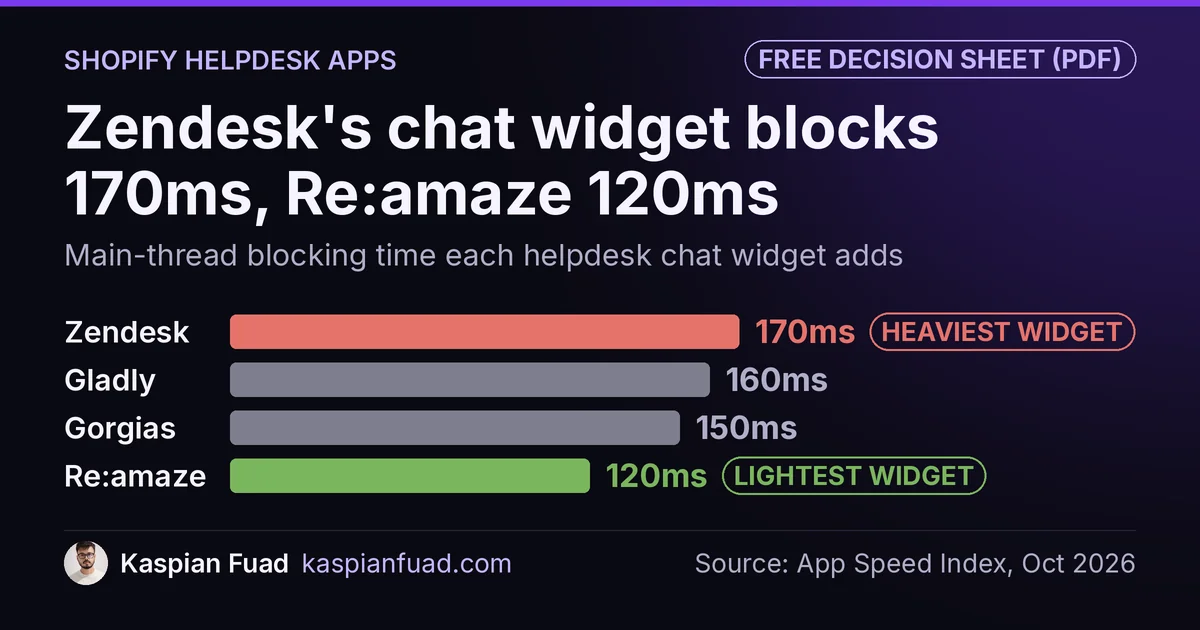
TL;DR: I measured the storefront chat widget of each helpdesk. Zendesk blocks the main thread for 170ms, Gladly 160ms, Gorgias 150ms and Re:amaze 120ms, against a 200ms budget for the whole page. A 4-agent team pays $196 a month (Re:amaze) to $480 plus AI usage (Gladly). Gorgias prices per ticket, so it is cheapest under about 650 tickets a month. Whichever you pick, load the chat on click.
Two of the top five Google results for “Gorgias vs Zendesk” are written by Zendesk and Gladly, two of the products being compared. Neither page prints what the chat widget costs your storefront in speed.
This is for a Shopify brand with a small support team, choosing a helpdesk or questioning the one it pays for. Below is the real monthly bill at three ticket volumes, the blocking time I measured for each widget, and the 15-line pattern that makes the speed cost close to zero. One honest limit: I compare price and storefront weight, not the agent inbox. Trial the inbox yourself.
What do Gorgias, Zendesk, Gladly and Re:amaze cost on Shopify in 2026?
I checked each Shopify App Store listing and Zendesk’s pricing page on October 11, 2026. The four sell on two different meters, which is why their sticker prices look impossible to compare.
- Gorgias prices on tickets. Basic, Pro and Advanced include unlimited agents.
- Zendesk, Re:amaze and Gladly price on seats. Ticket volume barely moves the bill.
Here is what a 4-agent team pays a month on monthly billing, at three realistic volumes:
| Helpdesk | Plan used | 300 tickets | 1,000 tickets | 2,500 tickets |
|---|---|---|---|---|
| Gorgias | Basic, then Pro | $60 | $340 | $540 |
| Re:amaze | Pro, 4 staff | $196 | $196 | $196 |
| Zendesk | Suite Team, 4 agents | $276 | $276 | $276 |
| Gladly | 4 seats | $480 + AI | $480 + AI | $480 + AI |
The Gorgias column comes straight from its Shopify listing. Basic is $60 for 300 tickets plus $40 per extra 100. Pro is $360 for 2,000 tickets plus $36 per extra 100. At 2,500 tickets that is $360 plus $180.
Zendesk’s pricing page lists Suite Team at $69 per agent monthly, or $55 billed annually, which takes a 4-agent team to $220. Re:amaze charges $49 per staff user on Pro and $69 on Plus. Gladly’s listing charges $120 per team member, plus $1.50 per AI resolution and $0.25 per AI assist.
The crossover matters more than any single price. Gorgias Basic passes Re:amaze’s $196 at about 640 tickets a month, and Zendesk’s $276 at about 840. Under that line, Gorgias is the cheapest helpdesk here by a wide margin. Above it, a seat-priced tool wins every month your volume grows.
How much does each helpdesk chat widget slow down Shopify?
This is the number none of the four vendors prints. My App Speed Index records the main-thread blocking time each app’s storefront script adds. I pulled the four helpdesks from it:
| Chat widget | Blocking time | vs chat median (145ms) | Share of a 200ms page budget |
|---|---|---|---|
| Zendesk | 170ms | 25ms over | 85% |
| Gladly | 160ms | 15ms over | 80% |
| Gorgias | 150ms | 5ms over | 75% |
| Re:amaze | 120ms | 25ms under | 60% |
| Shopify Inbox (chat only) | 90ms | 55ms under | 45% |
The 145ms median covers all 14 chat apps I have measured. The 200ms budget is Google’s: web.dev says sites should aim for a Total Blocking Time under 200 milliseconds on average mobile hardware. That budget is for the entire page, theme and every app together.
Read that last column again. A Zendesk widget alone uses 85% of the budget before your theme, your reviews app or your tracking pixels run. Re:amaze leaves the most room, and the gap between the lightest and heaviest helpdesk is 50ms on every page view.
Payload and blocking time rank apps differently, so I only use blocking time here. It is the part of a script’s cost that Lighthouse scores and that shoppers feel as a frozen tap.
Which helpdesk should a Shopify brand pick?
Pick on the meter first, then on weight. The inbox features overlap more than the comparison pages suggest: all four connect to Shopify order data, and all four handle email and chat.
Choose Gorgias when tickets are low and the team is growing
Gorgias is the best value under about 650 tickets a month, and it never charges for another agent. A brand adding part-time staff for peak season pays nothing extra for the seats. Its 4.3 star rating across 705 reviews is the deepest track record of the four on the App Store.
The trap is overage. A brand on Basic that grows into 1,000 tickets pays $340, more than Zendesk for the same team, so move to Pro before the overage passes $300.
Choose Re:amaze when you want the lowest bill and the lightest widget
Re:amaze is the cheapest seat-priced option at $196 for four agents, and its widget measured lightest of the four at 120ms. It rates 4.4 stars across 181 reviews. For a lean team with steady volume, it wins on both axes I can measure.
Choose Zendesk when volume per agent is high
Zendesk makes sense when each agent clears a lot of tickets, because the price does not move with volume. At 2,500 tickets a month, its $276 undercuts Gorgias by $264. Its Shopify app rates 3.2 stars across 94 reviews, the weakest of the four, and its widget is the heaviest. Budget setup time.
Choose Gladly when AI resolution is the plan
Gladly’s Shopify plan is built around an AI agent for chat and email, billed per resolution. At $120 a seat it is the most expensive per head, so it fits a brand that expects the AI to absorb volume a human would otherwise handle. With only 29 reviews, run the free 1-seat plan before you commit a team to it.
One pattern from my own work: on the Varsity Gripz build, support ran Gorgias and Zendesk side by side across email, social and on-site chat. Two helpdesks can coexist, but only one should ever load a widget on the storefront.
How do I keep a helpdesk widget from slowing my store?
Load it when the shopper asks for it. Chrome’s Lighthouse docs call this a facade: a static element that looks like the widget and swaps in the real one on interaction. The same doc names live chat as a textbook case. That audit was removed in Lighthouse 13, but the pattern still works.
First, switch off the helpdesk’s app embed under Theme settings, App embeds, and copy the script URL from its manual install snippet. Then add a button that loads it on click:
snippets/chat-facade.liquid
<button type="button" class="chat-facade" aria-label="Open chat">Chat with us</button>
<script>
  document.querySelector('.chat-facade').addEventListener('click', function (e) {
    e.currentTarget.disabled = true;
    var s = document.createElement('script');
    s.src = 'YOUR_WIDGET_SCRIPT_URL'; // from the vendor's manual install code
    s.async = true;
    s.onload = function () { e.currentTarget.remove(); };
    document.head.appendChild(s);
  }, { once: true });
</script>
Render it once in layout/theme.liquid with {% render 'chat-facade' %} and style the button to match your chat bubble. After the script loads, call your vendor’s documented “open” method so the shopper does not have to click twice.
The trade-off is real. Proactive chat triggers and unread-message badges cannot fire until the widget loads, the same caveat Chrome’s doc raises for Drift. For most stores, a 0ms page load beats a pop-up nobody asked for.
This is the change I make first on almost every speed audit, because it is low risk and reversible. On a US custom blinds store, deferring chat, analytics and pixels was one of five changes that took mobile Total Blocking Time from 2,290ms to 480ms. For other app scripts, my guide to deferring third-party scripts for INP covers the patterns.
Download the Shopify Helpdesk Decision Sheet (PDF)
Should I use Shopify Inbox instead of a full helpdesk?
Use Shopify Inbox if one person answers chat and email volume is light. It is free and measured 90ms, the lightest chat option I track. I compared it with Tidio, Crisp and Intercom in my Shopify chat app comparison.
Move to a helpdesk when you need a shared queue, macros, SLAs or more than one person on tickets. That usually arrives with the second support hire, not with revenue.
How do I check what my current helpdesk costs me in 5 minutes?
- Open your helpdesk’s billing page and note last month’s ticket count and total charge, including overage.
- Plug the ticket count into the cost table above and see which meter would have charged you less.
- Run your homepage through the App Bloat Detector and find the chat widget’s line in the results.
If the widget shows up and you have no facade, that is a free 120ms to 170ms back on every page. If the bill is over $300 on Gorgias Basic, change plans this week.
The takeaway
- Price the helpdesk on your real ticket count, because Gorgias bills tickets and the other three bill seats.
- Choose Gorgias under about 650 tickets a month and a seat-priced tool above it.
- Pick Re:amaze if you want the lowest bill and the lightest widget, at $196 and 120ms.
- Load any chat widget on click, so Zendesk’s 170ms or Gorgias’s 150ms costs 0ms at page load.
- Run only one storefront widget, even if two helpdesks share the inbox.
If you want the facade wired into your theme and the rest of your app stack measured, my rates and engagement terms are public.
Kaspian Fuad is a Shopify developer and CRO specialist. He measures the apps he writes about and publishes the numbers in the Shopify App Speed Index.