

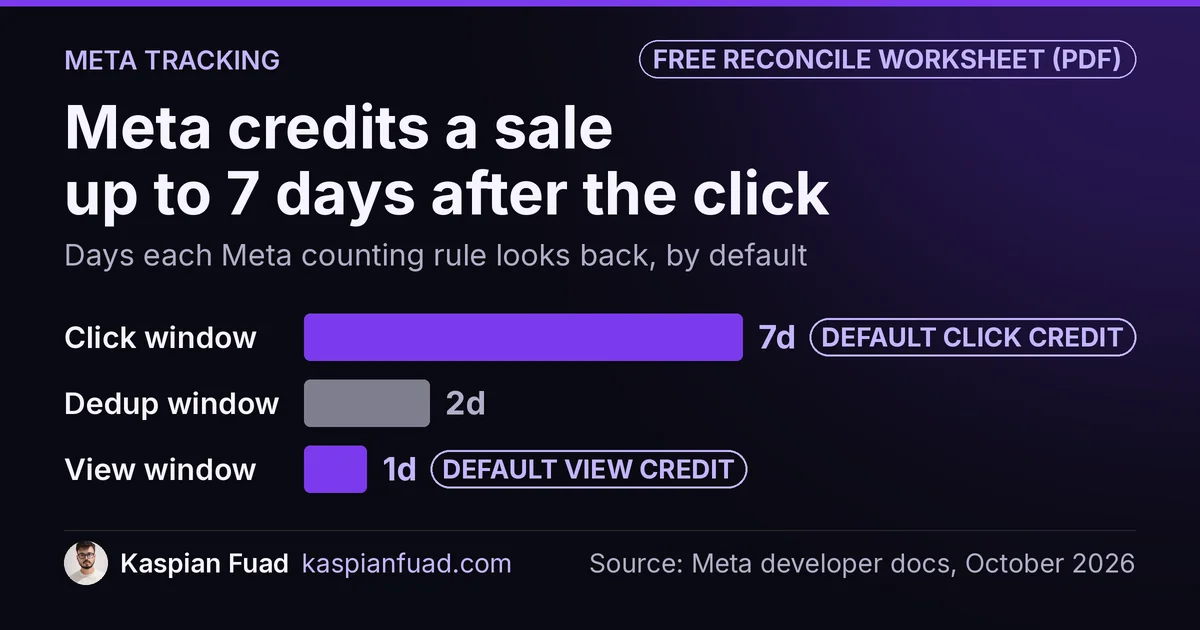
TL;DR: Meta shows fewer purchases than Shopify because they count different things. Meta credits a sale to an ad up to 7 days after a click or 1 day after a view, and files it under the day of the ad. Shopify counts every order on the day it was placed. Line up the window, the dates and the orders Meta could see, then chase only the gap that’s left.
Both numbers are usually right. A shopper clicks your ad on Monday and buys on Friday, and Ads Manager puts that purchase on Monday while Shopify puts it on Friday. Compare the two by day and you’ll see a tracking “bug” that’s really a calendar.
This is for Shopify brands spending real money on Meta who keep seeing Ads Manager and Shopify disagree. Read the gap wrong and you cut a campaign that’s working, or scale one that’s counting each sale twice. Below is why the numbers split in each direction, a 15 minute reconciliation, and the faults worth paying to fix. One honest limit: none of this tells you whether the ad caused the sale. That takes a holdout test.
Download the Meta vs Shopify reconciliation worksheet (PDF)
Why this matters for your store
- Meta’s algorithm learns from the purchases it receives, so every missing Purchase event weakens the targeting you pay for.
- A double-counted purchase inflates ROAS, and the budget you scale on that number goes to the wrong ad sets.
- Most of the fixes are a setting or one theme file, which costs far less than a month of misread ad spend.
What does Meta count that Shopify doesn’t, and the other way round?
Shopify counts orders. Every order, from every channel, on the day it was placed in your store’s time zone. Its marketing reports then credit each order to one channel, and Shopify’s own marketing insights guide says last non-direct click is the default of its five attribution models.
Meta counts attributed purchases. Its Ads Insights API reference says the default attribution setting means 7-day click and 1-day view. The same page shows two ways to date a conversion: to the day the ad was seen, or to the day the purchase happened. Ads Manager uses the ad date unless you change it, as Jon Loomer explains in his walkthrough of Meta conversion results.
So the two tools disagree on three things before any pixel breaks:
- Which orders count. Meta only sees purchases from people it can tie to an ad.
- Which day they land on. Meta files by ad date, Shopify by order date.
- Who gets credit. Meta and Google can both claim the same order. Shopify gives it to one channel.
The window also moved this year. Supermetrics documents that on January 12, 2026 Meta removed the 7-day view and 28-day view windows from its reporting API. If your dashboard used either, its Meta purchase line dropped that day without a single pixel changing.
Why does Meta show fewer purchases than Shopify?
This is the normal direction, and most of it isn’t a fault. Work through these in order.
Orders no ad could have caused. Subscription renewals, POS sales, draft and wholesale orders, and marketplace orders all land in Shopify with no shopper on your thank you page. Add every customer who came from email, Google or a bookmark and never saw an ad.
Purchases outside the window. Someone who clicked 9 days ago and bought today is outside the 7-day click window. Meta drops them. Shopify still credits whichever channel brought them back.
A blocked browser pixel. Shopify’s Facebook data sharing page lists three levels. Standard is the pixel alone, while Enhanced and Maximum add the Conversions API, and “data sent from server to server can’t be blocked by browser-based ad blockers.” On Standard, every ad blocker and every declined cookie banner is a purchase Meta never hears about.
A pixel that died on August 26, 2026. That’s the date Shopify stopped running Additional Scripts and Thank you page scripts on Basic, Shopify and Advanced plans. I covered what broke in my Additional Scripts deprecation guide. A pasted fbq('track', 'Purchase') went silent that day. A Shopify Community thread titled “Meta reporting fewer purchases than Shopify after the Aug 26 checkout upgrade” is one of the most read in Data and Analytics this quarter.
Two clocks. Your Meta ad account has its own time zone, and Shopify’s analytics discrepancies page warns that different reporting time zones shift which day an event lands on. A store on Eastern time with an ad account on Pacific time moves three hours of sales into the next day.
Why does Meta show more purchases than Shopify?
This direction is rarer, and it’s usually a real fault. One rule settles it fast: if Meta’s purchases beat Shopify’s total orders for the same week, something is counting twice.
The most common cause I find is copies. On a tracking-heavy store there’s often a Meta pixel hardcoded into theme.liquid years ago, a second from the Facebook and Instagram app, and a third fired from Google Tag Manager. My Elevar vs Littledata vs Analyzify comparison measured that setup at about 60ms of blocking time per pixel, 180ms for one platform. It also sends three Purchase events per order.
The second cause is broken deduplication. Meta’s deduplication guide says a browser and a server event merge only when the event name matches and the pixel’s eventID matches the Conversions API event_id, within 48 hours, or 2 days. A custom pixel that sends no event ID beside the Shopify app’s server event counts as a second sale.
Third, payment redirects. A buyer who pays through an off-site method and gets sent back to the thank you page can load it twice. Shopify Community has an open thread on a Meta pixel firing Purchase twice after a payment redirect.
Last, view-through credit. A shopper sees your ad, doesn’t click, searches your brand on Google and buys. Meta counts it under 1-day view. Shopify credits Google. Neither is broken, and both will claim it.
How big a gap between Meta and Shopify is normal?
Neither Meta nor Shopify publishes one, and a single percentage can’t tell you whether tracking is broken. A store that sells mostly to returning email subscribers will always show a wide gap. A store that lives on Meta prospecting will show a narrow one.
So stop comparing Meta to total orders. Compare Meta to the Shopify orders Meta could have caused, over the same dates, and then watch the shape of the gap over time.
My rule after 100+ store audits: a gap that holds steady week to week is attribution. A gap that jumps on one date is a tracking change, and the date tells you which one. August 26, 2026 points to the checkout upgrade. A theme publish date points to a pixel added or lost with the theme. January 12, 2026 points to the dropped view windows, if your dashboard used them.
How do I reconcile Meta and Shopify purchases in 15 minutes?
- Pick a 7 day range that ended a week ago. Weekly totals wash out most of the ad-date shift, and a week of delay lets late conversions land.
- Match the clocks. Check the time zone in your Meta ad account settings against Shopify’s Settings, General. Note the difference on the worksheet.
- Shrink Shopify to what Meta could see. In Shopify’s marketing reports, take orders credited to Facebook and Instagram. Read them under last non-direct click (the floor) and under any click (the ceiling).
- Strip out what no ad caused. Exclude subscription renewals, POS, draft and marketplace orders by sales channel.
- Count events per order. In Events Manager, open the pixel’s Purchase event and compare its count with Shopify orders for the same days. Then place one test order with Meta’s Test Events tool open and confirm one browser and one server event, merged.
- Chart the daily ratio for 90 days. Divide Meta purchases by Shopify orders each day. Look for the step, not the level.
If Meta lands between your floor and ceiling, attribution explains it. If it’s under the floor, events are missing. If it’s above total orders, events are duplicated.
What should I fix first?
Fix duplicates first, because inflated purchases teach Meta to find more of the wrong buyers. Remove every hardcoded fbq from the theme and from GTM, and keep one source: the Facebook and Instagram app.
Next, restore a missing Purchase event. If your store lost it on August 26, install the Facebook and Instagram app or rebuild the event as a Customer Events pixel, with an event ID that matches the server event.
Then raise data sharing to Maximum. It adds the Conversions API through Shopify’s own app, so ad blockers stop costing you purchases. That’s server-side Meta tracking for $0.
Pay for a server-side tool only after that, and only if you send conversions to four or more platforms or need click IDs stitched across sessions. Elevar, Littledata and Analyzify run $145 to $650 a month at the same order volume. If the numbers still disagree after all of it, a post-purchase survey is the cheapest tiebreaker. I compared four survey apps on price and speed.
Who should fix Meta and Shopify tracking, and what does it cost?
Hire a Shopify developer, not only a media buyer. Most of these faults live in theme.liquid, Customer Events, GTM and an app’s settings, which an ad account login can’t reach.
The pattern isn’t rare. When I audited GA4 setups, 5 of 14 stores had 0% conversion attribution, which I wrote up in my GA4 tracking fix guide. Meta breaks the same way, for the same reasons. And it matters most where Meta is the main source: on Mobelglede, a Norwegian furniture marketplace, Meta drove 61% of traffic, as my Facebook ads diagnostic shows.
I charge $500 for a fixed-scope tracking audit delivered in 2 to 3 days, and $50 an hour for the fixes after it. My Shopify expert cost guide breaks down what agencies bill for the same work. Whoever you hire, ask them to count Purchase events per order before they touch anything.
How do I know the fix held?
- Place a test order and confirm one merged Purchase in Test Events.
- After 7 days, rerun the reconciliation on a fresh week and check Meta now sits between your floor and ceiling.
- Recheck the daily ratio chart. The step you found should be gone, with no new one on the day you shipped.
Run step 1 on the payment method that redirects off-site. It’s the one most likely to fire twice.
The takeaway
- Compare Meta purchases with the Shopify orders Meta could see, never with total orders.
- Total both tools over a full week in one time zone before you judge the gap.
- Treat Meta beating Shopify’s total orders as double counting until proven otherwise.
- Find the date the gap stepped, because it names the cause.
- Keep one Meta pixel source, with matching event IDs and data sharing on Maximum.
I’m Kaspian Fuad, a Shopify developer and CRO consultant. If Ads Manager and Shopify still disagree after the worksheet, send me the two numbers and your store URL and I’ll tell you which cause it is.