

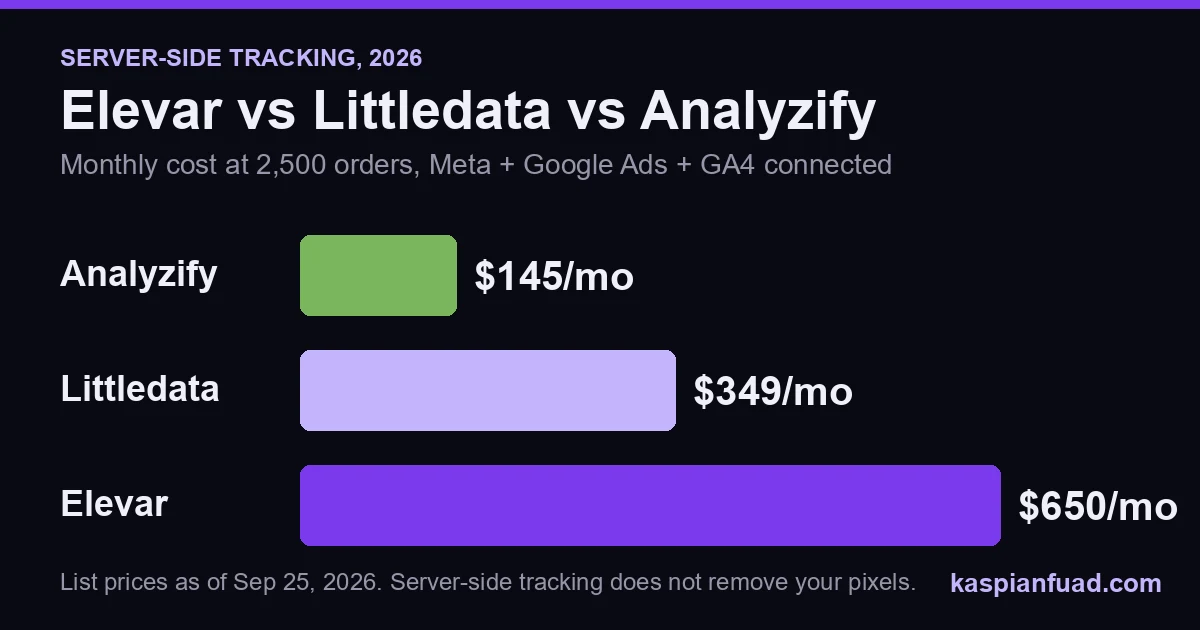
TL;DR: For a $3M Shopify store doing about 2,500 orders a month, the same server-side tracking job costs $145 a month on Analyzify, $349 on Littledata, and $650 on Elevar once Meta, Google Ads, and GA4 are connected. None of the three will make your store faster. Fix duplicate pixels first, turn on Shopify’s free Conversions API setting second, then buy the cheapest tool that covers your destinations.
Ask ChatGPT which server-side tracking app a $3M Shopify brand should buy and it cites the vendors themselves: Elevar’s docs, Littledata’s pricing page, Analyzify’s comparison posts. Google is the same. For “elevar vs littledata” the top two results are Littledata reviewing itself, and for the three-way query Littledata and Analyzify hold four of the top seven.
Nobody neutral has priced all three at the order volumes real stores run. So I did it on September 25, 2026, from the live Shopify App Store listings, and checked the speed side against my own measured App Speed Index.
Download the Server-Side Tracking Cost and Setup Sheet (PDF)
What does each server-side tracking app actually cost?
The headline prices mislead because all three bill on order volume, and Elevar also caps how many platforms you can send data to. Here are the list prices, monthly billing, as published on September 25, 2026.
| App | Entry plan | Orders included | Extra orders | Destinations |
|---|---|---|---|---|
| Elevar Core | $225/mo | 2,000 | $0.50 each | 2 |
| Elevar Advanced | $650/mo | 10,000 | $0.15 each | 4 |
| Littledata Flex | $0.35 per order | none | n/a | all 9 |
| Littledata Scale | $199/mo | 1,500 | $0.15, then $0.06 above 3,000 | all 9 |
| Analyzify Standard | $145/mo | 5,000 | next tier $175 | 10+ integrations |
The detail that changes the math is Elevar’s destination cap. Core covers two destinations, “Ad or Analytics.” A normal paid-traffic store wants Meta, Google Ads, and GA4. That is three, which pushes you onto Advanced at $650 before you have tracked a single extra order.
Littledata’s own pricing page shows Scale at $159 and Plus at $792. Those are the annual-billing prices, 20% off. Pay monthly through the App Store and it is $199 and $990.
What does that come to at your order volume?
Here is the monthly bill at five volumes, assuming Meta, Google Ads, and GA4 are connected and you pick the cheapest plan that covers the volume.
| Orders per month | Elevar | Littledata | Analyzify |
|---|---|---|---|
| 1,000 | $650 | $199 | $145 |
| 2,500 | $650 | $349 | $145 |
| 5,000 | $650 | $544 | $145 |
| 10,000 | $650 | $844 | $175 |
| 20,000 | $1,250 | $1,290 | $225 |
A $3M store at a $100 average order ships about 2,500 orders a month. At that volume Elevar costs $7,800 a year and Analyzify $1,740, a $6,060 gap. That gap buys a lot of developer time to set the cheaper tool up properly.
If you only need two destinations, Elevar Core gets cheaper at low volume: $225 at 1,000 orders, $475 at 2,500. Past about 2,850 orders the $0.50 overage makes Advanced the better Elevar plan anyway.
Littledata’s curve is the interesting one. It is cheap at low volume because Scale includes 1,500 orders, then climbs steadily. Somewhere near 7,000 orders it passes Elevar, and at 20,000 you should be on Plus ($990 plus $0.03 per order over 10,000).
Analyzify barely moves. Its tiers step from $145 to $175 to $225, so the flat price is its whole argument. Pay yearly and the first tier drops to $1,305 a year with the $295 implementation included.
Does server-side tracking slow down your Shopify store?
A little, and it does not make your store faster. Every vendor page implies speed gains, so this is the part worth reading twice.
Server-side tracking sends conversion events from a server to Meta or Google, which gets around ad blockers and browser limits. It does not delete the browser pixel. Meta’s own documentation recommends a “redundant setup”: the Conversions API running alongside the Meta Pixel, with a shared event ID so Meta can drop the duplicate. You keep the pixel and add a server feed.
What I have measured, from my App Bloat Detector dataset:
| Script | Measured blocking time |
|---|---|
| Littledata Tracker | ~60ms |
| Meta Pixel | ~60ms |
| TikTok Pixel | ~70ms |
| Google Tag Manager (container only) | ~50ms |
| GA4 (standalone gtag) | ~50ms |
| Pinterest Tag | ~50ms |
Elevar and Analyzify are not in my measured set yet, so I will not guess a number for them. What I can say from their own listings: Littledata advertises “No GTM” and uses Shopify’s web pixels, which Shopify says load in a sandbox with smaller pixel libraries. Analyzify is built around data layers and Google Tag Manager, so its storefront cost depends on what else lives in your container. Elevar ships its own data layer and event pipeline.
Where the speed actually goes: duplicate pixels
The real speed problem on a tracking-heavy store is copies, not the server-side app. The common mess looks like this: a Meta Pixel hardcoded into theme.liquid years ago, a second one from Shopify’s Facebook and Instagram app, and a third fired as a tag inside GTM.
That is three Meta Pixels at about 60ms each, 180ms of blocking time for one platform. Add TikTok and GA4 the same way and you pass the 200ms line Google sets for a good Interaction to Next Paint on tracking scripts alone. It also corrupts the very data you are paying to fix, because three pixels send three purchase events.
This is also why “my attribution looks wrong” is often a setup fault, not a tool gap. My GA4 tracking fix guide covers the same double-firing problem on the analytics side.
Do you need a paid app at all?
For Meta alone, maybe not. Shopify’s Facebook and Instagram app has three data sharing levels. Per Shopify’s help center, Enhanced and Maximum both use Facebook’s Conversions API, and “data sent from server to server can’t be blocked by browser-based ad blockers.” That is server-side Meta tracking for $0.
So check that setting before you spend $1,740 to $7,800 a year. Pay for a server-side tool when one of these is true:
- GA4 purchase revenue is more than about 10% off Shopify’s order revenue, and fixing duplicate tags did not close it.
- You send conversions to four or more platforms (Meta, Google Ads, GA4, TikTok, Klaviyo, Pinterest).
- You need click IDs and UTMs stitched across sessions, so a buyer who clicked a Meta ad Monday and bought Thursday is credited correctly.
- Your ad spend is large enough that a few points of Meta match quality moves real money.
Which one should you pick?
Pick Analyzify if you want Meta, Google Ads, and GA4 fixed at the lowest cost and you, or someone you hire, can live inside Google Tag Manager. The $145 flat tier covers most stores up to 5,000 orders. It has the most reviews of the three, 312 at 4.7 stars.
Pick Littledata if nobody on your team touches GTM and you want the shortest setup. Under about 400 orders a month its $0.35 per-order Flex plan undercuts both rivals, and its web-pixel approach is the one I have measured at a modest 60ms. It holds 4.8 stars across 140 reviews.
Pick Elevar if you are sending data to many platforms, run multiple storefronts, or have a data person who wants the fullest event pipeline. You pay for that depth: $650 a month is the realistic floor for an ad-driven store. One recent change: the App Store listing now reads “Elevar by Audiense,” and the old getelevar.com pricing URL redirects to Audiense, so check contract terms if you are signing an annual deal.
Whichever you buy, plan the cost next to the rest of your stack. My app stack cost calculator puts the subscription and speed cost side by side, and I compared the attribution layer that often sits on top of these tools in Triple Whale vs Northbeam vs Polar.
How do you check your tracking in 5 minutes?
- Open your store in Chrome, open DevTools, go to the Network tab, filter for
fbeventsand reload. More than one Meta Pixel loading means you have duplicates. - In Shopify admin, open the Facebook and Instagram app and check that data sharing is set to Maximum.
- Compare last month’s purchase revenue in GA4 against Shopify’s sales report. Under a 10% gap, you likely need cleanup, not a new app.
If Meta ads are the reason you are looking at this, read why Shopify Facebook ads stop converting first. Bad tracking and a bad landing page look identical in Ads Manager.
Download the Server-Side Tracking Cost and Setup Sheet (PDF)
The takeaway
- Price at your volume. At 2,500 orders a month the same job costs $145, $349, or $650.
- Count your destinations before choosing Elevar. Meta, Google Ads, and GA4 is three, which means the $650 plan.
- Turn on Maximum data sharing in Shopify’s Facebook and Instagram app. It is free server-side Meta tracking.
- Delete duplicate pixels first. Three copies of the Meta Pixel cost about 180ms and triple-count purchases.
- Buy speed elsewhere. Server-side tracking keeps your pixels running, so it adds a little load rather than removing it.
I am Kaspian Fuad, a Shopify CRO and performance consultant. I measure the load cost of the apps I recommend and I publish my rates. If your ad numbers and Shopify numbers disagree and you want the tracking fixed rather than replaced, book a call and I will find where the events are breaking.