

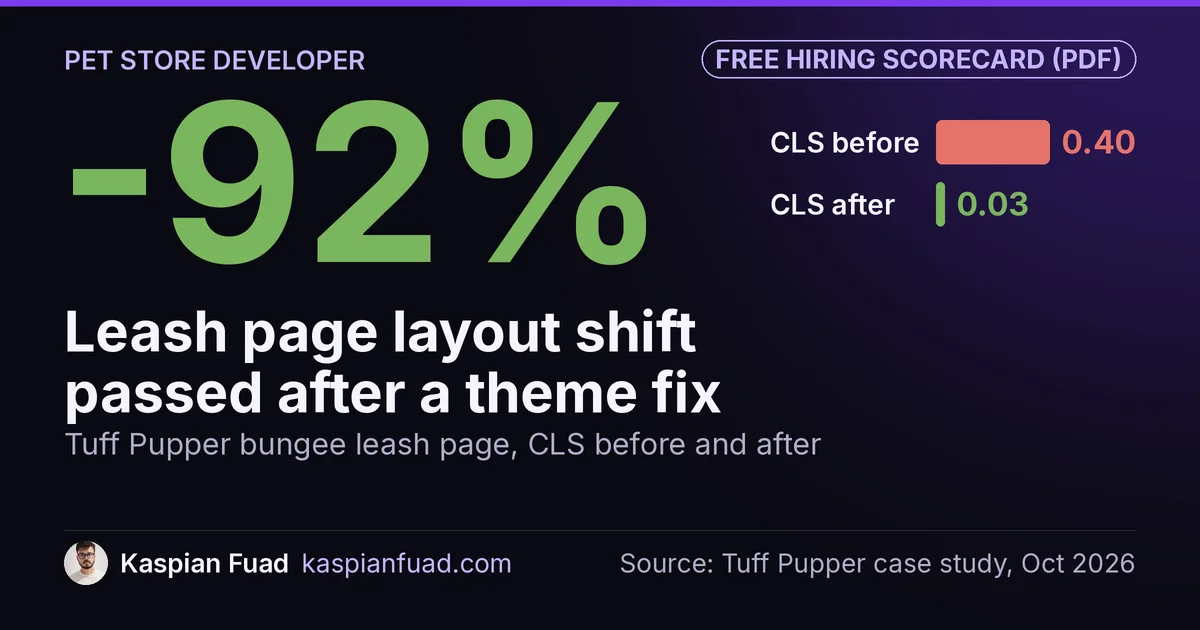
TL;DR: A pet brand needs a Shopify developer who treats size and color as product data, because a dog gear catalog lives in its variants. On Tuff Pupper, a dog gear brand, the color gallery filtered after the page painted and pushed the bungee leash page’s layout shift (CLS) to 0.40. Resolving it in Liquid cut CLS 92%, to 0.03. Fix fit and color first.
Pick March Red on a Tuff Pupper harness and the matching leash doesn’t come in March Red. It comes in Crimson Red, and the kit picker has to know that before the shopper taps Add to Cart.
That’s the job on a pet store. If you sell harnesses, leashes, collars, dog apparel or food, your catalog is mostly variants: sizes measured on the dog, colorways that don’t line up across products, and sets people buy together. Below is the fix order I’d follow, what each fix found on a real store, what the work costs and what to ask before you hire. One honest limit: at Tuff Pupper’s order volume I don’t quote a conversion lift, so the proof here is in measured fixes, not a revenue percentage.
Download the pet store developer scorecard (PDF)
Why this matters for your store
- A harness that doesn’t fit comes back, so a wrong size chart costs you the sale and the return shipping.
- Pet gear sells in colorways, and a gallery that shows the wrong color makes the whole page look unreliable.
- A harness, leash and collar are a natural set, so every single-item order leaves order value on the table.
What should a Shopify developer fix first on a pet store?
Here’s the order I’d work in, with what each step found on Tuff Pupper, a DTC dog gear brand run by founder Logan Edwards:
| Order | Fix | What to check | What it found on Tuff Pupper |
|---|---|---|---|
| 1 | Size and fit data | Charts as images, rows that don’t match the brand’s own chart | 3 of 8 harness charts wrong |
| 2 | Color variants | Gallery that filters after paint, photos with no color name | Product page CLS of 0.40 to 0.64 |
| 3 | Product routing | Look-alike products with nothing saying which to pick | Two waterproof harnesses at the same price, no guide |
| 4 | Kits | Natural sets sold only as singles | Zero kit SKUs in May |
| 5 | Buy button on phones | Popups and bars sitting on the sticky Add to Cart | 5 of 8 test taps hit a popup teaser |
| 6 | App weight | Duplicate popup, review and session tools | Homepage mobile Performance score of 38 |
Fit comes first because it decides returns as well as sales. App weight comes last only because the first five are cheaper to ship. The sections below take them one at a time.
How should a pet product page answer “will this fit my dog?”
With the brand’s own measurements, as text. I audited all eight harness size charts against the brand’s chart images, and 3 of 8 were wrong. Tracker was wrong on all four rows and missing its X-Small tier, Fast Fit was wrong on all six, and one harness had no chart at all.
After corrections, I moved the charts into structured product data. Products with a size chart went from 15 to 52, and every chart now fits a 360 pixel phone screen. The worst one used to run 680 pixels off the edge. The harness size guide page went from four lines of text to a hub listing every harness by chest range, with a section on dogs that back out of a harness.
The support chat confirmed the priority. In its first weeks, 24% of real customer questions were about sizing and fit. If you want the build, I wrote up Shopify size charts without an app.
Why does a harness color picker break the product page?
Because most themes pick the color’s photos with JavaScript after the page has painted. The shopper sees every photo, then the gallery filters, and everything below it jumps.
The bungee leash page scored a CLS of 0.40 to 0.64 across runs. Google’s CLS guidance calls 0.1 or less good and anything above 0.25 poor. I traced it to two theme causes: the color gallery filtering after first paint, and a stray margin on the kit picker. The fix resolves the selected color’s gallery in Liquid, where the variant object already knows its featured media. CLS dropped to 0.03, and the main photo arrived in about 6 seconds instead of 11.6 on a slow connection. The same fix took Trailblaze from 0.16 to 0.03 and Fast Fit from 0.18 to 0.03, alongside seven other products.
That only works if the photos are labeled. On the Tracker harness, 18 of 23 photos shared one description, which silently broke the color-filtered gallery. Each photo is named now, and picking a color shows that color’s photos. My Shopify CLS survival guide covers the other layout shift causes I find in Liquid themes.
What else goes wrong with pet store variants?
Two things, both quiet. First, filters: the harness collection had 13 raw color names, which I grouped into seven color families. Shopify’s Search & Discovery filters support grouping several values under one filter value, and size became a filter for the first time.
Second, publishing. Eight variants of the Bubblegum Pop hoodie were unpublished from the Online Store at the variant level while still showing on social and Google channels, which hid a whole in-stock colorway from the website. I restored them and swept all 157 products for the same issue. For search, Google’s product variant markup lets a ProductGroup declare that it varies by color and size, which is exactly how a harness catalog is built.
How do you help a shopper choose between look-alike harnesses?
Say which one is for which dog. Tracker and Trailblaze are both waterproof, both have a lifting handle and both sit around the same price, and nothing on the site said which to pick. Every harness now has a numbered fit guide and the questions people actually ask, written from that product’s own chart and description. Two of the eight had that before.
The same thinking applies to toys. They were repositioned around aggressive chewers, because that’s who actually buys them. And yes, the search bar was still suggesting the theme’s demo text (“Cat toys”) on a dog brand until I replaced it.
Do pet brands need a bundle app?
No. A harness, a leash and a collar are a natural set, and in May Tuff Pupper had none. Competitor Wild One already sold a Walk Kit assembled inline on one product page, with over 1,400 reviews on that kit.
Every harness with a matching leash and collar now carries a Build-the-Kit panel with three tiers: Just the Harness, Walk Set and Full Kit. One button adds the whole kit, and Shop Pay express carries all of it through a multi-line cart permalink, not just the harness. The $3 and $5 savings run on Shopify’s own automatic Buy X Get Y discounts, so the picker price matches the cart to the cent and there’s no monthly app fee.
The pet-specific work is color. Change the harness color and the picker swaps every thumbnail and finds the closest match on each add-on: exact match first, then a fuzzy word match, so March Red maps to Crimson Red. If that color is sold out it falls back to an in-stock one, and if the selected size is out of stock, the kit button and Shop Pay both disable with an inline status row.
Before launch I ran nine parallel audits and shipped 15 fixes. The worst would have shown the picker total $5 to $10 over the real bundle price after a color-then-size flip. The module added about 18 KB, used 44 pixel tap targets (WCAG 2.2’s AA minimum is 24 by 24) and went live on May 22. The full build is in Shopify bundle builder without an app.
Can shoppers on a phone actually reach Add to Cart?
Test it, because pet stores love popups. The email popup’s minimized teaser was sitting on top of the mobile sticky Add to Cart. Of eight test points across the button, five hit the teaser and one reached the button. Now all eight do.
The kit picker had its own version of this. On mobile, three competing buttons used to stack above the fold, and the red one stole taps meant for the bundle. I collapsed that into one buy surface with a kit-aware sticky button and shrank unselected tier cards from 350 to 450 pixels tall down to 80 to 110.
The rest of the mobile ceiling is third-party. The homepage measured a mobile Performance score of 38 in May, mostly from duplicated popup, review and session replay tools. Trimming those is the biggest win left, and it cuts subscription cost too. None of the work above added an App Store app.
What about pet food and treats on subscription?
Tuff Pupper sells gear, so this part comes from my measurements, not that store. If you sell food, treats or waste bags, a subscription app will load on your product page. Here’s the typical main-thread blocking time each adds in my App Speed Index:
| App | Blocking time | Read |
|---|---|---|
| Seal Subscriptions | 45ms | Lightest of the five |
| Recharge | 60ms | 15ms over Seal |
| Loop Subscriptions | 65ms | 20ms over Seal |
| Skio | 70ms | 25ms over Seal |
| Appstle | 80ms | Heaviest of the five |
The spread is only 35ms, so pick on features and fees, then load the widget only on subscription products. My Recharge vs Skio vs Loop teardown measured product page long tasks separately, so treat these as a floor.
What does a Shopify developer for a pet brand cost?
I publish my rates. A fixed-scope audit is $500, delivered in 2 to 3 days. Fixes bill at $50 an hour. A weekly retainer runs $750 to $1,000 a week, and a monthly retainer of 60 to 80 hours runs $2,700 to $3,600. A US Shopify Plus agency typically bills the same work at $100 to $250 an hour blended.
Tuff Pupper started as one bundle build in May and became a five-month retainer, because each fix turned up the next one. That’s the normal shape on a pet store: the catalog keeps growing (a 12-product pajama line, fall apparel with size tables), and every launch needs fit data and color handling done right. The American Pet Products Association projects $165 billion in US pet industry sales for 2026, so the category isn’t short of buyers. It’s short of stores that answer their questions.
Whoever you hire, ask for a fix list with hours per item before you sign.
What should you ask before hiring one?
These come from the work above, not a generic list:
- Ask what happens when the shopper picks a color the matching leash doesn’t come in.
- Ask whether size charts will be stored as data or uploaded as images.
- Ask how the gallery picks the selected color’s photos, and listen for “Liquid”, not “a script after load”.
- Ask what the kit button does when one size sells out.
- Ask which apps they’d remove before they add one.
My 12 questions to ask before hiring a Shopify developer covers the general ones, with red-flag answers. If Amazon is your main channel, read what an Amazon-first brand should fix on Shopify too.
How do you check your own pet store in 5 minutes?
- Open your best-selling harness on a phone and switch colors twice. If the photos jump or show the wrong color, that’s fix number 2.
- Try to pick a size using only that page. If the chart is an image, runs off the screen or doesn’t give chest range, that’s fix number 1.
- Let the email popup minimize, then tap the sticky Add to Cart. If you hit the popup, move one of them today.
Do step 2 first. It’s the one your customers are already doing.
The takeaway
- Store size charts as product data and render them as text that fits a phone.
- Resolve the selected color’s photos in Liquid so the gallery doesn’t jump.
- Name every product photo by color, and group raw color names into families for filters.
- Build kits on Shopify’s own discounts before you pay for a bundle app.
- Tap your own sticky Add to Cart on a phone with every popup showing.
I’m Kaspian Fuad, a Shopify developer and CRO consultant. The Tuff Pupper case study has the full five months of work. If you run a pet brand, send me your store URL and I’ll tell you which of the six fixes to start with.