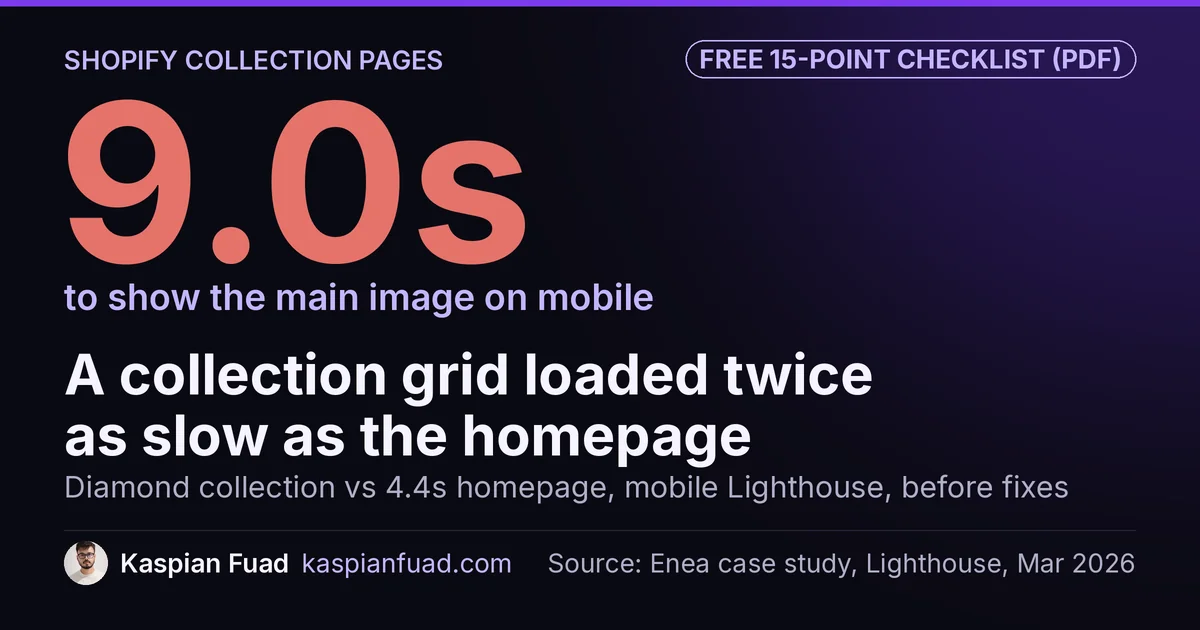
TL;DR: Shopify collection page optimization is one job: get a shopper from the grid into a product page fast, on a page Google can index cleanly. Put products on the first screen, show the deciding fact on each card, load the first images eagerly and keep filter URLs out of the crawl. One jeweler’s diamond collection took 9.0s to show its main image on mobile before those fixes.
On Tuff Pupper’s desktop collection pages, not a single product reached the first screen. A tall banner filled it, and on phones the same banner pushed the first product below the fold.
This is for brands whose ads, emails and menus send people to collection pages, where the grid decides whether they ever see a product. Below are the fixes I’ve shipped on four Shopify stores, grouped by what they move: clicks into products, load speed and search. One honest limit: a better grid won’t save a weak product page, so I check both in a conversion audit.
Download the Shopify collection page audit checklist (PDF)
Why this matters for your store
- A collection page is often the first page a paid click sees, so a banner-only first screen spends that click on scrolling.
- The same diamond collection spent 2,480ms of blocking time on a mobile test, which is how a first filter tap ends up feeling dead.
- Every filter combination Google crawls competes with your real collections for crawl time.
What should a Shopify collection page do?
A collection page has two readers. Shoppers need to spot a product worth tapping within a few seconds, so the first screen, the cards and the filters do most of the work. Google needs one clean, fast URL per collection with a single heading, valid structured data and no endless filter variations. Every fix below serves one of those two readers, and the best ones serve both.
Most themes, Dawn included, ship a decent grid. The damage usually comes later: a banner added for a sale, an app block dropped into the grid, a filter set copied from another store.
Which collection page fixes get more shoppers into a product?
Five changes move shoppers from the grid into a product: a product on the first screen, the deciding fact on each card, an even grid, a back button that returns to the same spot, and filters that match how buyers choose. Start with the first; it usually costs an hour.
Put a product on the first screen
The Tuff Pupper fix was not a redesign. Shorter banners, with a crop setting per template, moved the first product up about 220 pixels on mobile and put four products on the first desktop screen. If your collection banner is a hero image, it’s competing with the products for the only screen most shoppers read.
Show the fact that decides the click on the card
On Mobelglede, a Norwegian store selling one-of-a-kind used furniture, every card carried a generic “Salg” badge because 100% of products had a compare-at price. I replaced it with a calculated savings percentage, hidden below 10%, using the snippet in my Shopify sale badge guide.
Two more card changes followed. A colored condition pill now shows each piece’s grade, and a “Kun 1 igjen” (only 1 left) label appears when stock is 1, which is true for every item there. Ask what your buyer checks before tapping: size, fit, condition or price per unit. Put that on the card.
Keep the grid even and tight
On Enea Studio, a luxury jeweler, I rebuilt the grid to an 8px mobile gap, edge to edge, with a fixed card title height so rows never go ragged. The metal name moved out of the visible title to match the look, but it stays in the link’s aria-label and the raw HTML. I checked the raw rings page: 24 complete titles before any JavaScript runs.
Make the back button land where the shopper left
Infinite scroll breaks on the way back. Chrome’s data on web.dev’s bfcache guide shows 1 in 5 mobile navigations are back or forward, so a shopper who taps a card and returns to the top of the grid starts over. On Enea’s rings collection, pressing back now rebuilds all 96 loaded cards and lands at the same spot, 8,838px down.
Build filters around how buyers shop
WD Electronics sells UTV parts, and its buyers shop by vehicle, not by product type. The audit found no vehicle compatibility filter at all, and a search for “RZR” returned a battery and a blog post ahead of the kits. I wrote up the search side in my Shopify site search guide.
Know the native limits before you plan. Shopify’s Search & Discovery filter docs cap a store at 25 filters, and collections with more than 5,000 products don’t display filters at all. Pick the five or six that match how your buyers decide.
Why is my Shopify collection page slow, and what fixes it?
On Enea, the diamond collection scored 31 on a mobile Lighthouse test, with a 9.0s Largest Contentful Paint against 6.6s for New Arrivals and 4.4s for the homepage. The breakdown showed a 4,960ms delay before the main image even started loading. The fixes started with two theme bugs, and both are common.
The first: the card slider hardcoded loading="lazy", so the image Google measures waited behind everything else. The second: the grid’s smallest image width was 900px for cells about 154 CSS pixels wide, about double the 462px even a 3x retina phone needs. Adding smaller widths saved about 280 KiB per mobile page, as the Enea Studio case study I published in March 2026 shows.
{%- comment -%} sections/main-collection-product-grid.liquid {%- endcomment -%}
{%- for product in collection.products -%}
  {%- liquid
    assign img_loading = 'lazy'
    if forloop.index <= 4
      assign img_loading = 'eager'
    endif
  -%}
  {{ product.featured_image | image_url: width: 720 | image_tag: loading: img_loading, widths: '180, 260, 360, 480, 600, 720', sizes: '(min-width: 990px) 25vw, 50vw' }}
{%- endfor -%}
The first four cards load eagerly and everything below stays lazy. Then check apps: removing a Smile.io block from Enea’s collection page took roughly 390KB and two seconds of processing off it.
How do I optimize Shopify collection pages for SEO?
Link product cards to their /products/ URLs, keep filter and sort URLs out of Google’s crawl, and give each collection one H1, valid schema and a title written for the search. Those three fixes cover most collection page SEO, and each one showed up on more than one store I’ve worked on.
Point product cards at /products/ URLs
Shopify’s within: collection filter builds a second URL for every product, and Shopify’s own Liquid reference cautions about the SEO cost. On Enea, five card snippets used it, which added up to 25,285 collection-scoped links across 191 collections, about 132 per collection. I cover the canonical side in my Shopify duplicate content guide.
Keep filter and sort URLs out of the crawl
Enea had no meta robots logic at all, so every ?filter. and ?sort_by= URL sat open to Google. Tuff Pupper had 164 pages indexed against 979 not indexed. I blocked its feed and filter traps in robots.txt and noindexed paginated pages, which matches Google’s faceted navigation guidance. If Search Console shows the same pattern, read whether crawled, not indexed is a problem first.
Fix the heading, the schema and the title
Enea rendered every collection title as H1 twice, “Diamond Rings | Diamond Rings” across all 191 collections, with no collection schema. Tuff Pupper’s collection schema was invalid, so Google discarded it, and I rebuilt it. Enea got CollectionPage, ItemList and the BreadcrumbList markup Google documents.
Then write the title for the search. On WD Electronics, rewriting three collection titles moved one page from position 13.4 to 6.95 in seven days. Google’s title link guidance asks for descriptive, concise titles, not keywords repeated.
How do I check my own collection page in five minutes?
- Open your busiest collection on your phone and count the products visible before you scroll. Zero means the banner fix comes first.
- Tap a card three rows down, then press back. If you land at the top, your infinite scroll or pagination is costing you returns.
- Open the page source and search for
/collections/inside product links. Any hit means thewithin: collectionfix applies.
When is a collection page worth paying someone to fix?
When it’s a top landing page. Open Shopify’s Sessions by landing page report: if your collections sit near the top and product page views per session stay low, the grid is the leak. If shoppers mostly land on product pages, spend there first, which is how I order fixes in a Shopify CRO audit.
The takeaway
- Count the products on your first mobile screen, and cut the banner until there’s at least one.
- Put the fact your buyer decides on, like condition, savings or fit, on the card itself.
- Load the first row of images eagerly and give the grid image widths that match its cells.
- Point every product card at its /products/ URL and keep filter URLs out of the crawl.
- Test the back button on a phone before you ship infinite scroll.
Kaspian Fuad is a Shopify developer and CRO consultant who rebuilt Enea Studio’s collection grid and fixed collection pages for Tuff Pupper, Mobelglede and WD Electronics.