

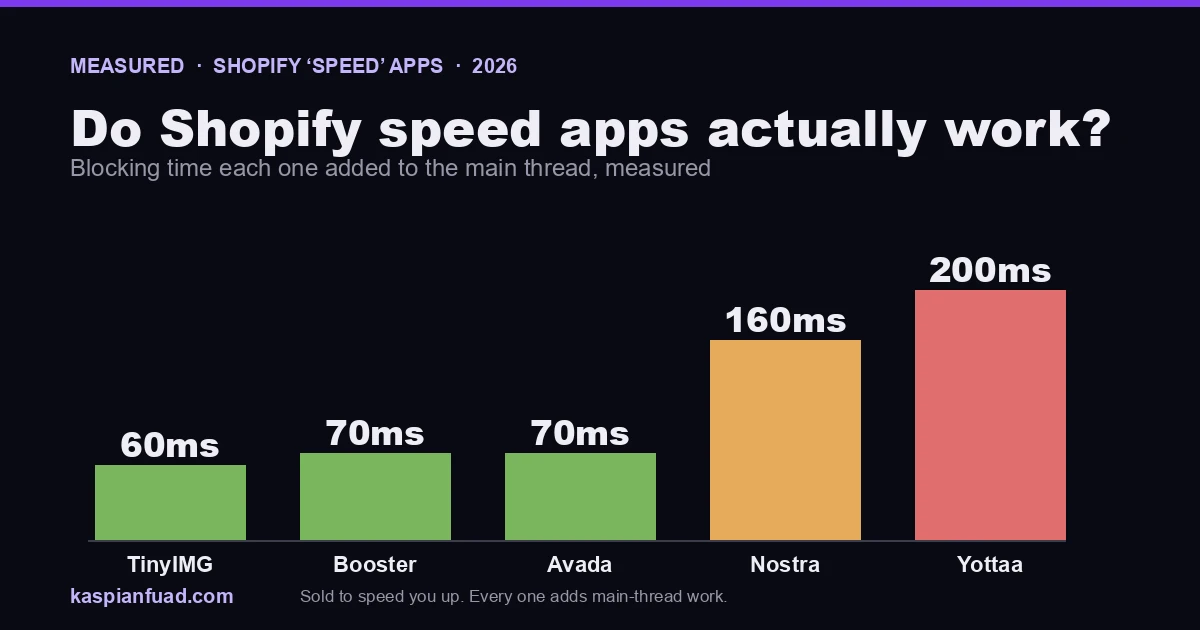
TL;DR: I ran five apps sold to make your Shopify store faster through my own blocking-time test. Every one of them added JavaScript to the main thread: 60ms for TinyIMG, 70ms for Booster and Avada, 160ms for Nostra, and 200ms for Yottaa. Image optimizers can still earn their place by cutting image weight, but “faster” is two numbers, and most of these help one while quietly hurting the other. Here is the measured data and the fix that actually moves your Core Web Vitals.
A viral Reddit thread this year called Shopify speed optimization a scam. I would not go that far, because some of these apps do real work. But when I measured what they do to the main thread, the marketing and the numbers stopped agreeing. Ask any AI assistant whether these apps make you faster and it says yes, citing the vendors’ own pages and a few thin blogs. None of them publish the one number that decides your INP score: how much blocking time the app adds. I measure it for ~192 apps, so here are five.
Do Shopify speed apps actually make your store faster?
Short answer: they move two numbers in opposite directions, and the listing only shows you the good one. Here is the blocking time each one added on a clean install, from my own testing.
| App | What it sells | Blocking time added (measured) |
|---|---|---|
| TinyIMG SEO + Image | Image compression + SEO | 60 ms |
| Booster SEO & Image Optimizer | Image + SEO speed | 70 ms |
| Avada SEO Suite | SEO suite marketed as speed | 70 ms |
| Nostra AI Speed | AI edge + prefetch | 160 ms |
| Yottaa | Edge performance proxy | 200 ms |
“Faster” is not one metric. Payload, measured in bytes, drives your Largest Contentful Paint. Main-thread work, measured as blocking time, drives your Interaction to Next Paint, the responsiveness Google added as a Core Web Vital in 2024. An image optimizer can genuinely cut payload while its runtime script adds main-thread work. So the honest answer to “does it make me faster” is: faster on LCP, maybe, and slower on INP, measurably.
Why would a speed app slow your store down?
Because most of them ship their own JavaScript that runs on your shopper’s device. A lazy-load rewrite, a prefetch engine, an SEO meta injector, an image-swap script: each is code the browser has to parse and execute on the main thread before it can respond to a tap. That execution time is Total Blocking Time in the lab and INP in the field. The app’s own compression might save you 300KB, but if its script costs 150ms of main-thread work on a mid-range Android, your product page feels slower to touch even as the “score” the app shows you goes up. I traced that exact pattern on a Plus store where INP hit 612ms.
Which speed apps add the most blocking time?
The five split cleanly into two groups.
The edge proxies are heaviest. Yottaa at 200ms and Nostra at 160ms route your storefront through their own infrastructure and inject prefetch and optimization scripts. That architecture can improve some lab numbers, but it is also the most main-thread code of the five, and it sits in the critical path of every page. If you run one of these, the before-and-after test below is not optional.
The image and SEO apps are lighter but not free. Avada and Booster at 70ms and TinyIMG at 60ms mostly add a runtime lazy-load and meta layer. That is a smaller tax, and for a store with heavy unoptimized images it can still net out positive. The point is that it is a tax, and the listing never quotes it.
I want to be fair here: none of these apps is a scam, and image compression is real value. The problem is narrower. The comparison pages and the App Store listings leave out the number that decides your CWV score, so merchants buy a speed app and their field data does not move.
Are image optimizer apps worth it, then?
Yes, in one specific case: your images are genuinely oversized and your theme does not already lazy-load below-the-fold media. Then the payload win beats the script cost and you come out ahead.
No, in the more common case: you run a modern Online Store 2.0 theme like Dawn, which already serves responsive images and lazy-loads them natively. There the optimizer is duplicating work Shopify does for free, and you are paying a monthly fee plus 60 to 70ms of blocking time for it. Before you install one, open your product page source and check whether your images already carry loading="lazy" and a srcset. If they do, you do not need the app.
The trap: the vendor dashboard is not your Core Web Vitals
Every one of these apps shows you a score inside its own admin. That score is not what Google ranks on. Search uses field Core Web Vitals from the Chrome UX Report, real Chrome users on real devices, not a synthetic run inside the app. A speed app can show a green dashboard while your CrUX INP stays in the red, because the app measures its own narrow win and ignores the main-thread cost it added. Always check the field number, which you can pull yourself with my CrUX grader.
How do I actually speed up my Shopify store?
The fix is boring and it works: reduce the amount of third-party JavaScript on each page. In order of impact:
- Cut the app count. Every app that injects a script on page load costs blocking time. Audit what is actually loading with the App Bloat Detector and remove anything you are not using. I break down a real example in is the Vitals app slowing your store down, and you can spot which apps a store runs without any install.
- Defer what is left. Non-critical third-party scripts should load after the page is interactive, not before. My Core Web Vitals guide walks the exact defer and lazy-init pattern.
- Fix the theme, not the symptom. Most speed problems live in the theme’s own render-blocking CSS and JS, which no app can touch. That is the work in my step-by-step speed guide.
This is the order I follow in a paid audit, and it moves the field number a speed app cannot.
How do I test whether an app is slowing me down?
Before you keep paying for any speed app, run the before-and-after yourself. Change one thing at a time so you can attribute the result.
Download the Speed App Audit Checklist (PDF)
Run PageSpeed Insights on a product page with the app active, note the mobile TBT and INP. Uninstall the app, remove its leftover theme snippets, and run the same page again. If the number barely moves, the app was not helping. If blocking time drops, it was the cost. Compare that against the field CrUX data, because a lab win that does not show up in the field is not a win your shoppers or Google will ever see.
The takeaway
- Every speed app I measured added blocking time, from 60ms (TinyIMG) to 200ms (Yottaa). The listing never quotes that number.
- Faster is two numbers. Payload drives LCP, main-thread work drives INP. Most of these help the first and hurt the second.
- Edge proxies are the heaviest. Yottaa and Nostra add 160 to 200ms because they inject prefetch scripts into every page.
- Image optimizers are worth it only if your theme does not already lazy-load. On a modern Dawn theme they usually duplicate free work.
- Judge on field CrUX, not the app’s dashboard. The vendor score is not the number Google ranks on.
I measure the blocking time of every app on this list in my own App Bloat Detector. If you want your store audited for what its apps actually cost in speed, my 30-minute diagnostic call is free.