

An upsell app exists to add money to each order. The awkward question nobody in the comparison posts asks: how much does it take back by slowing the page where people decide to buy?
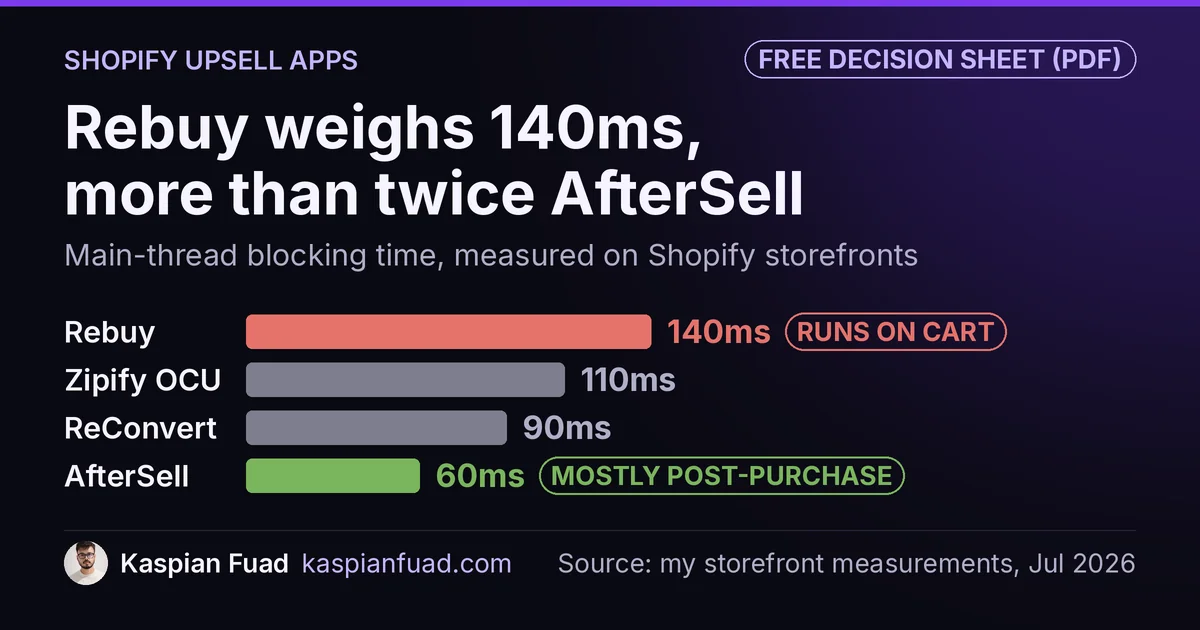
TL;DR: I measured four Shopify upsell apps. AfterSell is the lightest at 60ms and stays post-purchase. Rebuy is the heaviest at 140ms and runs on your live cart. ReConvert (now Upsell.com) is 90ms and Zipify One Click Upsell 110ms. The number that decides which one is safe is not the weight. It is where the app runs.
Download the upsell app comparison (PDF)
This is my own service line, so I have watched this play out on real stores. A merchant installs an upsell app, average order value ticks up 6%, everyone is happy. Nobody checks what the same script did to the conversion rate on the product page, because that number moved down quietly while the AOV number moved up loudly.
Here is the part the vendor pages leave out.
Which Shopify upsell app is fastest?
Four apps, my own measured main-thread blocking time on Shopify storefronts.
| App | Blocking time | Where it runs | Price |
|---|---|---|---|
| Rebuy Smart Cart | 140ms | Cart + product pages | $25 to $534 |
| Zipify One Click Upsell | 110ms | Post-purchase + on-page | Free, then $8 |
| ReConvert (Upsell.com) | 90ms | Post-purchase + on-page | Free, then $4.99 |
| AfterSell | 60ms | Mostly post-purchase | $34.99 up |
The weight column tells you Rebuy is more than twice AfterSell. The column that actually decides your risk is the middle one, where it runs, and I put it there on purpose.
For context, the whole Cart and Upsell category runs a 90ms median across the fifteen apps in my dataset. That is heavier than the analytics category, which I covered in the session recorder comparison, and it makes sense: upsell apps have to render interactive offers, not just log behavior.
Why “where it runs” beats the raw number
Blocking time is only expensive when it lands on a page where someone is deciding. That is the whole idea behind Google’s third-party budget: Lighthouse flags third-party code that blocks the main thread for 250ms or more, because that is what stalls the tap.
A pure post-purchase upsell fires on the order-status page, after the card is charged. Its blocking time lands on a page where the purchase decision is already made. So AfterSell at 60ms, running mostly post-purchase, costs you almost nothing where it counts.
Rebuy Smart Cart is the opposite. It runs on your live cart and product pages because that is where its merchandising logic belongs. So its 140ms lands directly on the pages your Core Web Vitals are scored on, competing with the Add to Cart button for the same thread.
That is the trade. Rebuy is the most powerful of the four and I still recommend it for the right store. You are just paying for that power in a currency the pricing page does not mention.
The quiet shift: post-purchase apps moving on-page
Here is what changed, and why an old buyer’s guide will mislead you.
ReConvert and Zipify One Click Upsell both started as post-purchase tools. That was their safety: fire after checkout, touch nothing. But both have expanded on-page. Zipify’s paid plan now lists a product-page offer widget, pre-purchase offers, and cart-drawer upsells. ReConvert, rebuilt as Upsell.com, runs a full funnel across product, cart, checkout, and post-purchase.
That is a better product. It is also a quiet migration of their blocking time onto your storefront. The 90ms and 110ms I measured used to sit on the thank-you page. Increasingly they sit on the pages that decide your conversion rate. If you install either one and switch on the on-page widgets, re-check your CruxGrader score afterward, not before.
AfterSell is the one that mostly stayed in its lane, which is a large part of why it is the lightest.
What each one actually costs
None of these four has a real free plan for a live store, and the sticker prices are the smallest number you will pay.
- ReConvert (Upsell.com): free for development stores, then $4.99, $9.99, and $19.99 tiers that scale with your order volume and upsell revenue.
- Zipify One Click Upsell: free for development and partner stores, then a single $8 plan that scales with generated upsell revenue.
- AfterSell: no standard free plan, starting at $34.99 for up to 500 orders and rising to $99.99 by 2,000 orders.
- Rebuy: a free Monetize plan that is really an ad unit, then $25 to $534 depending on order volume, with an ROI guarantee.
The pattern is usage-based billing across all four. A $4.99 headline becomes a real bill at real volume, so compare them at your order count, not at the tier that fits a starter store. If you are weighing that spend against a plan change, my Plan ROI Calculator runs the other side of that math.
How I would choose
Not by the leaderboard. By where you need the offer and how much thread you can spare.
- Start post-purchase. If you only want a thank-you-page upsell, AfterSell at 60ms is the safe default and it barely touches your storefront. Highest ROI, lowest risk, start here.
- Add on-page offers sparingly. If you want a cart-drawer or product-page offer, expect to pay in blocking time. Load the widget after the page is interactive, the same defer discipline I apply to any third-party script.
- Reach for Rebuy when the logic earns it. Rule-based recommendations and dynamic bundles are things AfterSell will not do. If you will actually use that depth, the 140ms is justified. If you just want a post-purchase offer, it is weight you did not need to spend.
Then measure. Install the app, run the App Bloat Detector on your own storefront, and confirm the AOV lift is not being eaten by a conversion-rate dip on the pages that got heavier.
The takeaway
- AfterSell is lightest at 60ms and stays post-purchase, so it barely touches conversion. Best low-risk starting point.
- Rebuy is heaviest at 140ms because it runs on your live cart and product pages, where the weight competes with the sale.
- ReConvert (90ms) and Zipify OCU (110ms) have both moved on-page, quietly shifting their cost onto your storefront.
- All four bill by usage. The $4.99 and $8 headlines scale with your volume, so compare at your real order count.
- Where the app runs beats the raw number. A heavy post-purchase app is safer than a light on-page one.
I am Kaspian Fuad, a Shopify CRO consultant. Every blocking-time figure here is my own measurement and every price came from the vendor’s own page, checked today. The full 191-app dataset is public at the App Speed Index.