

I audited 100+ Shopify checkouts in the last 12 years. The same four leaks show up in roughly 8 out of 10 of them: missing express wallets, hidden shipping costs, forced accounts, and a payment step that looks sketchy. Fix those four and the rest is rounding. For the cart-stage view of the same problem, see my reduce Shopify checkout abandonment guide.
TL;DR: Enable Shop Pay, Apple Pay, Google Pay, and PayPal Express. Surface shipping cost before checkout. Switch on one-page layout. Add a security indicator and card logos next to the card field. Together those four moves typically lift checkout completion 15-30% on the stores I audit, with Shop Pay alone converting 1.72x higher than guest checkout per Shopify’s own numbers.
Why this matters for your store
- Baymard’s aggregate of 49 studies puts the average cart abandonment rate at 70.19%, which is roughly 7 of every 10 add-to-carts walking out.
- Checkout sits at the bottom of the funnel, so a 7-point completion lift on a $50,000/month store adds about $10,000/month in revenue at zero extra ad spend.
- 49% of abandoners blame extra costs, 24% blame forced accounts, 19% blame slow delivery, 18% blame card-trust per Baymard. Every fix below maps to one of those four.
What is Shopify checkout optimization?
Shopify checkout optimization is the systematic removal of friction, surprise, and doubt from the cart-to-confirmation flow so more begun checkouts finish. In practice that means enabling every accelerated wallet, surfacing real shipping cost before the card field, cutting the form down to seven required inputs, and parking trust signals within 100 pixels of the payment input. The exact 12 fixes are below.
Where this fits in the rest of the funnel
- For Plus stores migrating off
checkout.liquidbefore August 26 2026, the Plus checkout optimization post. For Basic/Shopify/Advanced, the non-Plus extensibility migration. - For the speed half (slow pages cost completions before the form renders), use the Core Web Vitals guide.
- For upstream (most “checkout abandonment” starts in the cart drawer or PDP), see the CRO audit guide.
Why shoppers actually quit at checkout
Checkout is not where buying intent is created. It is where intent is destroyed. By the payment step, the shopper has accepted price, shipping speed, and fit. What kills them now is friction, surprise, or doubt. Friction looks like a 14-field form on a 4G phone. Surprise looks like a $29 protection fee they never agreed to. Doubt looks like a card field with no padlock, no Visa logo, no return policy. Every fix below pulls one of those three levers.
How do I cut Shopify cart abandonment in one week?
Start with payment, money, and trust. The 12 fixes below are ranked by lift on real stores, biggest first.
1. Turn on Shop Pay, Apple Pay, Google Pay, and PayPal Express
Shop Pay converts 1.72x higher than regular checkout per Shopify’s published data. Apple Pay and Google Pay pull stored credentials straight from the device, which crushes the mobile form-fill problem. PayPal Express picks up the older buyers who refuse to type a card.
The four wallets cover different shopper segments and devices. Pick none of them and you push 30 to 50 percent of mobile buyers through a 14-field form. Pick all four and most one-tap buyers never see the form at all.
| Wallet | Coverage | Conversion lift | When it wins |
|---|---|---|---|
| Shop Pay | Returning Shopify buyers, all devices | 1.72x vs guest checkout | First-time visitors who recognise the Shopify brand and have a Shop account from another store |
| Apple Pay | Safari on iOS / macOS only | Up to 2x on iPhone | Mobile-heavy DTC where iOS is 60+ percent of traffic |
| Google Pay | Chrome on Android, Chrome desktop | 1.4x to 1.6x | Android-leaning categories: tools, automotive, sports |
| PayPal Express | Cross-device, no Shopify account needed | 1.2x to 1.5x | Older buyers, gift purchases, high-AOV considered orders |
Ship it: Settings > Payments. Enable Shop Pay, Apple Pay, Google Pay, and PayPal Express. Shop Pay needs Shopify Payments live. PayPal Express needs your business account linked under Alternative Payments. Test each button on a real iPhone and Android across PDP, cart drawer, and checkout. Buttons missing on PDP and cart cost you the one-tap path.
2. Show shipping cost before the cart, not at step 3
Unexpected costs are the #1 reason for abandonment, 49% per Baymard. The brutal version is a shopper filling out the entire form, hitting the payment step, then watching the total jump.
I audited a high-ticket accessories store silently bolting a $29 package-protection fee onto every order. Payment-step drop-off was nearly double benchmark. We made protection opt-in and surfaced totals at the cart. Payment-step drop-off fell 22% in 30 days.
Ship it: Display a shipping calculator on the cart page using /cart/shipping_rates.json or Shopify’s native estimator. If you offer free shipping above a threshold, run a progress bar in the announcement bar and cart drawer. For flat-rate, state the rate on the product page. Bake it into your sticky add-to-cart bar on mobile too.
3. Switch to the one-page checkout layout
Shopify rolled out one-page checkout as default in 2023. I still audit stores in 2026 running the old three-step flow because nobody flipped the toggle. Every extra step burns 5-15% of the remaining shoppers.
Ship it: Settings, then Checkout, then Checkout layout, then “One-page checkout.” If you run Shopify Plus checkout extensibility, audit every UI extension and custom block on the page. Strip promo banners, redundant trust strips, and every upsell that does not directly help the buyer click Pay now. Then scroll the whole flow on a phone. One-page goes long fast when stuffed.
4. Park trust signals inside 100 pixels of the card field
18% of shoppers quit specifically because they do not trust the site with their card per Baymard. The fix is not actual security. The fix is what the eye sees at the moment the card number gets typed.
A UK DTC skincare brand I worked with had a clean checkout and zero indicators near the card field. We added a “256-bit SSL encrypted” line, Visa, Mastercard, and Amex logos, and a one-line return policy (“Free returns within 30 days”). Payment-step abandonment dropped 11% over 60 days.
Ship it: On standard Shopify, you get payment-method logos and footer policy links by default. On Shopify Plus, use a checkout UI extension to inject custom trust content next to the card field, not above the fold and not buried below. Three signals beat six: card logos, an encryption line, a one-line return policy. Six badges look desperate. My Shopify CRO audit checklist covers placement across the rest of the funnel.
5. Mobile checkout: the 4G phone test
70%+ of Shopify traffic is mobile per Shopify’s commerce trends, but mobile checkout completion runs 45-60% lower than desktop on the stores I audit.
A UK accessories brand had a 74.6% drop between add-to-cart and checkout completion. The cart drawer opened with the Checkout button below the fold, blocked by oversized product thumbs. After we restructured the drawer and pinned a sticky checkout bar at its base, ATC-to-checkout lifted 18%. Same pattern shows up in my Factory Direct Blinds case study, where mobile add-to-cart was 62% behind desktop until we rebuilt the drawer, the upsell, and the legacy product builder.
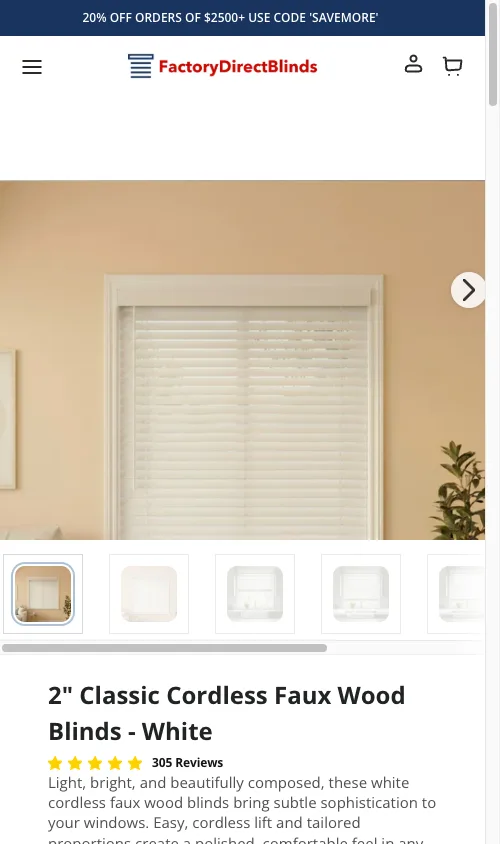
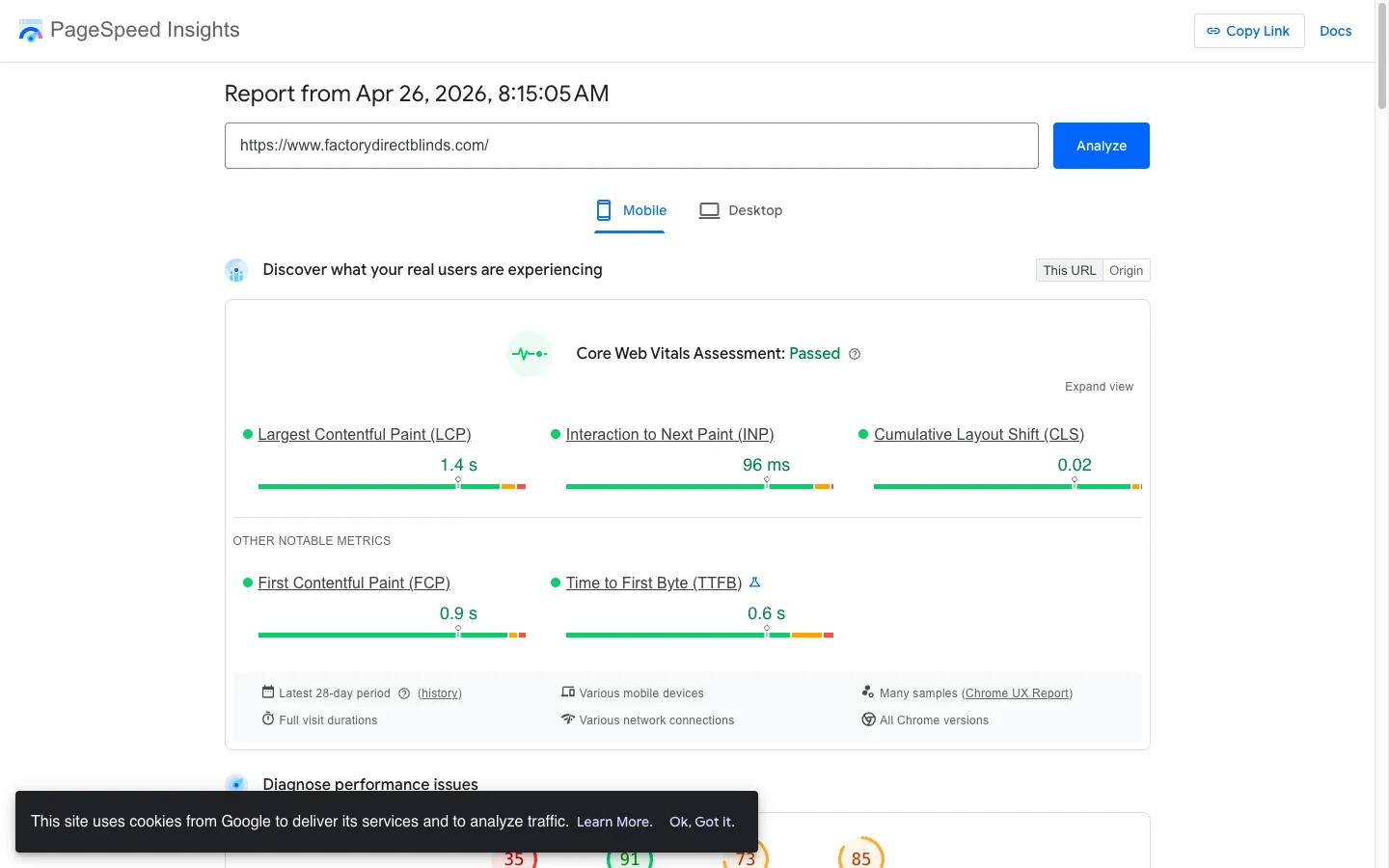
Ship it: Run the full flow on a real phone over throttled 4G, not Chrome DevTools. Check four things. Inputs at 16px+ so iOS does not auto-zoom. The right keyboard per field (numeric for phone and zip, email for email). The Pay now button visible without scrolling at the payment step. Checkout PageSpeed mobile score above 80.
6. Kill forced account creation
Forced accounts cause 24% of abandonment per Baymard. The argument that mandatory accounts grow your database is upside down. You burn first-time buyers to collect passwords from people who already bought.
Ship it: Settings, then Checkout, then Customer accounts. Pick “Accounts are optional” or, on plans that support it, guest-only. Then offer accounts on the thank-you page with a single password field and a reason (“Track your order, save your details”). Shopify’s native post-purchase invitation handles this if you flip it on.
7. Strip third-party scripts off the checkout page
Google’s research shows bounce probability climbs 32% from 1 to 3 seconds of load time and 90% at 5 seconds. Checkouts are not exempt.
The usual culprits are storefront apps that quietly fire on checkout: Tidio, Gorgias widget, GA4 + Meta Pixel + TikTok Pixel + Hotjar all stacked, review apps with no business on a checkout page.
Ship it: Open the checkout in Chrome DevTools, Network tab, filter by JS. Count third-party scripts. For each one ask: does this need to fire here? Chat almost never gets used during checkout. On Shopify Plus, control the load list through Script Editor or checkout extensibility. Target sub-3-second checkout load on a mid-range Android. My Shopify Core Web Vitals guide covers LCP, INP, and CLS fixes with Liquid examples.
8. Place upsells post-purchase, never pre-payment (Plus only)
Most CRO advice misses this: an upsell before Pay now costs more than it earns. Once you push it past the payment confirmation, the rules flip. Card is on file, the buy is closed, the offer is one tap. Well-targeted post-purchase upsells run 5-15% take rate on the Plus stores I work with.
Ship it: Use the Shopify Plus post-purchase checkout extension. Pull order data so the offer reflects what they just bought. Single product, clear price, equally prominent “No thanks.” One page only. Stack two and you train shoppers to ignore the next one. Non-Plus stores get the same effect through ReConvert or AfterSell.
9. Show delivery dates, not “Standard”
19% of Baymard abandoners cite slow or unclear delivery. “Standard Shipping $5.99” answers a question shoppers do not have. “Standard Shipping $5.99 (Arrives April 4-7)” answers the one they do.
Ship it: Shopify Shipping exposes delivery date estimates in checkout settings. For custom rates, calculate processing days plus carrier transit, skip weekends, render via a checkout UI extension on Plus. Even a Liquid stub beats nothing. Surface the same estimate on the product page so shoppers know the answer before they open the cart.
10. Cut the form from 14 fields to 7
Baymard’s checkout usability work pegs the average checkout at 14.88 fields, while most could ship with 7. Each extra field is friction the shopper has to absorb on a phone keyboard.
Ship it: Settings, then Checkout, then Form options. For B2C: Company name hidden. Address line 2 optional. Phone optional unless your carrier needs it. On Plus, use checkout extensibility to hide fields conditionally by country and reorder for natural flow. Run the form on a phone afterwards. It should feel visibly shorter.
11. Turn on Google Places address autocomplete
Address autocomplete cuts form completion time roughly 20% per Google’s own data and removes the typo addresses that cost you reships. Shoppers type three characters, tap the suggestion, the whole shipping block fills.
Ship it: Shopify ships native Google-powered autocomplete in checkout for most regions. Test it: start a checkout, type into the address field, watch for suggestions. If nothing shows, check Settings, then Checkout, then confirm autocompletion is on. Custom Plus checkouts may need the Google Places API wired into the extension directly.
12. Keep the order summary visible at every step
On mobile, Shopify collapses the order summary by default. Shoppers type a card number for a total they half see. That is the “wait, what am I paying for?” moment that kills the click.
Ship it: On standard plans, make the summary scannable: short product titles, variant info, thumbnails enabled. On Plus, use a checkout UI extension to expand by default on mobile or pin a sticky total bar.
How to verify the fix in 5 minutes
- Open GA4, Reports > Monetisation > Checkout journey. Watch the step with the worst drop-off rate.
- Run a real checkout on your own phone over cellular. If it takes more than 90 seconds end-to-end with Shop Pay, something is wrong.
- Re-check the GA4 funnel 14 days after each shipped fix. Move on only when the previous one moved.
For upstream stages see hidden cart abandonment causes and the mobile CRO guide. For dollar-ranking, conversion leaks by dollar impact.
The takeaway
- Enable Shop Pay, Apple Pay, Google Pay, and PayPal Express today. The 1.72x lift is one toggle.
- Surface every cost (shipping, taxes, protection fees) before the cart, never at the payment step.
- Park card logos, an encryption line, and a one-line return policy next to the card field, not in the footer.
- Switch to one-page checkout, kill forced accounts, and strip non-essential third-party scripts off the checkout page.
- Re-check the GA4 checkout funnel 14 days after each fix. Ship the next one only when the previous moved.
Kaspian Fuad is a Shopify CRO specialist and Liquid developer. 12 years of ecommerce, 100+ projects shipped for DTC brands. Get in touch for a free checkout audit or see the full services page.