

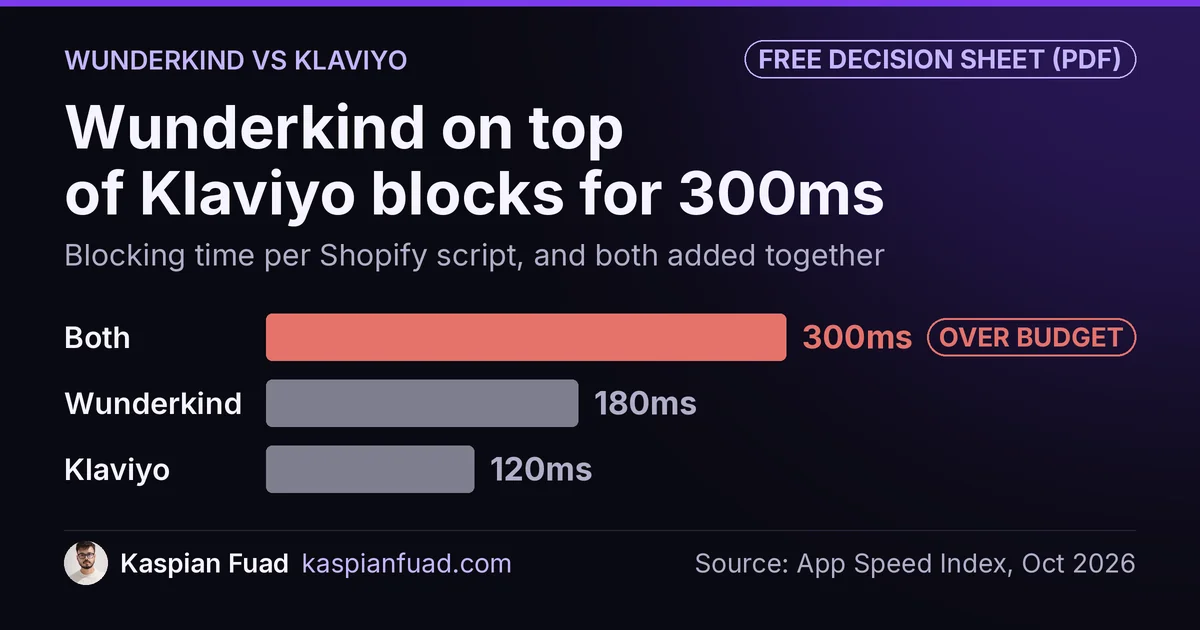
TL;DR: Wunderkind doesn’t replace Klaviyo. Its own Klaviyo datasheet says Klaviyo stays the sending platform, so you pay for both. Wunderkind publishes no price, and its script blocks the main thread for 180ms in my App Speed Index. Stacked on Klaviyo, that’s about 300ms, past Google’s 200ms target. Sign only after a randomized holdout proves the extra revenue.
Wunderkind’s case study for HOMAGE, a vintage apparel brand, reports a 3x jump in triggered email conversions in the first month. The same page credits Wunderkind with 7% of HOMAGE’s total digital revenue. Both numbers come from the vendor’s own reporting, and neither says what would have sold without it.
This is for a Shopify brand doing a few million a year on Klaviyo, sitting across from a Wunderkind rep. Below is what each tool does, the math that decides whether the fee pays back, the speed cost of running both, and a test you can write into the contract. One honest limit: I can’t see your quote, so the cost section gives you the break-even math, not a price.
Does Wunderkind replace Klaviyo?
No, and the clearest source is Wunderkind itself. Its Klaviyo datasheet describes Wunderkind as the identity and decisioning layer, while “Klaviyo remains the platform for campaign execution.” Your flows, templates, segments and sending stay in Klaviyo.
What Wunderkind sells is recognition. Most visitors to a Shopify store are anonymous, so Klaviyo can’t email them when they browse and leave. Wunderkind’s pitch is that its identity network matches more of those visitors to an email address, then feeds the behavior into Klaviyo so your existing flows fire for more people.
Klaviyo already does a version of this. Its cookie documentation explains that the __kla_id cookie tracks a visitor once they’re identified, and email links carry a _kx parameter that identifies whoever clicks. So a subscriber who clicked last month’s email is already recognized. Wunderkind’s value is the gap: shoppers Klaviyo has never matched.
| Klaviyo | Wunderkind | |
|---|---|---|
| Job | Sends email and SMS, runs flows | Identifies more visitors, feeds Klaviyo |
| Shopify listing price | From $20 a month (251 to 500 contacts) | “Contact Wunderkind Sales” |
| Shopify App Store reviews | 4.7 stars, 3,394 reviews | 0 reviews |
| Blocking time (my App Speed Index) | 120ms | 180ms |
| Can you drop the other one? | Yes, it works alone | No, it needs a sender |
The review counts come from the Klaviyo listing and the Wunderkind listing, both checked on October 17, 2026. Wunderkind mostly sells through a sales team, so the empty review count says more about how it’s bought than about quality.
What does Wunderkind cost compared to Klaviyo?
Klaviyo publishes its price ladder. Wunderkind doesn’t. Its Shopify listing is free to install and then says “Monthly or Annual fees apply. Contact Wunderkind Sales for more information.” I couldn’t find an official price anywhere, so treat any number you read on a comparison site as a guess.
That means the useful question isn’t the fee. It’s how much extra revenue the fee demands. If your contribution margin is 40%, every $1,000 of monthly fee needs $2,500 of extra monthly revenue to break even. Here’s that math at three example quotes. These are illustrations, not Wunderkind prices:
| If your monthly quote is | Break-even revenue at 30% margin | At 40% margin | At 50% margin |
|---|---|---|---|
| $2,000 | $6,667 | $5,000 | $4,000 |
| $5,000 | $16,667 | $12,500 | $10,000 |
| $10,000 | $33,333 | $25,000 | $20,000 |
The word that matters is extra. Break-even revenue has to be incremental, meaning orders that wouldn’t have happened without Wunderkind. Your Klaviyo bill also doesn’t shrink, because Klaviyo still sends every message. If the extra recognized visitors become new Klaviyo profiles, the Klaviyo bill can rise too, since Klaviyo prices on active profiles. I covered that profile-based pricing curve in my Klaviyo vs Omnisend vs Mailchimp comparison.
How much does Wunderkind slow down a Shopify store?
My App Speed Index records the main-thread blocking time each app’s storefront script adds. Wunderkind sits at 180ms, the heaviest of the 22 email and SMS apps I track. The category median is 100ms.
| Email or SMS app | Blocking time | vs category median (100ms) |
|---|---|---|
| Wunderkind | 180ms | 80ms over |
| Klaviyo | 120ms | 20ms over |
| Bluecore | 120ms | 20ms over |
| Listrak | 110ms | 10ms over |
| Attentive | 110ms | 10ms over |
| Klaviyo plus Wunderkind | 300ms | 1.5x Google’s budget |
The budget comes from Google. web.dev says sites should aim for a Total Blocking Time under 200 milliseconds, and that’s for the entire page: theme, reviews, chat, pixels and every app together. Add the two scripts the way my App Bloat Detector scores a stack and you get 300ms before the theme has done anything. Both run site-wide, so every product page pays it.
A second data set reads lighter. 2Visions’ ShopWeight benchmark measured Wunderkind’s added processing time on 24 Shopify homepages, last on September 25, 2026. It came in under 100ms on 21 stores, between 100ms and 300ms on 1, and between 300ms and 1 second on 2. Different page, different method, and a real spread between stores. Read both sets of numbers the same way: the setup on your store decides the cost, so measure it there.
Klaviyo isn’t free either. On WD Electronics, a Shopify Plus store on my weekly retainer, the Klaviyo popup setup ran a page-wide MutationObserver plus a 600ms timer forever on every theme page. Fixing it was one line item in a sprint where the store’s JavaScript error rate fell from 11.7% to 5.5% of sessions. Any script you add on top of Klaviyo stacks onto whatever Klaviyo already costs you.
Is the “3x triggered email revenue” claim real?
It’s real attributed revenue. That’s a different number from the one you need.
Attribution means a tool claims an order because a message touched the shopper first. Klaviyo’s conversion tracking article says the default window for accounts created after October 9, 2024 is 5 days, and that conversions count if someone opens or clicks. An Apple Mail privacy open can count as an open unless you exclude it. Now add a second dashboard. When Wunderkind’s signal fires a Klaviyo flow and the shopper buys, both reports can show that order.
None of that makes the HOMAGE results false. It makes them unproven for your store. A shopper who browsed, got an email and bought within 5 days might have come back on their own. The only clean answer is a randomized holdout: a group of identified visitors who get nothing, compared against the group that gets the messages. If you’re already paying for attribution software, my Triple Whale vs Northbeam vs Polar breakdown covers which ones run incrementality tests and which only re-slice the same attributed orders.
How do you test Wunderkind before you sign?
Ask for the test in writing before the contract, not after. Here’s the order I’d run it in:
- Baseline. Pull 8 weeks of Klaviyo flow revenue, total revenue and revenue per visitor from Shopify, so you know what normal looks like.
- Holdout. Get the vendor to hold back a random 10% or more of the visitors it identifies, with no messages, for at least 4 weeks.
- Speed. Run Lighthouse on a product page twice: once normally, once with
wunderkind.coandbounceexchange.comblocked in Chrome DevTools request blocking. The TBT difference is your real cost. - Verdict. Compare revenue per visitor between the holdout and the messaged group, then subtract the fee and any Klaviyo profile increase.
If the vendor won’t agree to a holdout, that’s an answer too. Any tool that claims revenue should be able to show you the revenue it caused.
Download the Wunderkind decision sheet (PDF)
When is Wunderkind worth adding to Klaviyo?
It can pay off when three things are already true. Your Klaviyo flows convert well for the visitors Klaviyo does recognize. You get enough repeat, unidentified traffic that recognizing more of it changes the numbers. And your pages have blocking-time room left, so 180ms doesn’t push product pages into a failing Core Web Vitals score.
It’s the wrong buy when the basics are missing. If you don’t have a browse abandonment flow on Klaviyo’s Viewed Product metric, build that first: it costs nothing extra. If the sign-up form is slow, fix it. My script defer guide shows how to load popups after the page is usable. If you’ve already got three popup and capture tools fighting each other, cut to one before you add a fourth.
And if you add Wunderkind and later cancel, remove the script properly. Tags left in theme.liquid keep costing you after the bill stops, which I covered in my leftover app code guide.
The takeaway
- Keep Klaviyo: Wunderkind’s own datasheet says Klaviyo stays the sending platform.
- Divide any quote by your contribution margin to see the extra revenue it demands every month.
- Measure the 180ms script on your own product page before you sign.
- Demand a randomized holdout, because attributed revenue isn’t incremental revenue.
- Build Klaviyo’s browse abandonment flow first, since it costs nothing extra.
I’m Kaspian Fuad, a Shopify developer and CRO consultant. If a rep has sent you a Wunderkind proposal, send it to me and I’ll check the math and the speed cost against your store.