

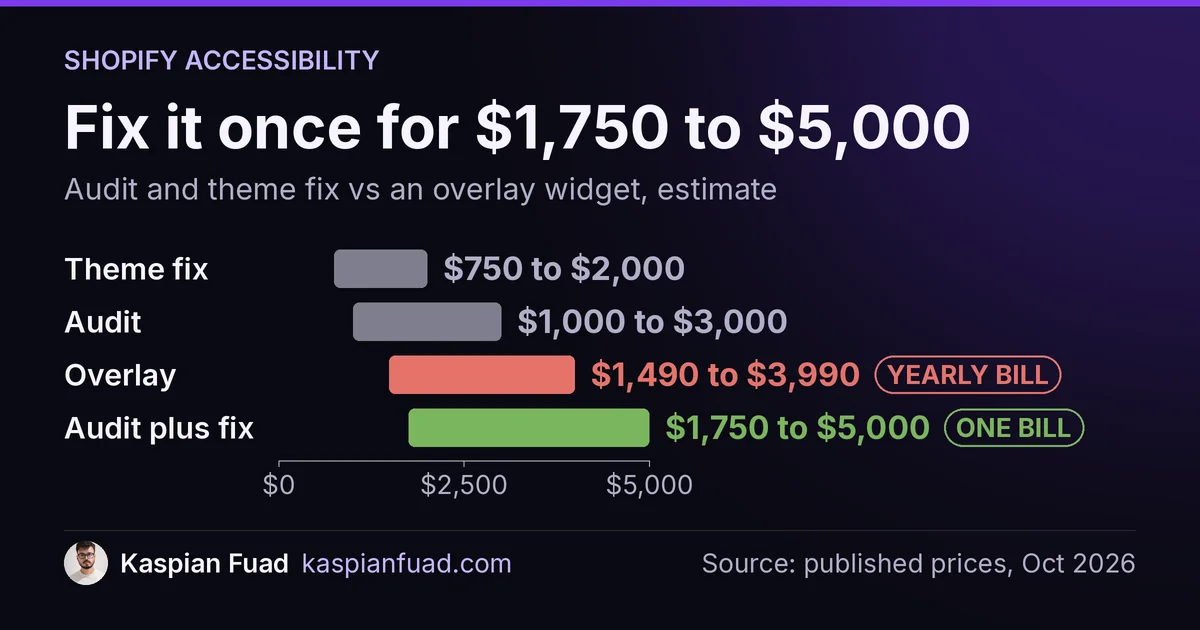
TL;DR: A manual accessibility audit of a Shopify store costs $1,000 to $3,000 for 10 to 20 templates, and fixing what it finds in a standard theme takes 15 to 40 hours, about $750 to $2,000 at my rate. That is $1,750 to $5,000, paid once. Skip checkout (Shopify audits it), and put the budget on your theme, your apps and your content.
Every theme in the Shopify Theme Store had to average 90 on Lighthouse accessibility to get listed. WebAIM’s 2026 scan of the top million home pages still found WCAG failures on 95.9% of them.
Both are true, and the gap between them is what you are paying an auditor to find. This is for a US Shopify brand that got a demand letter, a nervous email from a lawyer, or a quote that made no sense. Below is what each piece of an audit costs, which scope to cut, and how to tell a real audit from a scan with a logo on it. One honest limit: no audit makes you lawsuit-proof. It makes you defensible and easier to buy from.
Download the accessibility audit quote scorecard (PDF)
Why this matters for your store
- E-commerce made up nearly 70% of ADA web lawsuits in 2025, so the risk sits with stores like yours, not with banks and airlines.
- The same barriers that block a screen reader user also block a mobile shopper with a broken menu or an unlabeled size picker, so the fix reaches conversion rate too.
- A bad audit costs twice: once for the report, and again for the developer who has to translate a 200-row spreadsheet into theme changes.
How much does a Shopify accessibility audit cost in 2026?
Specialists price by unique page or template, not by product count. A store with 4,000 products still has one product template doing most of the work. Here is how the public numbers stack up:
| Line item | Typical price | Who publishes it | What it buys |
|---|---|---|---|
| Automated scan | $0 | WAVE, Lighthouse, axe | A triage list of machine-detectable errors |
| Manual audit, per template | $100 to $250 | Accessible.org, AccessibilityCost | Keyboard, screen reader and WCAG review of one page type |
| Full Shopify audit | $1,000 to $3,000 | AccessibilityCost, updated April 2026 | 10 to 20 templates with a written report |
| Worked Shopify example | $1,650 | Accessible.org, June 2026 | 12 templates, plus 10% for WCAG 2.2 AA |
| Theme remediation | $750 to $2,000 | Me, at $50 an hour | 15 to 40 hours of fixes in the theme code |
Neither audit price includes the fixes. AccessibilityCost says plainly that remediation cost depends on the issue count and who does the work. That is the line most quotes leave blank, and it is usually as big as the audit itself.
Which Shopify pages does an accessibility audit need to cover?
A standard Shopify store has 10 to 14 page types worth auditing. Count yours before you request quotes, because the number sets the price:
- Home page, including the slideshow and any popup that fires on load
- Header, mega menu and the mobile menu drawer
- Collection page with filters and sort
- Product page, including variant swatches, the size chart and the review widget
- Cart drawer and cart page
- Search results and predictive search
- Account login and registration
- Contact form and newsletter signup
- Blog article and one content page
- The 404 page
Add a line for each extra product template your theme uses (a bundle page or a configurator counts as its own template). Ten templates at $100 to $250 lands at $1,000 to $2,500, which matches the published ranges.
Can I skip checkout in a Shopify accessibility audit?
Mostly, yes, and it is the easiest money to save. Shopify’s accessibility page publishes a conformance report for checkout tested against WCAG 2.2 A and AA. Outside Shopify Plus you cannot edit checkout code at all, so an auditor billing hours to document checkout issues is writing a report nobody can act on.
Keep one checkout item in scope: your branding. The colors, fonts and logo you set in the checkout editor are yours, and a light brand color on a white button fails contrast no matter how well Shopify built the page.
The scope you cannot skip is apps. Review widgets, chat bubbles, popups and loyalty launchers inject their own markup into your theme. An audit that tests your pages with apps disabled is testing a store your customers never see.
Why does a theme that passed Lighthouse still fail an audit?
Because Lighthouse only sees what a machine can see. Deque’s automated coverage study of about 13,000 pages found automated testing catches 57.38% of issues. The rest need a person with a keyboard and a screen reader. The ADA.gov web guidance says the same thing: a clean automated report does not guarantee an accessible site.
Then the store drifts after launch. The Theme Store requirement checks the theme’s own home, collection and product pages, filled with sample content. It never sees your custom sections, your 30 product images with empty alt text, or the cart upsell app you added in March.
The WebAIM Million 2026 shows where the failures cluster. On Shopify, every one of them maps to a specific fix:
| Failure (WebAIM 2026) | Share of home pages | Where it lives on Shopify |
|---|---|---|
| Low contrast text | 83.9% | Theme color settings, sale badges, text over hero images |
| Missing image alt text | 53.1% | Product media and collection images in the admin |
| Missing form labels | 51% | Newsletter, search and popup app forms |
| Empty links | 46.3% | Icon-only social and account links in the header |
| Empty buttons | 30.6% | Cart, search and menu icons with no accessible name |
Most of that list is cheap to fix. A contrast change is a theme setting. Alt text is admin work your own team can do once someone tells them which images matter.
What does fixing a Shopify theme for accessibility actually involve?
Remediation is where a Shopify developer earns the fee, because the hard fixes live in Liquid and JavaScript. In my experience a standard Online Store 2.0 theme takes 15 to 40 hours. The usual work:
- Keyboard access in the mobile menu, cart drawer and mega menu: focus moves into the drawer when it opens and returns when it closes.
- Variant pickers. Swatches built as plain divs need real radio inputs or buttons with names. My color swatch build shows the accessible markup.
- Focus not obscured. WCAG 2.2 added criterion 2.4.11, and a sticky header or a sticky add to cart bar that covers the focused element fails it.
- Target size. WCAG 2.2’s 2.5.8 sets a 24 by 24 pixel minimum, and Shopify’s own theme accessibility practices recommend 44 by 44 for primary controls.
- Heading order and names. On Enea Studio, six standard pages carried an extra H1 from a misused FAQ block, a heading-structure fault that confuses screen readers and search engines alike.
The fix list also covers the apps. Sometimes the answer is a CSS override or a setting. Sometimes the app has no accessible mode and the honest fix is to replace it, which I weigh against speed in the app bloat detector.
Is an audit cheaper than an accessibility overlay?
Over two years, yes. Overlay widgets on Shopify bill $1,490 to $3,990 a year on the plans I priced in my accessiBe vs UserWay vs AudioEye comparison, and they leave your theme code exactly as broken as it was. The audit and the fix cost $1,750 to $5,000 once.
The legal picture points the same way. UsableNet’s 2025 lawsuit report counted more than 5,000 digital accessibility suits, and 64% of the companies sued earned under $25 million a year. Lawsuits named companies already running widgets 95 to 155 times a month. Plaintiffs’ firms test with a screen reader, so the fix has to hold up under a screen reader.
How do I tell a real accessibility audit from a rebranded scan?
Ask for a sample report before you pay. A real audit has these five things, and a scan with a logo has none of them:
- Manual testing named in the method: keyboard-only, plus at least one screen reader (VoiceOver or NVDA), on mobile and desktop.
- WCAG 2.2 AA as the target, with each issue tied to a success criterion number.
- Your apps tested live, with each issue labeled theme, app or content so you know who fixes it.
- A fix you can hand to a developer: the element, the template file and the change, not “improve contrast.”
- A retest included after remediation, plus a dated accessibility statement you can publish.
Price is a weak signal on its own. A $5,000 audit that ships a PDF full of axe output is worse than a $1,500 audit that names the Liquid file. The vetting is the same as for any developer hire, and my questions to ask before hiring a Shopify developer cover the code side.
How to check your store in 10 minutes before you buy an audit
- Run your home page and one product page through WAVE and write down the error count for each.
- Unplug your mouse. Tab from the top of a product page to Add to Cart, then open the cart drawer and close it. Note where focus disappears or gets stuck.
- Count your templates using the list above, multiply by $100 and $250, and you have your fair audit range before the first sales call.
If the keyboard test fails on Add to Cart, you have found the fix that matters most. It blocks screen reader users and keyboard users, and it is usually a few hours of work. My technical audit checklist covers what to check next, beyond accessibility.
The takeaway
- Count your templates first, because per-template pricing at $100 to $250 sets a fair audit range.
- Cut checkout from the scope, except for your own brand colors.
- Insist on apps tested live and every issue tagged theme, app or content.
- Budget 15 to 40 hours of theme fixes on top of the audit, not inside it.
- Skip the overlay subscription and spend that money once on the fix.
I am Kaspian Fuad, a Shopify developer and CRO consultant who fixes accessibility in the theme code myself, at a published $50 an hour. If you have a demand letter or an audit report you cannot act on, send me your store URL and I will tell you which fixes come first.