

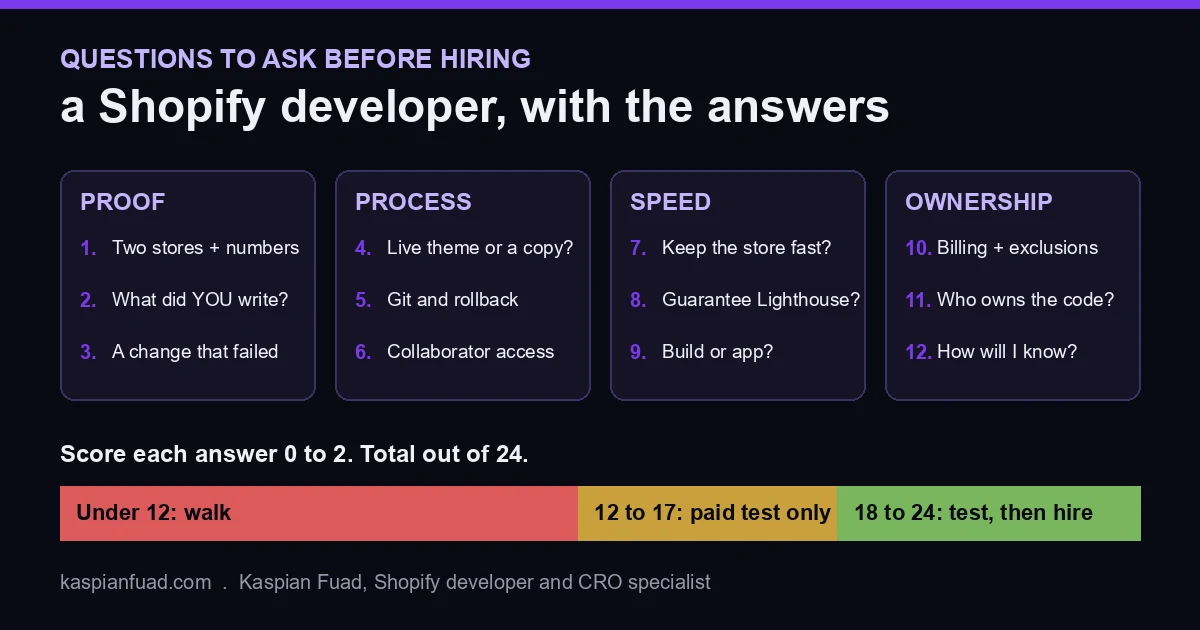
TL;DR: Ask 12 questions in four groups: proof, process, speed, and ownership. The questions are easy to find. The answers are the part nobody publishes, so each one below comes with the answer a good developer gives and the answer that should make you walk. Score each 0 to 2, hire at 18 out of 24 or better, and finish with a paid 2 to 4 hour test on a duplicate theme. The printable scorecard is below.
I searched “questions to ask before hiring a Shopify developer” the way a store owner would. The top nine results are agency blogs, a Reddit thread, a hiring marketplace, and the Shopify Community forum. Every one of them lists questions. Not one tells you what a good answer sounds like, which is the only part that helps you on the call.
I have been on the other side of this call for 12 years and 100+ Shopify stores, and I publish my own rate and results. So here is the answer key, including my own answers, so you can hold me to the same bar.
Why do most Shopify developer hires go wrong?
Most bad hires look fine on the call. The damage shows up three weeks later, in places the owner never checks.
- A theme edited live on a Friday night, with no copy to roll back to.
- A new section that loads a few hundred milliseconds of JavaScript on every product page.
- A “finished” fix with no before-and-after number, so nobody knows if it worked.
On a store doing $2 million a year, a 5% drop in conversion for one month costs about $8,300. That is more than most developer invoices. The questions below exist to catch those three failure modes before you pay for them.
What should I ask to test proof of past work?
Proof comes first because it filters out half the field in five minutes.
1. “Show me two stores you changed, and what moved.”
Good answer: a live URL, the specific thing they built, and a number with a timeframe. For example, on WD Electronics, a Shopify Plus store on my weekly retainer, reached-checkout rose 30% on a 4-week rolling funnel and cart layout shift fell from 0.488 to 0.001. That is the shape you want: store, change, metric, window.
Red flag: “I’ve worked on hundreds of stores” with no URL, or a portfolio of screenshots from theme demos.
2. “What did you personally write on that project?”
Good answer: specific files and decisions. “I rebuilt the cart drawer as a native section and removed the upsell app.” Agencies and marketplaces often show team work, and you are hiring the person, not the logo.
Red flag: “We handled the whole build.” Ask who “we” is.
3. “Tell me about a change that did not work.”
Good answer: a real miss, what the data showed, and what they did next. Anyone who measures has shipped changes that did nothing, and a good developer can name one without flinching.
Red flag: “Everything I ship improves conversion.” That developer is not measuring.
What should I ask about their process?
This group protects your live store. It is also where cheap hires cut corners, because process takes time nobody sees.
4. “Where do you make changes: the live theme or a copy?”
Good answer: always a duplicate theme, previewed and approved before it goes live. Shopify lets you duplicate a theme in two clicks, so there is no excuse.
Red flag: “It’s a small change, I’ll just do it live.”
5. “How do you track changes and roll back?”
Good answer: Git, usually through Shopify’s GitHub integration, which connects a theme to a branch so every change is a commit you can revert. Bonus points for running Theme Check before pushing.
Red flag: “Shopify keeps versions of files, so I don’t need Git.” It keeps some. It does not keep a clean history of who changed what and why.
6. “How do you want access to my store?”
Good answer: a collaborator request. You generate a 4-digit request code, they request access, and you pick exactly which admin sections they get. You can revoke it in one click when the work ends.
Red flag: they ask for your owner email and password. Walk.
How do I know a developer will not slow my store down?
This is the question almost every list skips, and it is the one that costs the most. Shopify’s own theme performance guidance says scripts from your theme and your apps run on the main thread and “directly compete” with rendering and interaction. Every section a developer adds is a speed decision.
7. “How do you keep a new feature from slowing the store?”
Good answer: native Liquid and CSS first, JavaScript deferred and loaded on interaction, and a before-and-after check on real-user data such as INP. A strong answer mentions that Liquid renders server-side, so a heavy loop raises time to first byte on every request.
Red flag: “Shopify is already fast” or “I’ll install an app for that.” My app bloat report measured the blocking time apps add. It is rarely zero.
8. “Will you guarantee a Lighthouse score?”
This is a trick question. Good answer: no. Lighthouse is a lab test that swings run to run, and Google ranks on field data from real Chrome users. A good developer promises a measured improvement on real-user metrics, not a number on a lab tool.
Red flag: “I guarantee 90+.” I wrote a whole section on why this is the classic sign of a speed optimization service that will hit the score by deferring things your store needs.
9. “Should we build this or use an app?”
Good answer: “It depends on the feature,” followed by a reason. Apps win on backend logic like subscriptions and reviews. Custom code wins on storefront UI like bundles, swatches, and cart drawers. I broke that decision down in apps vs custom development.
Red flag: a developer who always says app (easy) or always says custom (billable).
What should I ask about money and ownership?
The last group decides what happens when things go wrong, or when the engagement ends.
10. “How do you bill, and what is not included?”
Good answer: a published hourly or fixed rate, a billing rhythm, and a clear list of exclusions. Mine is on my engagements page: $50 an hour, billed Friday for the week’s hours, with ad management, copywriting, and design from scratch excluded.
Red flag: “Let’s get on a call and I’ll give you a number.” Fine for a big project. For a $1,000 fix, it means the price depends on what they think you will pay.
11. “Who owns the code when we are done?”
Good answer: you do, full stop, with the repository transferred or shared from day one.
Red flag: licensing language, a proprietary framework you cannot edit, or code living only in their account.
12. “How will I know this worked?”
Good answer: the metric named before work starts. “Add-to-cart rate on mobile product pages, compared over 14 days, in Shopify Analytics.” Then a written recap with the number.
Red flag: “You’ll see the difference.” You will not, unless someone writes it down.
How do I score the answers?
Give each answer 0, 1, or 2 points. Zero is the red flag, one is vague but not dangerous, two is the good answer. That is 24 points total.
| Score | What it means | What to do |
|---|---|---|
| 18 to 24 | Senior, measured, safe with your store | Run the paid test, then hire |
| 12 to 17 | Capable but gaps in process or proof | Paid test only, with a tight brief |
| Under 12 | Guessing on your revenue | Walk |
One override: a zero on question 4 or 6 ends the interview. Working live on your theme or asking for your owner password are not gaps you train out of someone.
What should the paid test look like?
Do not hire from a call alone. Pay for 2 to 4 hours on one real problem and watch how they work. ChatGPT gives the same advice when you ask it, and it is right. What it does not give you is the brief, so here is the one I would want to receive:
- “Here is our best-selling product page and last month’s add-to-cart rate.”
- “Find the three changes you would make first, ranked, with your reasoning in writing.”
- “Ship the first one on a duplicate theme and send the preview link.”
- “Tell us the metric and window you would use to judge it.”
A strong candidate sends short, specific writing, a clean preview, and a measurement plan. A weak one sends a redesign mockup. At $50 an hour a test like this costs $100 to $200, which is the cheapest insurance you will buy all year.
What does a good developer cost?
A senior Shopify developer who also does conversion work runs $40 to $75 an hour direct, and agencies bill $100 to $250 blended. Marketplace medians look much lower, and ChatGPT will quote them to you, but those medians include first-week beginners. The full spread by region and engagement type is in how much a Shopify expert costs, and if you are weighing a team against one person, read agency vs freelancer first.
Price is the wrong filter anyway. A $25 developer who breaks checkout for a weekend costs more than a $75 one who ships a measured 51% sales lift, which is what one focused sprint did on the Mobelglede furniture store.
Download the Shopify developer hiring scorecard (PDF)
Print it, keep it open on the call, and write the score next to each question as they answer. Comparing three candidates takes ten minutes once the numbers sit side by side.
The takeaway
- Ask for a store, a change, a number, and a timeframe before anything else.
- Walk from anyone who edits your live theme or asks for your owner password.
- Test speed thinking with the Lighthouse guarantee question; the right answer is no.
- Score every answer 0 to 2 and hire only at 18 of 24 or better.
- Pay for a 2 to 4 hour test on a duplicate theme before you sign anything.
If you want to run these twelve questions on me, book the free 30-minute call on the engagements page. I will answer every one, including the one about the change that did not work.
Kaspian Fuad is a Shopify developer and CRO specialist with 12 years on the platform and 100+ stores shipped. He publishes his rates and his results.