

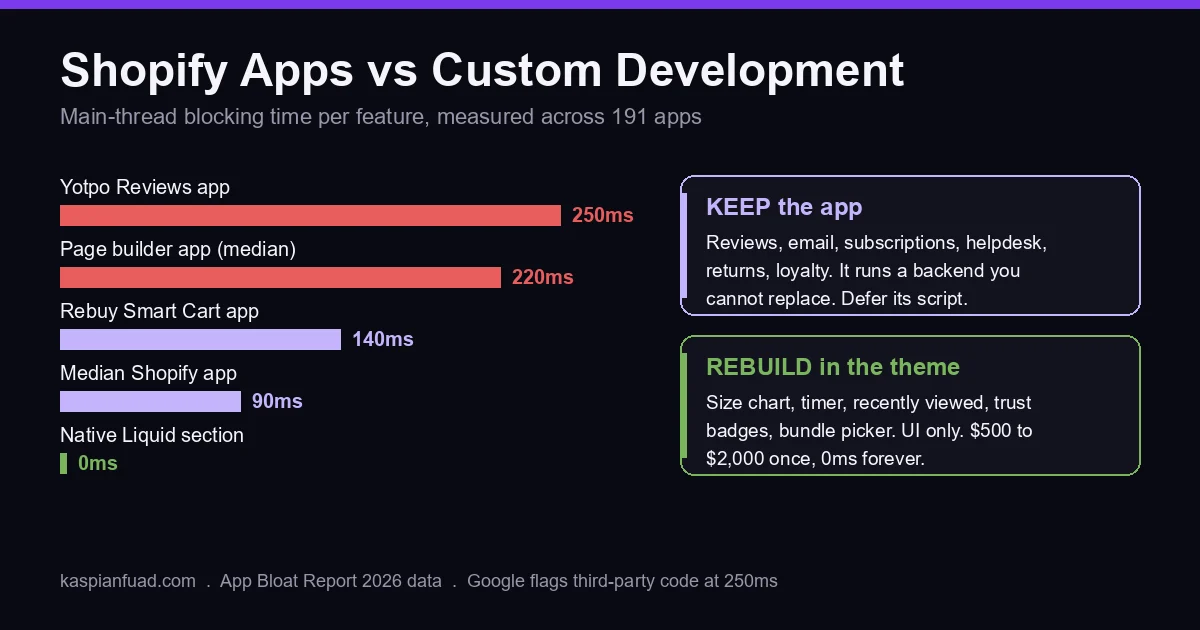
TL;DR: Keep the apps that do work on a server you cannot replace (reviews, email, subscriptions, helpdesk, returns). Rebuild the ones that only paint storefront UI (size charts, timers, recently viewed, trust badges, bundle pickers) as native Liquid, because those cost you 90ms to 220ms of blocking time each and $0 once built. The decision matrix and the numbers behind it are below.
Enea Studio, a fine jewelry brand I have engineered for through six sprints this year, scored 23 out of 100 on mobile Lighthouse after I had finished the theme work. Five apps made up roughly 60% of its JavaScript payload and 1,526 KiB of unused code. Every Core Web Vital still passed in Google’s real-user data. That one store holds the whole apps-versus-custom argument: the app cost was real, the app value was real, and the decision was never “apps bad, code good.”
I searched “shopify apps vs custom development” the way a store owner would. Eight agency and freelancer blogs plus a forum thread, all arguing the subscription break-even. Not one measures what the app costs in speed, and not one publishes a build price. Here is the version with both.
Should you replace Shopify apps with custom code?
Replace an app when its only job is to render something on your storefront. Keep an app when it owns data or a workflow that lives off the storefront. That single test settles 80% of the 28-app stacks I audit, and it is the test Shopify’s own theme performance guidance points at when it says to “avoid heavyweight frameworks when Liquid and CSS can do the same job.”
The reason it works is architectural. A size chart, a countdown bar, a recently viewed row, a trust badge strip, a three-tier bundle picker: each of those is HTML that Shopify’s server can render from Liquid and a metafield in 0ms of browser time. An app delivers the same HTML by shipping a script to the shopper’s phone, waiting for it to download, then building the element in JavaScript after the page has painted. You pay for that twice, once in the subscription and once in blocking time.
Reviews, email flows, subscription billing, helpdesk tickets, returns, loyalty points: those need a database, a queue, and a team maintaining it. Rebuilding them is rebuilding a company. The app wins, and your job is to make its script load late, not to remove it.
What does a Shopify app actually cost your store?
Two costs, and every guide on this SERP counts only the first.
The subscription is the visible one. A typical Hextom plus Bold plus Privy plus Sticky Tools plus ReConvert stack runs about $87 a month, or $1,044 a year, which is the sum behind my 15 Liquid snippets that replace apps. Drop your own stack into the app stack cost calculator for your number.
The blocking time is the invisible one. I measured the main-thread blocking time of 191 Shopify apps across 18 categories. The median app costs 90ms. Page builders cost 220ms. Rebuy Smart Cart costs 140ms, Vitals costs 240ms with every module on, Yotpo Reviews costs 250ms. A normal five-app stack lands around 860ms, and Google’s Lighthouse flags third-party code at 250ms. Three median apps and you are over the line before your own theme has loaded a byte.
Shopify’s App Store rule makes this worse, not better. An app must not reduce Lighthouse performance by more than 10 points to be listed. The cap is per app. Ten apps each sitting politely inside a 10-point limit still add up to a store that fails, and nothing in the App Store measures the total. Shopify’s help center says as much: “Too many apps loading assets on your storefront can slow performance,” and, in the same document, “Uninstalling an app doesn’t automatically remove its code from your theme.”
On Enea Studio, the Klaviyo popup alone created a 14-second critical request chain because it loads Google Fonts through its own CSS. Pulling a single Smile.io block off the collection template took roughly 390KB and two seconds of processing off the page. Neither app was uninstalled. That is what “keep the app” looks like when it is done properly: you cut what it loads and where, not the account.
When does the app win?
The app wins whenever the feature needs a server you do not own. Reviews are the clearest case: Judge.me stores the reviews, sends the request emails, and handles photo moderation. You could render the stars in Liquid, but you cannot collect the reviews in Liquid. The right move is picking the light one, which is most of the argument in Judge.me vs Loox vs Okendo vs Yotpo, then deferring its widget below the fold.
Same logic for Klaviyo (flows, segments, deliverability), Recharge or Skio (billing, dunning, customer portal), Gorgias (ticketing), Loop (returns and exchanges), Smile.io (points ledger). Each one runs a backend that took a funded company years to build. Rebuilding any of them at $50 an hour is a bad trade at any store size.
Bundles are the interesting middle. ChatGPT, asked the same question I put to Google, told a $2 million store to keep its bundle app because “inventory, discounts, component SKUs and cart logic make this much more complex.” Half right. The inventory and SKU logic belongs to Shopify’s own free Shopify Bundles app (up to 30 components in a fixed bundle, on every plan) or to a Shopify Function for the discount. The picker the shopper sees is storefront UI, and that part belongs in your theme. I split it exactly that way for Tuff Pupper: a native three-tier Build-the-Kit picker on every harness page, one multi-line Add to Cart, the savings applied through a Discount Function, zero bundle apps installed.
When does custom development win?
Custom development wins when the app’s whole value is in the browser. The four apps a developer most often flags, bundles, size chart, recently viewed, countdown timer, are all in that group, and I have published the working code for each so you can judge the scale of the build yourself: the size chart is a metaobject plus a modal, recently viewed is 40 lines of Liquid and localStorage, the countdown timer is one section with a schema, and the bundle builder is a Liquid section plus a 60-line JavaScript class. Color swatches without an app reuse the swatch data Shopify already stores.
That last one carries the number every break-even sum leaves out. A premium DTC brand’s bundle app was flashing £0.00 on 5% to 8% of mobile sessions, dropping 127KB of JavaScript on every page, and adding 180ms to INP. I rebuilt it natively and revenue per visitor rose 38% over a 12-day Intelligems test, net revenue up 43%. The app fee was never the cost. The conversion leak was.
Custom also wins when no app fits. Factory Direct Blinds sells made-to-measure window coverings, and its product configurator was a 6,221-line legacy script that no App Store listing could replace. I rebuilt it ground-up behind a template suffix so new products used the new builder while old ones stayed untouched. And it wins when an app did the job badly in the first place: Everly’s multi-currency landing page had 38 hardcoded USD prices and 90 lines of JavaScript rewriting them after paint. Replacing that with Liquid money filters took CLS from 0.11 to 0.00 across 236 regions.
Most CRO advice gets this wrong because it treats “custom” as risky and “app” as safe. On a storefront, the reverse holds. Your theme cannot race itself for a DOM node. An app can, and the £0.00 flash is what that race looks like.
What does custom Shopify development cost in 2026?
A senior freelance Shopify developer charges $48 to $74 an hour; my published rate is $50, with the full table in how much a Shopify expert costs. A Shopify Plus agency bills $100 to $250 blended for the same Liquid. Against those rates, replacing a storefront-only app is typically a $500 to $2,000 one-time build, which is where the break-even sum starts. A backend job, like an ERP sync, is a different build with its own hours, covered in custom Shopify app development cost.
Run it honestly. A $15-a-month size chart app against a $250 build (five hours) breaks even in 17 months on fees alone, which is the sum every agency blog stops at, and it makes custom look marginal. Now add the second cost. If the app is one of the 13 in my library over 180ms, it is holding your INP hostage on every page it loads, and INP is a Core Web Vital Google scores on real-user data. Deloitte’s Milliseconds Make Millions study put 0.1s of mobile speed at 8.4% of retail conversion across 37 brands, the same figure my slow-store post is built on. On a $2 million store, that dwarfs the subscription in the first month.
The mistake in the other direction is just as expensive. Paying a developer $1,500 to rebuild a reviews widget saves $29 a month and hands you a moderation queue you now maintain forever, and upkeep has its own price, which I break down in what a maintenance retainer buys. When a client asks me to quote that, I quote the deferral instead: two hours to load the script after interaction, which cuts the app’s blocking time to near zero and keeps the vendor’s backend doing the work.
How do you decide, app by app?
Three checks per app, in order. They fit on one page, and the PDF below is that page.
First, ask what the app does when no shopper is on the site. If the answer is “stores data, sends messages, bills customers, or syncs with another system,” it is a keep. Defer its script and move on. If the answer is “nothing,” it is a storefront-only app and a rebuild candidate.
Second, measure it. Paste your store URL into the App Bloat Detector and read the blocking time per app. A storefront-only app over 180ms goes to the top of the rebuild list. One under 60ms can wait, unless it is also breaking something, like the £0.00 flash.
Third, price it both ways. One-time build at $50 to $75 an hour, against 24 months of fees plus the conversion loss from the blocking time. Any developer worth hiring will give you the hours in writing before you commit; the rebuild of a size chart is not a mystery project. If the quote for a countdown timer comes back above $500, get a second quote.
Download the Apps vs Custom Decision Matrix (PDF)
One warning from the Enea engagement. Lighthouse flagged a preconnect to fonts.shopifycdn.com as unused. I removed it and the related products section rendered blank. “Unused” in the audit tool is not always unused in the DOM, so every removal ships behind a preview theme and a real-device check, never straight to live. That is the same duplicate-first theme workflow I use for every edit.
How do you verify the decision paid off?
Three steps, five minutes, and you do them before and after each change.
Open PageSpeed Insights on your busiest product page and note the field INP and LCP, not the lab score. Lighthouse can read 23 while every vital passes, so the field numbers are the ones to watch. Then re-run the App Bloat Detector and confirm the replaced app’s script is gone from the network waterfall, not just uninstalled; Shopify warned you about leftover code for a reason. Finally, watch add-to-cart rate and revenue per session for 14 days on flat traffic. A rebuild that moved the speed numbers but not the funnel was a speed project, and that is fine, but call it what it is.
If you want the audit done for you, book a free 30-minute call and I will go through your app list live and tell you which ones I would keep, which I would defer, and which I would rebuild, with the hours for each. Sometimes the honest answer is that every app stays.
The takeaway
- Sort every app by one question: does it do work on a server you cannot replace, or only paint UI in the browser?
- Keep the backend apps (reviews, email, subscriptions, helpdesk, returns, loyalty) and defer their scripts instead of removing them.
- Rebuild the storefront-only apps (size chart, timer, recently viewed, trust badges, bundle picker) as native Liquid at $500 to $2,000 one time.
- Measure blocking time before deciding; the median app costs 90ms and anything over 180ms on a UI-only feature is a rebuild.
- Verify on field INP and revenue per session over 14 days, never on the Lighthouse lab score.
Kaspian Fuad is a Shopify CRO consultant and Liquid developer. 12 years on Shopify, 100+ stores, Top Rated Plus on Upwork (top 3%, 4.96 out of 5 across 105+ jobs). Rates and terms are on the engagements page; the results are in the case studies.