

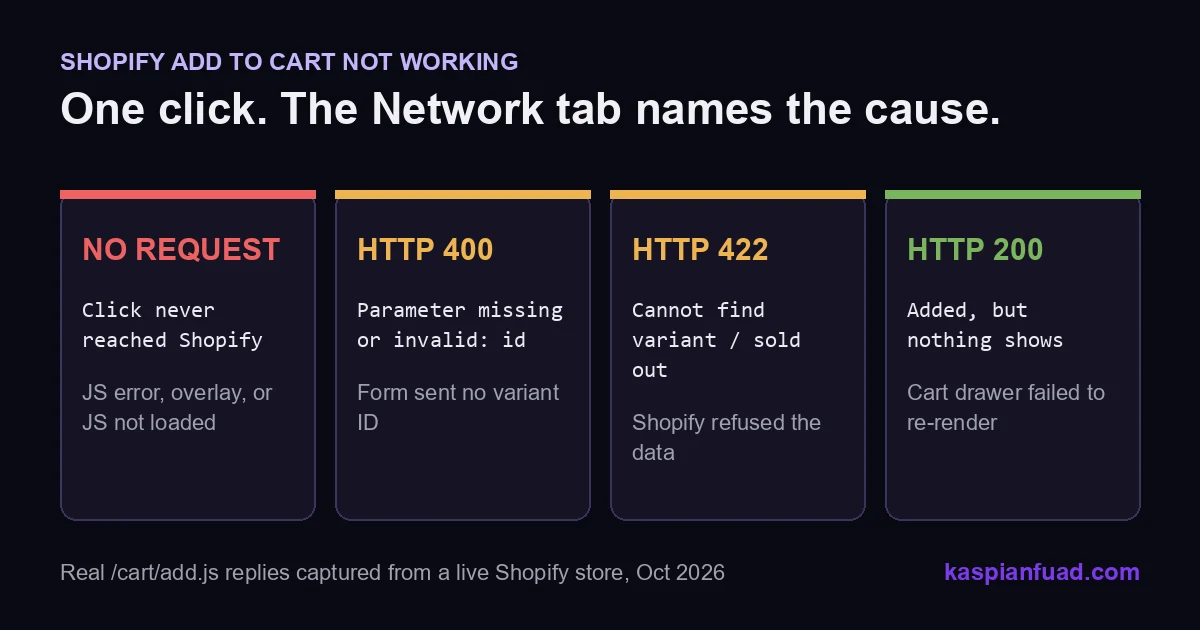
TL;DR: When a Shopify Add to Cart button “does nothing”, the browser already knows why. Open DevTools, watch the Network tab, and click. You will see one of four outcomes: no request (JavaScript or an overlay), HTTP 400 (no variant ID sent), HTTP 422 (Shopify refused the data), or HTTP 200 with no visible change (the cart drawer broke). Each one has a different fix.
At 9 AM on October 8, 2026, I sent five deliberately broken requests to Allbirds’ live Shopify cart endpoint. Shopify answered every one with a specific, readable reason: “Cannot find variant.” “Already sold out.” “Cannot apply selling plan to variant.”
Then I asked ChatGPT the question a store owner types when sales stop: “my Add to Cart button does nothing on some products, what’s wrong?” It gave a sensible list and a probability ranking, then admitted the percentages were its own guesses, “not Shopify-published statistics.” It cited only Shopify’s documentation. Nobody it found had published what the errors actually look like.
So here they are, with the triage I run before I touch any theme code.
Download the Add to Cart triage card (PDF)
Why this matters for your store
- A dead Add to Cart button converts at exactly zero, and every paid click to that product is wasted spend.
- Shoppers rarely report it. They leave, so you find out from a revenue dip days later.
- Guessing at the cause sends owners into uninstalling apps one by one, which can take a week of lost sales.
What actually happens when someone clicks Add to Cart?
On almost every modern Shopify theme, including Dawn and the newer Horizon family, the button runs JavaScript. That script collects the selected variant ID and quantity, then posts them to Shopify’s Ajax Cart API at /cart/add.js. Shopify replies with JSON. The theme then re-renders the cart drawer or count bubble, often using sections Shopify returns in the same reply.
That chain has four links, and the button “does nothing” whenever one breaks. The click handler must run. The request must carry a valid variant ID. Shopify must accept the data. The theme must show the result.
Here is the part most guides skip. Each broken link leaves a different fingerprint in the browser, so you never have to guess which one failed.
How do I find out why my Add to Cart button is not working?
Open the product page in Chrome. Press F12, open the Network panel, and type cart into the filter box. Now click Add to Cart and look at what appears.
| What you see in Network | What it means | Where the fix lives |
|---|---|---|
| Nothing at all | The click never reached Shopify | Theme JS, app scripts, an overlay, a disabled button |
/cart/add.js with status 400 |
The form sent no variant ID or no items | Product form markup or custom template |
/cart/add.js with status 422 |
Shopify read the request and refused it | Product data: stock, variants, selling plans |
/cart/add.js with status 200, nothing changes |
The item was added, the UI failed to update | Cart drawer script or a cart app |
Check the Console tab too. A red error that appears on click is usually your answer for the “nothing at all” row.
This takes two minutes. It also turns a vague “the button is broken” into one sentence a developer can act on, which is the cheapest thing you can do before you hire anyone.
What do the real Shopify cart errors look like?
These are the exact replies from Allbirds’ production Shopify store, captured with plain POST requests on October 8, 2026. Your store returns the same shapes, with your product names.
| Request I sent | HTTP status | Shopify’s reply (description) |
|---|---|---|
| Empty body | 400 | Required parameter missing or invalid: items |
Item with no id |
400 | Required parameter missing or invalid: id |
| Variant ID that does not exist | 422 | Cannot find variant |
| Sold out variant | 422 | The product ‘…’ is already sold out. |
| Valid variant, fake selling plan | 422 | Cannot apply selling plan to variant |
| Valid variant, quantity 9,999 | 422 | Only 12 items were added to your cart due to availability. |
Two things in that table surprised me. First, the 400s use a different JSON shape: status comes back as the string "bad_request", not a number. A theme script that checks status === 422 misses them completely and shows no message.
Second, the last row is a 422 even though Shopify did add 12 items. Shopify’s docs say the cart “will instead add the maximum available quantity.” A theme that treats every 422 as failure shows an error while the cart quietly fills. I have seen shoppers click again and again in that state.
Why does the button do nothing with no request at all?
This is the most common case I fix, and it is never Shopify’s fault. Something on the page stops the click before any request leaves the browser. Three causes cover nearly all of it.
A JavaScript error earlier on the page
A browser stops running a script at its first uncaught error. If that script is the one that wires up the product form, or an app breaks a library the form depends on, the button never gets its handler.
On a luxury jewelry store I maintain, jQuery loads twice: once in the theme head and once inside a trust-icons section. Deferring the first copy made it load second and overwrite the global $. Every plugin attached to the old copy died with TypeError: $slider.slick is not a function. One line in the Console, and the cause was obvious.
Apps are the usual source. Shopify’s own theme troubleshooting guide suggests temporarily uninstalling a suspect app and contacting its developer if the issue goes away. Before you uninstall anything, check what is actually loading with the app detection method and the App Bloat Detector.
An invisible layer sitting on top of the button
A closed popup, drawer or size-guide backdrop can stay on the page with zero opacity and still catch every tap. The CSS property responsible is pointer-events.
On a pet gear store, a size-guide scrim had pointer-events: auto set permanently, open or closed. Mobile shoppers hit a frozen page. The fix was gating it on the open state, two lines of CSS. To test for this, right-click the button and choose Inspect. If the highlighted element is not the button, something is on top of it.
The script has not loaded yet
Deferring theme JavaScript is good for speed, and I recommend it in my script deferral guide. The catch: a shopper who taps before the script arrives gets nothing.
On an electronics store, I held back a site-wide defer rollout until a click-queue guard existed for the Add to Cart button. The guard records early taps and replays them once the script is ready. Slow mobile connections are where this bites, so test on throttled 4G, not office Wi-Fi.
Why does Add to Cart fail only on some products?
When the button works on most products and fails on a few, check the data before the code. In my experience the cause is one of four.
The variant is unavailable. A sold out variant returns the 422 above, but many themes disable the button instead, which looks like a dead click. Check stock and the “continue selling when out of stock” setting for that variant.
The product passes the variant limit Liquid can see. Shopify restricts product.variants to 250 in Liquid. An older theme that builds its selector from that array cannot resolve variant 251 and beyond. I wrote up the 250 variant cap fix for exactly this.
The product uses a different template. An alternate product.*.json template with a hand-edited form can drop the hidden variant ID field. Shopify’s Parameter Missing or Invalid guide names this cause: a single-variant product needs a hidden field carrying the first variant’s ID. That is the 400 row in the table.
A custom rule refuses the add on purpose. On a custom blinds store, a mixed-cart guard blocks samples from sharing a cart with made-to-order products. It matches on the exact vendor name. A product saved with the vendor spelled differently would be refused by design. Rules like this need an on-screen message, or they read as a broken button.
What if the cart says 200 but nothing changes?
Then the item is in the cart and your shopper cannot see it. Open /cart in a new tab to confirm.
This is a display failure. Modern themes ask Shopify to return rendered cart sections in the same call, a feature the Ajax API calls bundled section rendering. If a cart app such as Rebuy or UpCart has replaced the theme drawer, the theme can request sections that no longer exist, and the drawer never opens.
The fix is choosing one owner for the cart UI. Either the theme drawer or the app drawer, never both fighting over the same click. My cart drawer vs cart page comparison covers which one to keep.
How do I verify the fix worked?
- Repeat the Network test on the broken product, and on one product per template. Every click should show a 200 and a visible cart update.
- Test on a real phone on throttled mobile data, and tap the button the instant the page appears.
- Watch the “Added to cart” line in the Shopify Analytics conversion breakdown for the next 7 days. It should recover for the affected products.
When should I hire a developer to fix Add to Cart?
Fix it yourself if the cause is data: stock, a variant setting, or an app you can switch off without losing anything.
Hire when the Console shows an error in theme or app code, when the 400 comes from a custom template, or when two cart systems fight. Once the cause is known, most of these fixes take me 1 to 4 hours. App conflicts with a custom drawer run 4 to 8. At my published $50 an hour rate that is $50 to $400.
The test of a good developer here is simple. Ask how they would diagnose it. If the answer starts with the Network tab, you are in good hands. If it starts with “reinstall the theme,” keep looking.
The takeaway
- Open the Network tab and click before you change anything.
- Read the status code: none, 400, 422 or 200 each point to a different layer.
- Inspect the button to rule out an invisible overlay catching taps.
- Check the data first when only some products fail.
- Pick one owner for the cart drawer, theme or app, never both.
I am Kaspian Fuad, a Shopify developer and CRO consultant who publishes real rates and real error output. If your Add to Cart button is dead and the Network tab confuses you, send me the product URL and a screenshot of what you see, and I will tell you which of the four cases you are in.