

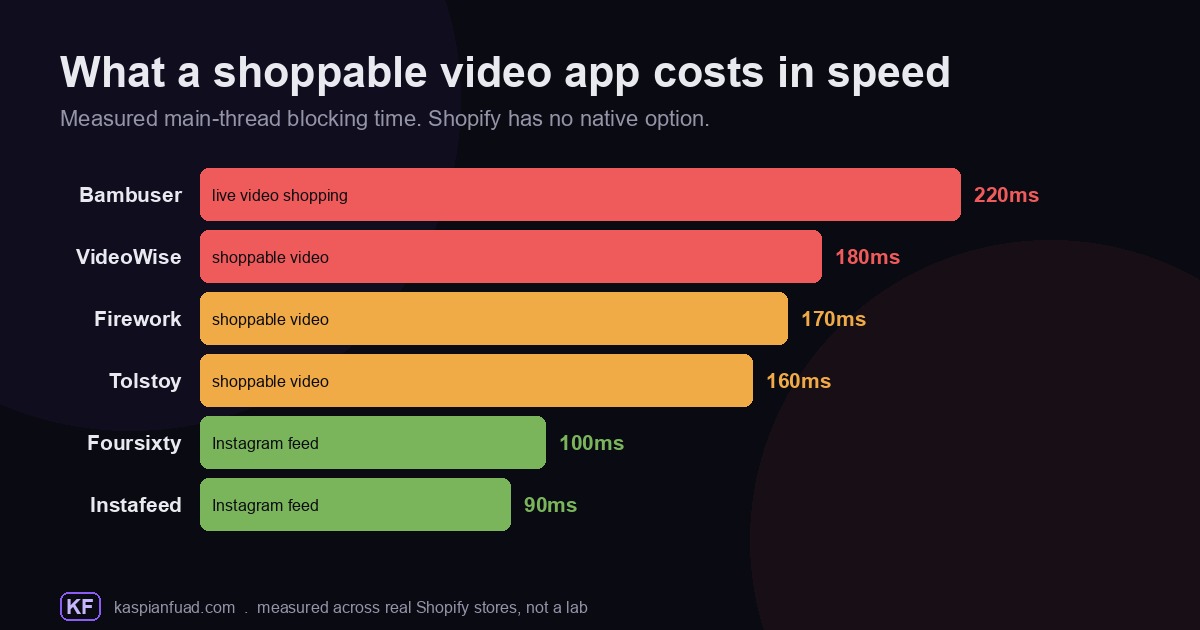
TL;DR: Shoppable video vendors all say the same thing: their app will not slow your store down. So I measured them. Bambuser added 220ms of blocking time, VideoWise 180ms, Firework 170ms, Tolstoy 160ms, while the lighter Instagram-feed apps Foursixty and Instafeed sat at 100ms and 90ms. Firework’s own site says “Zero Impact on Performance.” A video player is never zero. Here is what each one costs in speed and subscription, and how to add video without wrecking your Core Web Vitals.
Video is where the money is going. US social commerce is forecast to pass $100 billion in 2026, up roughly 18% year over year, with short-form shoppable video reported as the format driving that growth. So every store owner eventually asks the same question: which app puts clickable video on my product pages, and what does it cost me. The subscription is the easy part to compare. The part nobody publishes is what the player does to your load time. That number is my whole reason for writing this.
Does Shopify have shoppable video built in?
Sort of, but almost certainly not where you want it. Shopify does have a native shoppable video feature, and it lives in the Shop app and Shop Store, plus connected channels like TikTok, YouTube and Meta. There you can tag up to 10 products per video, and it shows in the Shop home feed and Shop Store. That is a real feature, but it is Shopify’s own consumer app, not your storefront.
Your actual online store theme is a different story. Shopify lists exactly three native media types for a product: images, video, and 3D models. The video is playback only, streamed at up to 1080p or embedded from YouTube and Vimeo. There are no clickable product tags, no hotspots, no in-video add to cart. If you want a shopper to watch a Reel on your PDP and tap a product inside it, you need a third-party app. The proof is the market itself: Shopify runs a dedicated Video and livestream category with 160 apps, which is not a marketplace that would exist if the feature shipped in the theme. That is 160 third-party apps filling one gap Shopify leaves open in your storefront.
So the real question is not native versus app. It is which app, and what it costs you when it loads.
What does a shoppable video app cost you in speed?
I keep a library of Shopify apps with their measured main-thread blocking time, the proxy for how much an app delays a shopper’s next tap. Here is where the video apps land.
| App | What it is | Blocking time | Cheapest paid | Rating |
|---|---|---|---|---|
| Bambuser | Live and shoppable video | 220ms | $79/mo | 5.0 (3) |
| VideoWise | Shoppable video and UGC | 180ms | $9/mo | 4.9 (217) |
| Firework | Shoppable video, UGC, live | 170ms | $39/mo | 5.0 (43) |
| Tolstoy | Shoppable video and UGC | 160ms | $19/mo | 4.7 (237) |
| Foursixty | Instagram and UGC galleries | 100ms | $90/mo | 4.9 (127) |
| Instafeed | Instagram feed and Reels | 90ms | $8/mo | 4.9 (1,934) |
The pattern is not an accident. A video player is heavier than an image gallery because it does more work on the page. Google’s own guidance on third-party JavaScript is blunt about the mechanism: too much JavaScript that keeps the main thread busy can block DOM construction and delay page rendering. A shoppable video app ships its own script bundle, boots the player, parses its code, wires up a tap handler for every clickable hotspot, and starts streaming. All of that competes for the main thread, the same thread the browser needs to answer the shopper’s next tap. That delay is exactly what Interaction to Next Paint measures, and good INP is 200ms or less.
There are two more ways video hurts your Core Web Vitals. If an autoplaying video sits above the fold, its poster image or first frame becomes a Largest Contentful Paint candidate, so a slow player pushes your LCP past the 2.5 second line. And a widget that injects itself and resizes after the page has settled causes layout shift, which Google names directly as “third-party ads or widgets that dynamically resize themselves.” That is a CLS penalty you can see and feel.
Do shoppable video apps really have zero performance impact?
Here is where the marketing gets interesting. Firework’s product page says its video is “Optimized for Speed, Zero Impact on Performance.” VideoWise’s guide says it uses “asynchronous small-sized .JS scripts of just 37kb” and its App Store listing states “No impact on site speed.” Moast advertises a 6KB widget that is “smaller than most images on your site,” loading “without slowing down page load or layout stability.”
None of those numbers is a lie. The scripts really are small, and a 6KB or 37KB file downloads in a blink. The problem is that download size is not the number that decides your Core Web Vitals score. A small script tag is just the doorway. The cost arrives after the download, when the player initializes, streams video, and runs its logic on the main thread. That is why I measure blocking time and not kilobytes. VideoWise’s script may be 37KB, but I measured the running app at 180ms of blocking time. The KB figure is real. It is simply the wrong metric to reassure you with.
This is the same pattern I found with popup apps: the apps that market themselves as fast are sometimes lighter, but “async” and “small script” describe the download, not the work. Loading a player asynchronously keeps it off your first paint, which is genuinely good. It does not make the player free once a shopper scrolls to it.
Tolstoy vs VideoWise vs Firework vs Bambuser: price and speed
These four are the full shoppable video platforms. Here is how they actually differ.
Tolstoy is the most flexible on price and the lightest of the four at 160ms. It has a free forever plan for Shop videos, then Shoppable Plus at $19 a month for 5,000 monthly impressions, with bundles climbing to $199 for higher volume and AI features. It carries a 4.7 rating across 237 reviews, the deepest review count of the four. If you want to test shoppable video without a budget conversation, this is the softest on-ramp.
VideoWise is the confusing one to price, so read carefully. Its Shopify App Store listing starts its paid plan at $9 a month for 5,000 widget impressions. But the company’s own website sells a broader video-commerce platform where the comparable shoppable video tier is $239 a month and up, with a full bundle around $639. Same brand, two very different price ladders depending on which door you walk through. At 4.9 stars across 217 reviews it is well liked, and I measured it at 180ms. Just know that the cheap App Store number and the enterprise platform number are both real.
Firework is the live-and-shoppable hybrid. Its free Pilot plan covers 1,000 monthly views, Starter is $39 a month for 10,000 views, and Growth jumps to $259 a month for 50,000 views, with Enterprise pricing reserved for stores over a million monthly visitors. It has a perfect 5.0 rating but only 43 reviews, so the sample is thin. I measured it at 170ms.
Bambuser is built for live shopping first, which is why it was the heaviest at 220ms: a live stack carries real-time streaming machinery that an on-demand player does not. It is free up to 250 views, then Essential is $79 a month. It shows a 5.0 rating, but from just 3 reviews, so treat that as early days. If you are not actually running live sales events, this is more app than you need, and more weight.
What is the lightest shoppable video app for Shopify?
If what you really want is shoppable UGC carousels rather than a full video-commerce platform, three lighter apps do that job for less.
Instafeed was the lightest thing I measured in this whole set at 90ms, and it carries Shopify’s Built for Shopify badge and a huge 4.9 rating across 1,934 reviews. It is free for a single feed, $8 a month for the Pro tier, and $20 for Plus with auto-tagging and UGC. For most stores that just want Instagram Reels shopping on the homepage, this is the sensible default.
Moast advertises a 6KB widget that loads after your theme, lazy-loads video only when it scrolls into view, and claims to keep CLS stable. It has a free forever plan and a single $15 a month Pro tier, a 5.0 rating across 305 reviews, and a Built for Shopify badge. I have not put it through my own measurement yet, so I am quoting its claims, not my numbers. On paper it is one of the more specific and checkable performance claims in the category, since it names the load behavior you can verify yourself, but test it on your own store.
Foursixty is the premium end of this group. There is no free tier, only a trial, and pricing starts at $90 a month, rising to $300 and $500 for Reels, TikTok, ambassador shops and Klaviyo. It measured 100ms. It is aimed at brands running serious influencer and UGC programs, and it is priced like it.
How to add shoppable video without wrecking Core Web Vitals
The app is only half the outcome. Placement decides the rest.
- LCP slot: keep autoplay video out of it. If a video sits at the top of your PDP or homepage, its first frame competes to be your Largest Contentful Paint. Put a fast image there and place video lower.
- Lazy-load below the fold: every app here can defer the player until a shopper scrolls to it. That keeps the 160ms to 220ms cost off your first paint, where it hurts most.
- Reserve space: a player that pops in and pushes content down is a CLS penalty. Give it a fixed container so the layout does not jump.
- One app, not three: stacking a video app, a UGC app and a reviews app triples the main-thread cost. Pick the one that earns its keep.
- Measure after install: check your INP in the field, not just a lab score. If it crosses 200ms, the video is a suspect.
If you want to sanity-check any of these before you install, run the app through my App Bloat Detector, which carries the measured blocking time and pricing behind this post, or read the wider Shopify app bloat report for how the video category compares to everything else. And if your store is already slow, start with the fundamentals in how to speed up your Shopify store before you add anything new.
Download the Shoppable Video App Cheat Sheet (PDF)
The takeaway
- Shopify has native shoppable video in the Shop app, but not in your storefront theme. On-site clickable video needs a third-party app, which is why 160 of them exist.
- I measured every full video player heavier than an image gallery: Bambuser 220ms, VideoWise 180ms, Firework 170ms, Tolstoy 160ms. The Instagram-feed apps Foursixty and Instafeed were lighter at 100ms and 90ms.
- “Zero impact on performance” and a “6KB widget” describe the download, not the work. A player is never zero once it boots and streams. Measure blocking time, not kilobytes.
- Match the app to the need: Tolstoy for a free on-ramp, VideoWise or Firework for a full platform, Instafeed or Moast for lightweight UGC carousels, Bambuser only if you actually run live sales.
- Placement decides your Core Web Vitals: keep autoplay video out of the LCP slot, lazy-load below the fold, reserve space to stop layout shift, and measure INP after install.
I measure these apps myself because vendors will publish a kilobyte count but never their blocking time. If you want the number for an app I have not covered, tell me and I will run it.