

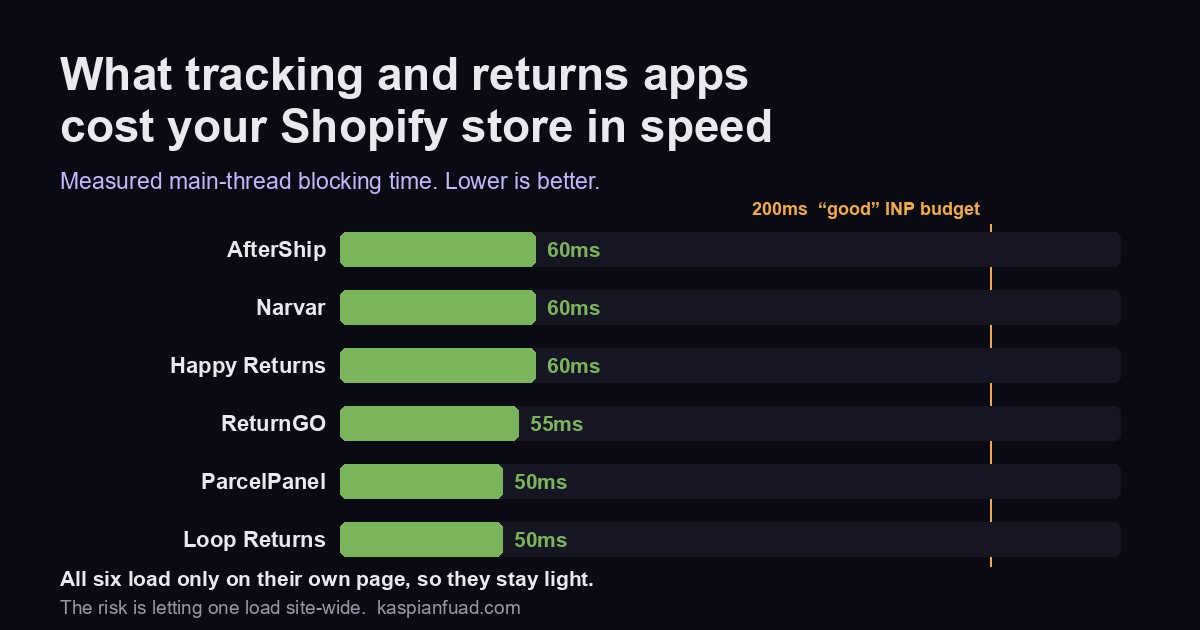
TL;DR: I usually measure Shopify apps to show you how much they slow your store down. This category is the exception. Every order tracking and returns app I measured lands between 50ms and 60ms of blocking time, among the lightest in my library, because a tracking or returns page only needs to load on its own page. There is one catch, and it is a single toggle. Here is which app to run, what each costs, and the setting that turns a light app heavy.
Returns are a bigger number than most merchants realize. The National Retail Federation projects US shoppers will return nearly $850 billion of merchandise in 2025, about 15.8% of sales, and 82% of consumers say free returns shape where they shop. On the front end of that same journey, “where is my order” tickets are an industry-cited 25% to 40% of inbound support volume. So a tracking app and a returns app are two of the first tools most stores add. The good news for your Core Web Vitals is that they are cheap in speed. The trap is how you install them.
Does Shopify have order tracking and returns built in?
Both, and more than merchants assume. For tracking, Shopify’s order status page auto-recognizes tracking numbers from hundreds of carriers, including UPS, FedEx, DHL, Canada Post and EVRi, shows live location for supported carriers, and emails updates. The Shop app adds a live map. Where native stops: there is no fully branded tracking page under your theme, no SMS, and no upsell block on the tracking page. That gap is the entire pitch for AfterShip, ParcelPanel and Narvar.
For returns, Shopify has native self-serve returns under Settings then Customer accounts, plus return rules for the return window, restocking fees, and final-sale items. What native returns do not do is exchanges, instant store-credit exchanges, automated approval workflows, carrier rate shopping, or physical return-bar drop-off. That is where Loop, ReturnGO and Happy Returns come in.
So for a lot of stores the honest first question is not which app, it is whether you have outgrown native yet. If you only need a tracking number shown and a basic return request, native covers it for free. The apps below earn their money on branding, exchanges, and automation.
What do tracking and returns apps cost you in speed?
I keep a library of Shopify apps with their measured main-thread blocking time, the proxy for how much an app delays a shopper’s next tap. Here is where the post-purchase apps land, and this table looks different from every other one I publish.
| App | Type | Blocking time | Cheapest paid | Rating |
|---|---|---|---|---|
| AfterShip | Tracking | 60ms | $11/mo | 4.7 (1,303) |
| Narvar | Tracking | 60ms | Quote only | n/a |
| Happy Returns | Returns | 60ms | $500/mo | 3.1 (23) |
| ReturnGO | Returns | 55ms | $147/mo | 4.8 (357) |
| ParcelPanel | Tracking | 50ms | $11/mo | 5.0 (2,865) |
| Loop Returns | Returns | 50ms | $155/mo | 4.7 (408) |
Nothing here breaks 60ms. For context, the shoppable video apps I measured recently ran 160ms to 220ms, and the popup apps 80ms to 150ms. Post-purchase apps are light for a structural reason: a tracking page and a returns portal are needed on exactly one page, so a well-built app loads its code only there, or serves the whole experience from a hosted portal on its own domain that touches your theme almost not at all. Loop and Happy Returns typically run as a hosted portal rather than a theme embed, which keeps storefront JavaScript close to zero.
That is the good news. The number in the table is what these apps cost when they behave. The rest of this post is about the setting that makes them misbehave.
AfterShip vs ParcelPanel: which order tracking app?
Both give you a branded, hosted tracking page under your own domain, so both stay page-scoped and light.
ParcelPanel measured the lightest tracking app at 50ms and carries the strongest social proof in this whole set: 5.0 stars across 2,865 reviews, with a Built for Shopify badge. It starts free for 20 orders a month, then Essential is $11 a month for 200 orders, Professional $59 a month for 2,000, and a published Enterprise tier at $479 a month for 25,000. One naming note that trips people up: ParcelPanel is now listed on the App Store as CWILL Order Tracking (briefly ParcelWILL) after its parent company rebranded, but the app, the URL, and the review history are unchanged. Most people still search “ParcelPanel.”
AfterShip is the incumbent and the most recognized brand here: 4.7 stars across 1,303 reviews, also Built for Shopify, measured at 60ms. It starts free for 50 shipments a month, then Essentials is $11 a month and Premium $70 a month. The hosted tracking page runs through a Shopify App Proxy, so it renders under your domain and stays page-scoped. One thing to watch with AfterShip specifically: its separate Protection widget (shipping insurance at cart) installs as a raw site-wide script, which is a different footprint from the tracking page. Add it deliberately, not by default.
Narvar is the enterprise pick. Its real tracking product is sold through a demo, not self-serve, and its App Store presence is split into a free backend Order Sync app and a separate returns app, so its tracking product carries no single App Store rating. Measured at 60ms. Unless you are a large brand that needs Narvar’s post-purchase platform, AfterShip or ParcelPanel will serve you at a fraction of the cost and complexity.
Loop vs ReturnGO vs Happy Returns: which returns app?
Returns apps are a different budget conversation. Where tracking starts at $11 a month, returns apps start at ten times that.
Loop Returns is the DTC favorite: 4.7 stars across 408 reviews. It is the only one here with a real free tier, Checkout+ at $0, which includes the returns software plus US and Canada return labels and package protection. Paid tiers jump to $155 a month for Essential and $340 for Advanced. Loop typically serves its return flow from a hosted portal on its own subdomain rather than embedding in your theme, which keeps its storefront footprint light. I measured it at 50ms.
ReturnGO is the highest-rated returns app at 4.8 stars across 357 reviews, with strong exchange and store-credit automation. There is no free plan, only a 14-day trial, and it starts at $147 a month. It measured 55ms, but it is the one app here whose core script loads site-wide by default, which is the next section.
Happy Returns, now a UPS company, is built around physical return bars where shoppers drop off box-free returns. It is a single $500 a month plan with external per-label charges on top, and it carries the weakest App Store signal here at 3.1 stars across just 23 reviews. Measured at 60ms. It is an operations decision more than a software one, and it suits brands with real reverse-logistics volume.
Why do some tracking and returns apps load site-wide?
Here is the catch I promised. Shopify apps add their storefront code through theme app extensions, and there are two kinds. An app block is placement-based: a merchant drags it onto one template, and its code loads only there. That is the page-scoped, low-risk pattern, and it is why the numbers above are so low. An app embed is different: it injects before the closing </head> or </body> tag and is controlled by a single on-or-off toggle. Once that toggle is on, the script runs on every page of your store by default, the homepage, the product page, the cart, unless the developer scoped it.
This is not hypothetical. ReturnGO’s own help center states that its script loads site-wide by default, to power features like its cart widget and store-credit widget. So the 55ms I measured is the per-page cost, and site-wide you pay it on the homepage and product page too, the pages that carry your LCP hero image and your add-to-cart button. AfterShip’s Protection widget is the same shape, a raw script that lands wherever you paste it. None of that means these are bad apps. It means the install is a Core Web Vitals decision, not a checkbox, and Google’s own guidance is blunt that shipping non-critical JavaScript on every page is the pattern to avoid.
The rule I follow: a returns or tracking experience belongs on its own page, so it should load on its own page. If an app ships as a global embed, scope it, or turn the embed off everywhere except where it is needed. And whatever you do, do not leave a test embed switched on across the whole store after you finish testing it. That is the single most common way a 50ms app becomes a 50ms tax on every page load.
How to add tracking and returns without hurting Core Web Vitals
- Native first: Shopify’s order status page and self-serve returns are free and add zero third-party script. Reach for an app when you need branding, SMS, exchanges, or automation, not before.
- Page-scoped or hosted: an app block on the tracking or returns template, or a hosted portal on the app’s own domain, keeps the cost off your storefront. Loop and Happy Returns are hosted; ParcelPanel and AfterShip render page-scoped tracking pages.
- Audit the embed toggle: if the app installs a global embed, confirm whether it is scoped to one page. ReturnGO loads site-wide by default, so scope it or accept the cost everywhere.
- Do not stack: a tracking app, a returns app, an upsell app and a loyalty app, all as site-wide embeds, pay the cost four times over. Run what you need and measure the total.
- Measure after install: check your field data, not just a lab score. These apps should not move your numbers if they are page-scoped. If they do, an embed is leaking site-wide.
If you want to sanity-check any app before you install, run it through my App Bloat Detector, which carries the measured blocking time and pricing behind this post, or read the wider Shopify app bloat report to see how post-purchase compares to heavier categories. And if your store is already slow, start with the fundamentals in how to speed up your Shopify store before adding anything new.
Download the Tracking & Returns App Cheat Sheet (PDF)
The takeaway
- Shopify covers the basics free: the order status page tracks hundreds of carriers, and native self-serve returns handle simple requests. Apps earn their money on branding, SMS, exchanges, and automation.
- Post-purchase apps are the lightest category I measure, all 50ms to 60ms, because tracking and returns only need to load on one page. ParcelPanel and Loop measured lightest at 50ms.
- Tracking is cheap, returns are not: AfterShip and ParcelPanel start free then $11 a month, while Loop starts free then $155, ReturnGO from $147, and Happy Returns at $500.
- The catch is the app-embed toggle. ReturnGO loads site-wide by default, and any embed left on runs on every page. Scope it to one page or pay the cost everywhere.
- Install like it matters: native first, page-scoped or hosted, no stacked embeds, and measure INP in the field after you switch it on.
I measure these apps myself because the App Store shows you a rating, not a blocking time, and the number that decides your Core Web Vitals score is the one nobody publishes. If you want the measurement for an app I have not covered, tell me and I will run it.