

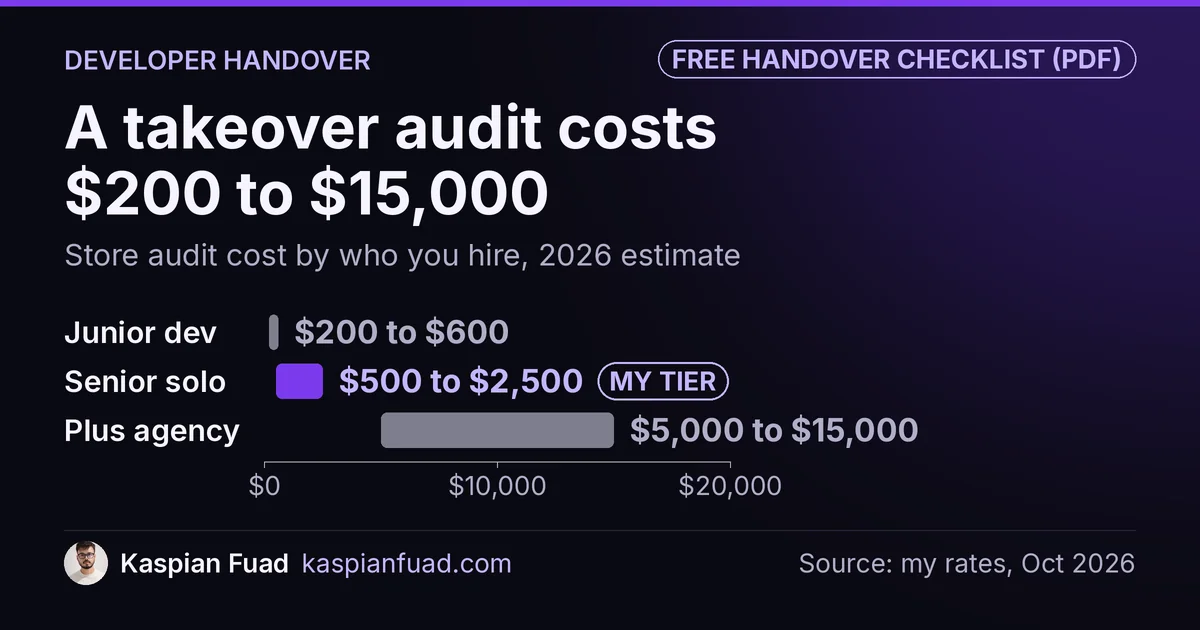
TL;DR: Before you let a Shopify developer go, collect four things while they still answer email: store ownership in your name, the theme code in a GitHub repository you own, a list of every app, script and pixel they added, and admin access to every account in their name. Have the new developer audit before the old one leaves. A store audit costs $200 to $15,000, depending on who you hire.
On a Shopify Plus B2B store I audited, the contractor handoff doc carried one instruction that cost more than any missing file: “leave notes in comments.” The next developer did, in HTML comments, and wholesale margin notes ended up in view-source under every variant’s price.
This is for a store owner about to switch developers or fire an agency. Most handovers stop at passwords. The expensive gaps sit in code ownership, hand-pasted scripts, and accounts that quietly live under someone else’s login. Below is the list to collect, the order to switch in, and what a takeover costs. One honest limit: a checklist can’t make an uncooperative developer cooperate. If the relationship has already broken down, start with the contract.
Download the Shopify developer handover checklist (PDF)
Why this matters for your store
- Code your developer wrote may legally stay theirs unless your contract assigns it to you.
- Scripts and pixels pasted by hand keep running, and sometimes keep billing, after the person who added them is gone.
- An account registered under the old developer’s email can lock you out of your own tracking data or domain renewal.
What should I get from my Shopify developer before I let them go?
Get everything that would be hard to rebuild without them. Here’s the list I ask for on every store I take over, and where each item lives.
| What to collect | Where it lives | Why it bites after they leave |
|---|---|---|
| Store ownership | Settings, Users | Only the store owner can change ownership |
| Theme code and history | A GitHub repository | A repo under their account holds your edit history |
| Unpublished themes | Online Store, Themes | Nobody knows which copy holds the real work in progress |
| App list and who pays | Settings, Apps, plus vendor invoices | Off-Shopify subscriptions keep billing |
| Code pasted by hand | theme.liquid, snippets, Customer events |
No uninstall ever removes it |
| Custom app source | Your admin or their developer account | You can’t fix an app whose code you don’t have |
| Tracking and email accounts | GA4, Tag Manager, Meta, Klaviyo | Only an admin can add or remove users |
| Domain registrar login | Your registrar | Renewal notices go to whoever registered it |
| Notes on fragile files | A short written doc | The next developer breaks what nobody wrote down |
Three of these trip owners up more than the rest.
Ownership first. Shopify’s ownership guide says only the store owner can change it, and the new owner must already be a user on the store. Shopify’s collaborator account docs add that you can’t transfer ownership to a collaborator at all. If an agency set the store up and still holds the owner seat, fix that before anything else.
Code second. Shopify’s GitHub integration syncs both ways: edits in the admin get committed back to the connected branch. That’s great when the repository is yours. When it sits in the agency’s GitHub organization, every commit history, branch and note leaves with them. Ask them to transfer the repository, or at minimum push a full copy to one you own.
Unpublished themes third. A store can hold 20 themes, and older stores tend to fill the list. Ask the developer to name each one: live, staging, abandoned, or a backup from a specific date. Without that, the next person can’t tell which “Copy of Dawn” holds three weeks of unfinished work.
Do I own the code my Shopify developer wrote?
Only if your contract says so. I’m not a lawyer, so treat this as the question to take to one, not the answer.
The US Copyright Office’s Circular 30 on works made for hire lists nine categories of commissioned work that can count as made for hire, and only with a signed written agreement. Software isn’t one of them. So a custom section, a Liquid snippet or an app built by a freelancer usually needs an explicit assignment clause to become yours.
Agencies often keep the rights to reusable pieces they bring from project to project and license them to you instead. That’s normal. What matters is that the license survives the end of the contract and lets another developer edit the code. Read the contract for words like “license”, “proprietary framework” or “retained IP” before you send the termination email, not after.
It’s the same question owners should ask on day one, and it’s question 11 in my 12 questions to ask before hiring a Shopify developer: who owns the code when we’re done?
What do new developers find when they take over a Shopify store?
Usually things the previous team never mentioned, because they’d forgotten them too. Here’s what turned up in first audits on stores I’ve worked on.
- On Everly, a supplement brand, a landing page pointed at 3 variant IDs that no longer existed. The product had been recreated at some point and nobody updated the page.
- On a DTC dog gear store, a script from an app Shopify removed in 2019 still loaded on every product page, and two disconnected app pixels still billed about $26 a month.
- On Enea Studio, the first crawl found 0 of 679 pages with a correct H1 hierarchy, plus 25,285 collection-scoped duplicate product links.
- On Shopify Plus, I found leftovers in the old checkout setup on 11 of 14 checkouts I audited in one quarter.
- I found notes in HTML comments on 4 themes I audited in 2025 and 2026, which is the Liquid comments problem from the opening.
None of that shows up in a password handover. It shows up when someone compares what the store loads against what the business pays for and uses. On the average store I audit, 6 of the 14 third-party script domains belong to apps nobody uses anymore. My leftover app code guide walks through that check.
The fragile-file note matters just as much. On Factory Direct Blinds, we documented 8 separate incidents where a change to one product builder file broke the live or staging site. Each one got a written “never do this” rule. That doc is worth more to the next developer than any login.
In what order should I switch Shopify developers?
Switch in an order that never leaves the store without someone who understands it.
- Read the contract. Find the notice period, the code ownership clause and anything about retained IP.
- Secure ownership and accounts. Move the owner seat, the domain and tracking admin roles to you while the relationship is still friendly.
- Get the code. Repository transferred, plus a list of every theme and what it is.
- Get the inventory. Apps, who pays for each, scripts pasted by hand, custom apps and where their source lives.
- Bring the new developer in. Let them audit a duplicate theme with the old team still on call for questions.
- Test the money paths. Product page, cart, checkout, discounts, subscriptions, order emails and tracking on mobile.
- Remove the old access last. Then rotate any API tokens they could have seen.
Step 5 is the one owners skip. Firing first feels cleaner. In practice it means the first time something breaks, the only person who knows why is the one you just let go.
How do I remove the old developer’s access without breaking anything?
Check what’s tied to their account before you click remove. Shopify’s collaborator docs are blunt about it: “You can’t undo this action.” The developer would have to send a fresh access request to get back in.
Custom apps are the usual trap. Shopify’s custom apps guide says a legacy custom app created in the admin is associated with a staff or collaborator account, which you can see on the app’s settings page. Shopify’s app distribution docs confirm those admin-created apps can’t be made anymore, but existing ones keep working. So check which account each custom app points to, and get its source code, before that account disappears.
Do the same outside Shopify. Google’s GA4 user management help says you need the Administrator role to add or remove users, so make sure you hold it before you remove theirs. Then check Settings, Customer events for pixels they added, and your GitHub organization for their access.
If tracking breaks during the switch, sales can look like they’ve dropped when they haven’t. My guide to sales dropping after a theme change covers how to tell a reporting gap from a real drop.
What does it cost to take over a Shopify store from another developer?
A takeover audit is priced like any store audit. These are the ranges from my Shopify expert cost guide, where rates also lean on Lemon.io’s 2026 rate data.
| Who you hire | Typical hourly | What an audit costs |
|---|---|---|
| Junior or offshore developer | $15 to $35 | $200 to $600 |
| Senior freelance expert | $48 to $74 | $500 to $2,500 |
| Shopify Plus agency | $100 to $250 blended | $5,000 to $15,000 |
| Me | $50 | $500 fixed scope |
The audit is only the start. What follows depends on what it finds: a clean store needs a few hours of setup, while a store with stale variant IDs, hardcoded prices and dead scripts needs a fix list. Ask for that list with hours per item before you approve any of it.
For ongoing work after the takeover, compare a maintenance retainer against hourly billing. My $500 audit runs 2 to 3 days and ends with that fix list, on the engagements page.
How do I check the handover is complete in 5 minutes?
- Open Settings, then Users. Confirm you’re the store owner and every remaining account belongs to someone still working on the store.
- Open Online Store, then Themes. Confirm every theme has a name that says what it is, and the live theme’s code exists in a repository you own.
- Open a product page, press Ctrl+U, and search for
<script src=. Every domain you see should match an app you pay for and use.
If any of the three fails, the handover isn’t done, whatever the termination email says.
The takeaway
- Secure store ownership, the domain and tracking admin roles before you announce the switch.
- Collect the theme code into a GitHub repository you own, with a named list of every theme.
- Read the contract for code ownership and retained IP before the termination email goes out.
- Bring in the new developer to audit while the old one can still answer questions.
- Remove the old access last, then rotate any tokens they could have seen.
I’m Kaspian Fuad, a Shopify developer and CRO consultant. If you’re switching developers and want someone to take over cleanly, send me your store URL and I’ll tell you what the audit would cover.