

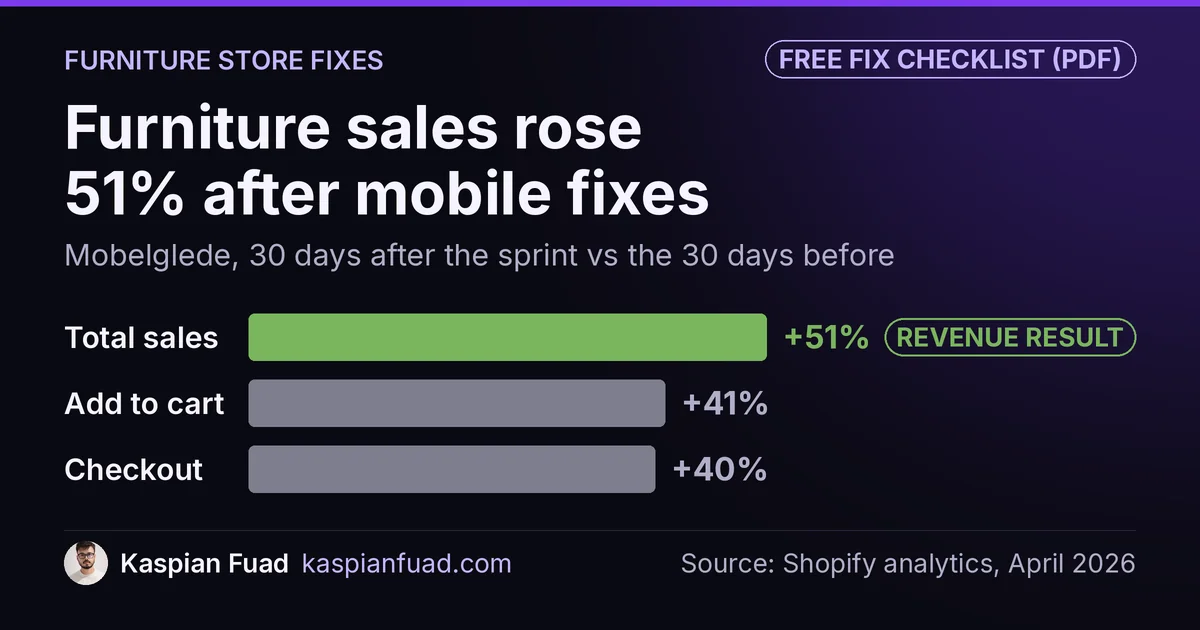
TL;DR: A furniture store needs a Shopify developer who fixes the mobile buy path, delivery cost and fit confidence before anyone talks about a redesign. On Mobelglede, a used Scandinavian furniture store, that order came before add-to-cart up 41% and sales up 51% in 30 days. On a made-to-measure blinds store, mobile LCP fell from 22.0s to 2.7s. Budget $500 for the audit, then hourly fixes.
Mobile shoppers on a made-to-measure blinds store added to cart at a rate 62% below desktop shoppers. Same products, same prices. The builder had been designed for a wide screen, so on a phone the touch targets were tiny and the price hid behind extra taps.
If you sell furniture or home goods on Shopify and you’re about to hire a developer, this is the fix order from two stores I’ve worked on, plus what the work costs and what to ask before you sign. One honest limit: fixing the store won’t fix the traffic. On the furniture store, once the on-site leaks closed, cheap Meta clicks became the next bottleneck.
Download the Shopify furniture store fix checklist (PDF)
Why this matters for your store
- Furniture orders are large: Mobelglede’s pieces ran about $500 to $3,000, so every shopper who leaves takes a big order with them.
- Furniture buyers can’t sit on the product, so the page has to answer size, condition and delivery before they’ll commit.
- Big photo galleries and configurators make furniture pages heavier than almost any other product type, which costs you on mobile first.
What should a Shopify developer fix first on a furniture store?
Two stores shaped this list. Mobelglede is a Norwegian marketplace for used and vintage Scandinavian furniture, every piece one of a kind, priced roughly $500 to $3,000. Factory Direct Blinds is a US store selling made-to-measure window blinds through a custom product builder. One sells finished pieces, one sells built-to-order ones, and that covers most of the furniture and home goods category.
Here’s the order I’d work in on any furniture store:
| Order | Problem | What I found | Fix |
|---|---|---|---|
| 1 | Mobile buy path | 56% of mobile taps went to popups; 21% left before Add to Cart | Popups off product pages, shorter gallery, sticky button |
| 2 | Delivery cost | Hidden until checkout | Every delivery option priced on the product page and in the cart |
| 3 | Fit confidence | No measuring help at the point of anxiety | Dimension images, measuring guides, a remake guarantee |
| 4 | Configurator on mobile | Add-to-cart gap of 62% versus desktop | Step-by-step builder with 44px touch targets |
| 5 | Speed | Mobile LCP of 22.0s | Image sizing, deferred scripts, builder code on product pages only |
The order follows the money. A shopper who never sees the button can’t be persuaded by anything below it, so the buy path comes first. Speed sits last only because the first four are cheaper and faster to ship, not because it matters less. And the product page is where most stores fall short: Baymard’s product page benchmark of 344 sites rates about half of them mediocre or worse.
Why do furniture shoppers leave before they see Add to Cart?
Before writing any code on Mobelglede, I installed Microsoft Clarity and let it record real sessions. Furniture stores need this more than most. 75% of Mobelglede’s traffic came from phones, and 56% of sessions arrived through Meta’s in-app browser, where a page that works fine on a laptop often falls apart.
The scroll map answered the first question. 21% of mobile visitors were gone before the scroll depth where the Add to Cart button sat, because product photos filled the whole screen and pushed everything below them. The tap map answered the second. 56% of all mobile taps went to a full-screen cookie modal and an email popup. Shoppers were spending their session closing boxes.
The fixes were plain, and none of them was a redesign:
- The cookie modal became a small bottom bar, and the email popup stopped firing on product pages, where it had produced zero signups.
- Mobile images were capped in height, which saved about 220px of scroll on a 390px iPhone.
- A sticky Add to Cart bar appeared once the main button scrolled away.
- The Buy Now button came out, leaving one clear action for a 10,000 NOK purchase.
The popup finding isn’t unique to furniture. I measured the same pattern on other stores in why popups kill Shopify conversions. Furniture just pays more for it, because the order you lose is a sofa, not a phone case.
How do you answer “will it fit?” on a Shopify product page?
Fit is the question that kills furniture sales quietly. Baymard’s 2026 furniture and home decor survey of 1,598 US shoppers found 49% call written dimensions essential to deciding whether a piece fits their space, and 42% say the same about dimension images. Its dimensions image research explains why text alone fails: in testing, almost all participants struggled to connect written measurements to the parts of the product they described.
So a developer on a furniture store should build three things into the product template:
- A dimension image slot, with each measurement drawn on the piece and text big enough to read on a phone without zooming.
- At least one in-scale photo, a person or a known object next to the piece. Baymard’s in-scale image study found 42% of users try to judge size from product images.
- Condition or material details first and open by default, not buried in the fourth accordion.
On Mobelglede, condition was the fit question, because every piece is used. The condition accordion moved to first position and opened by default, and a colored condition badge went above the product title. Clarity recordings had shown shoppers returning to the About and Return Policy pages again and again, which is what a buyer who wants to buy but doesn’t trust you yet looks like.
Made-to-measure pieces have a sharper version of the same fear: what if I measure wrong? On Factory Direct Blinds, I built measuring guides for each product type, openable without leaving the builder, and a MeasureSafe guarantee offered as a checkbox at the exact step where the shopper types in the width and height. It promises a free remake if the customer measures wrong. The guarantee sits where the anxiety peaks, not in the cart where it’s too late.
Why should delivery cost sit on the product page?
Mobelglede hid delivery costs until checkout. For a 15,000 NOK piece, that’s the moment a shopper finds out whether the price they’ve been weighing is the real one. Baymard’s furniture survey ranks delivery costs and logistics details among the most important factors for home goods shoppers.
The fix printed every option on the product page: home delivery 990 kr, PostNord 590 kr, free pickup in Bergen. The same three lines went into the cart drawer, next to a trust bar with the 14-day return policy. A one-line Klarna message also went directly under the price, because installment framing changes how a 10,000 NOK price feels without changing the price.
Add-to-cart rose 41% and checkout 40% from March 14 to April 12, 2026, against the 30 days before. That was the whole sprint, not delivery cost alone, so I won’t credit any single change. The full story is in the 51% sales lift sprint write-up.
How do you rebuild a furniture configurator without breaking live products?
This is where hiring the wrong developer gets expensive. Factory Direct Blinds ran on a legacy product builder of 6,221 lines of jQuery, and every product type depended on it. Over the engagement I logged 8 separate incidents where a change to that one file broke the live or staging site: a slider that lost its dependencies, a pricing tooltip that created invalid HTML, room photos forced into square boxes.
The rebuild never touched the old builder. Shopify themes allow alternate templates of the same type, so the new builder shipped on its own product template and went onto 12 new supplier products first. The 6 existing product types stayed on the legacy builder, untouched. If the new one broke, rollback meant reassigning a template, one click.
The new builder also fixed the mobile gap. Options appear one step at a time (material, color, size, mount, extras), the price updates live, and every touch target is at least 44px. If you’re comparing a custom build with an app, my Shopify product configurator guide shows what the native approach involves.
Ask any developer you’re considering how they’d roll out a configurator change. “I’ll edit it carefully” is the wrong answer. “On a new template, assigned to a few products, with a one-click rollback” is the right one.
Why are furniture pages slow, and what fixed one?
Furniture pages carry big galleries, room scenes and builder scripts, and on Factory Direct Blinds that added up to a mobile LCP of 22.0 seconds. Google’s line for a good LCP is 2.5 seconds, per web.dev’s Core Web Vitals reference.
| Mobile metric | Before | After |
|---|---|---|
| PageSpeed score | 38 | 81 |
| LCP | 22.0s | 2.7s |
| Total Blocking Time | 2,290ms | 480ms |
| Speed Index | 5.9s | 3.5s |
Four changes did most of it. Above-the-fold images had been lazy-loaded, so they switched to eager. Hero images were capped at 1200px instead of serving 3000px originals. Non-critical app scripts were deferred. And the product builder’s JavaScript and CSS, which loaded on every page including blog posts, now load on product pages only.
That last one is the furniture-specific trap. A configurator is often the heaviest code on the store, and it’s easy to load it everywhere by accident. Ask your developer to check it first.
What does a Shopify developer for a furniture store cost?
I publish my rates, so here they are. A fixed-scope audit is $500, delivered in 2 to 3 days. Fixes bill at $50 an hour. A weekly retainer runs $750 to $1,000 a week, and a monthly retainer of 60 to 80 hours runs $2,700 to $3,600. In my experience, a US Shopify Plus agency bills the same kind of work at $100 to $250 an hour blended.
For scale, Mobelglede started with a 5-day audit that produced 43 findings, then an implementation sprint of 87 commits across 10 tasks. Nobody needed a new theme. My Shopify expert cost breakdown compares rates by region and seniority if you want a second reference point.
Whoever you hire, ask for a fix list with hours per item before you sign. A furniture store’s price depends far more on its configurator and theme than on how many products it carries.
What should you ask before hiring one?
These come from the two stores above, not from a generic list:
- Ask what data they’ll collect before writing code. Listen for heatmaps and session recordings, not “I’ll review the design.”
- Ask where delivery cost will appear, and whether it repeats in the cart.
- Ask how they’d show dimensions, and whether they’d add a dimension image slot to the template.
- Ask how they’d roll out a configurator change, and what rollback looks like.
- Ask which scripts load on pages that don’t need them.
My 12 questions to ask before hiring a Shopify developer covers the general ones, with red-flag answers.
How do you check your own furniture store in 5 minutes?
- Open your best-selling product on your phone. If you can’t see the price and Add to Cart without scrolling past the photos, that’s fix number 1.
- Look for delivery cost on the product page. If the first time a shopper sees it is checkout, that’s fix number 2.
- Run the same page through PageSpeed Insights on mobile and read the LCP in the field data panel. Anything over 2.5s needs work.
Do step 1 today. It takes a minute, and on Mobelglede it pointed at the problem behind a 0.11% mobile conversion rate.
The takeaway
- Fix the mobile buy path first, because shoppers who never see the button can’t buy.
- Print every delivery option and price on the product page and again in the cart.
- Add written dimensions, a dimension image and an in-scale photo to every product.
- Roll out configurator changes on an alternate template with a one-click rollback.
- Load builder code on product pages only, then measure LCP in field data.
I’m Kaspian Fuad, a Shopify developer and CRO consultant. The Mobelglede case study has the full sprint, and the Factory Direct Blinds case study has the builder rebuild. If you run a furniture store, send me your store URL and I’ll tell you which of the five problems to fix first.