

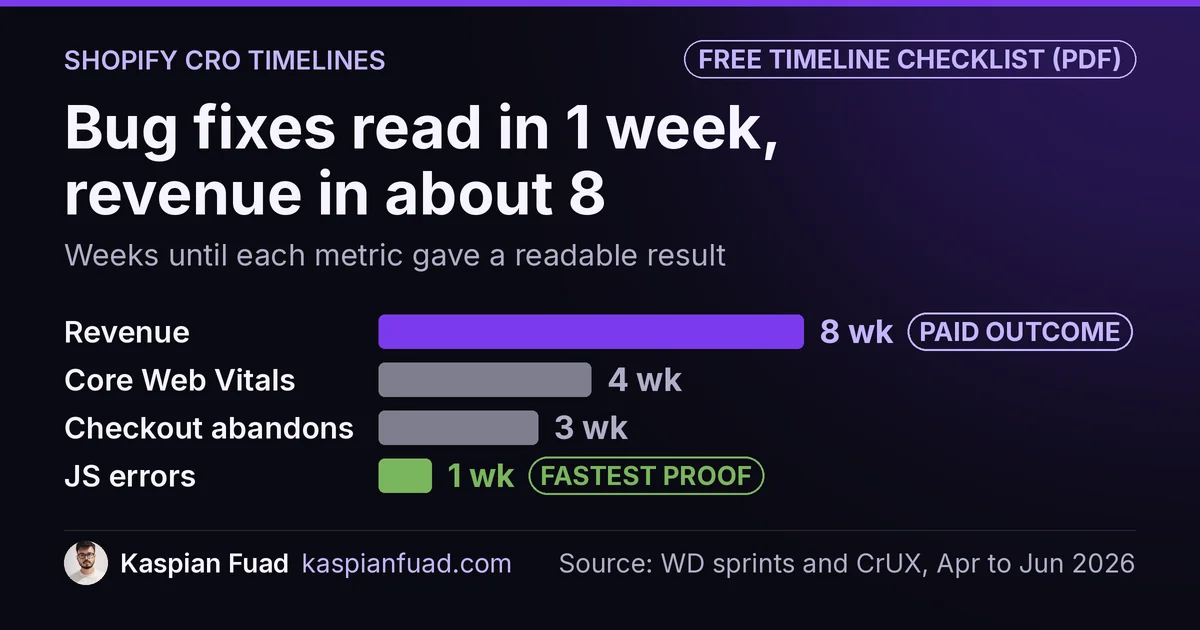
TL;DR: Shopify CRO shows results on three different clocks. Bug and friction fixes show up in about 1 week, funnel rates (added to cart, reached checkout) in 2 to 4 weeks, and revenue only reads cleanly after about 8 weeks on a 4-week rolling window. Core Web Vitals field data lags 28 days, about 4 weeks. Judge a CRO hire on that order, not on week-one sales.
Checkout abandonment on a $450 AOV store fell 13.4 points in the week one undefined JavaScript function got fixed. That same week, conversion moved from 0.73% to 0.81%, a jump too small at that volume to prove anything.
This is for a Shopify owner about to pay for CRO, or a month into it and wondering if it’s working. Read the wrong metric too early and you fire someone mid-fix, or keep paying someone whose “lift” was a good weekend. Below are the timelines from dated sprints on real stores, the traffic math for testing, and what you should see by day 30. One honest limit: none of these stores ran a holdout group, so the reads are before and after, with the caveats named.
Download the CRO results timeline checklist (PDF)
Why this matters for your store
- A CRO retainer at $3,000 to $4,000 a month gets judged after the first invoice, usually on the one number that can’t read yet.
- Stopping a test the day it looks good can hand you a false winner 26.1% of the time, even when the change does nothing.
- Speed fixes take 28 days to show in Google’s field data, so a “no change” report in week two can kill work that already landed.
How long does Shopify CRO take to show results?
It depends on which metric you’re watching, because each one needs a different amount of data before it stops lying. Here’s the timeline I use, built from the WD Electronics sprints and the other engagements I’ve published.
| What you measure | When it reads | What it looked like on a real store |
|---|---|---|
| JavaScript errors, rage clicks | About 1 week | JS error sessions 93.9% to near zero in sprint 2 |
| Checkout abandonment | 1 to 3 weeks | 62.9% to 43.2% in three weeks |
| Added to cart, reached checkout | 2 to 4 weeks | Add to cart +41% in the first 30 days (Mobelglede) |
| Core Web Vitals field data | 28 days | Field INP 580ms to 195ms over 14 days, confirmed by the 28-day window |
| Conversion rate and revenue | About 8 weeks | Reached checkout +30%, gross sales +13% on a 4-week rolling read |
| SEO-driven traffic | Months | No recovery date I’d put in writing |
The pattern is simple. The closer a metric sits to the fix, the faster it reads. A broken button either throws errors or it doesn’t. Revenue sits at the end of the funnel, carries every outside factor (ads, season, stock), and needs the most data before it means anything.
What moves in the first week of CRO?
Bugs and friction. They’re binary, they affect a big share of sessions, and they don’t need a large sample to show.
On WD Electronics, a Shopify Plus store selling $400 to $2,000 UTV kits, sprint 2 ran April 21 to 25, 2026. A theme function called calculatesubtotalwithdiscount was undefined and threw on 190 sessions. Fixing it, plus srcset and lazy loading on product images, moved these in one week:
- JavaScript error sessions went from 93.9% to 41 sessions.
- Checkout abandonment fell from 62.9% to 49.5%.
- Scroll depth rose from 42.16% to 64.55%.
Microsoft Clarity caught most of that, and rage clicks later dropped from 22 to zero. These are the numbers to check in week one. They tell you whether the person you hired is fixing real problems, and they don’t depend on the season or your ad budget.
Conversion rate also moved that week, from 0.73% to 0.81%. I didn’t report it as a win. At that volume, a single week can swing either way on its own.
What moves in weeks 2 to 4?
Funnel step rates. Shopify defines both as sessions with the action divided by all sessions. Added to cart and reached checkout need a few weeks of sessions, but far fewer orders than revenue does, because more visitors take those steps than buy.
WD’s sprint 3 rebuilt the cart drawer with a sticky footer so the checkout button stayed above the fold. Checkout abandonment fell another 6.3 points to 43.2%. That’s 19.7 points in three weeks, and it’s the read I’d trust most from that stretch, since each drop landed in the week its fix shipped.
Mobelglede, a Norwegian used-furniture store, shows the other end. It started at 0.11% mobile conversion, and 56% of all mobile taps went to closing a cookie modal and an email popup. After an 87-commit sprint, the first 30 days against the prior period read: add to cart +41%, checkout completion +40%, total sales +51%. I wrote up the full Mobelglede sprint separately.
Keep one thing in mind. A broken baseline reads fast and big. A healthy store should expect 10 to 20%, and it’ll take longer to see it.
When can you trust a revenue number?
After about 8 weeks, on a 4-week rolling window. That’s the read I give clients, and it’s the one I’d ask any consultant for.
On WD, work started April 12. The first clean read compared May 6 to June 6 against April 4 to May 5, nearly two months in:
| Metric | Value (May 6 to Jun 6) | Change vs prior 4 weeks |
|---|---|---|
| Sessions | roughly flat | +4% |
| Added to cart rate | 2.4% | +28% |
| Reached checkout rate | 1.35% | +30% |
| Conversion rate | 0.62% | +14% |
| Gross sales | $492,184 | +13% |
Why so long? You need two equal windows, and the “after” window has to start once enough fixes are live. Equal-length windows also wash out weekday swings and a lucky weekend. Even then, April to June is riding season for UTV owners, so I lead with the funnel rates, which rose 30% on a 4% traffic rise, rather than the sales line. The full numbers and caveats are in the high-ticket CRO case study.
Why do Core Web Vitals take 28 days to show a fix?
Because Google doesn’t score your store’s Core Web Vitals on today’s visits. The Chrome UX Report is “a 28-day rolling average of aggregated metrics,” updated daily. A fix shipped today shares the window with 27 days of the old, slow store.
On a Shopify Plus apparel store with about 180,000 monthly sessions, the theme work took five working days and cut p75 INP from 612ms to 178ms. The variant click’s field number fell from 580ms to 195ms over 14 days, and the full window confirmed it after that. The INP case study has the code.
Lab tools read instantly, which is why they mislead here. Google’s lab and field data guide explains the gap, and I cover it for Shopify in Lighthouse vs CrUX. From the blinds store in my speed case study: image and font fixes tend to show in days, while script and CSS work takes longer to ship safely.
How much traffic do you need to A/B test on Shopify?
More than most stores have. This is where “we’ll test it” quietly turns a 4-week promise into a 6-month one.
I ran the standard two-proportion sample size formula, the same math behind Evan Miller’s calculator, at 95% confidence and 80% power. Sessions are split 50/50 between two versions:
| Baseline conversion | Lift to detect | Sessions per version | Weeks at 30,000 sessions a month |
|---|---|---|---|
| 1.0% | 20% | 42,693 | 12.4 |
| 1.5% | 20% | 28,304 | 8.2 |
| 1.5% | 10% | 108,153 | 31.3 |
| 2.0% | 10% | 80,682 | 23.4 |
At 30,000 sessions a month and 1.5% conversion, proving a 10% lift takes about 31 weeks. Proving a 20% lift takes about 8. That’s why I push small and mid-size stores toward fixing broken things first: a fix for a bug that hits most sessions doesn’t need a split test to prove itself.
Don’t peek and stop early, either. Evan Miller showed that checking a test after every visitor and stopping at the first 5% significance reading produced a false winner 26.1% of the time on a change with no real effect. Set the sample size before you start, then wait.
What if your store is too small to test?
Then you read controlled before and after windows, and you watch completed orders, not rates.
Tuff Pupper sells dog harnesses at about 60 orders a month. At that volume, one $120 multi-dog order moves the monthly AOV by more than a dollar, so a split test would run for many months. The AOV case study shows how I reported results there instead.
The same store taught me to sanity-check any rate. Reached checkout fell from 1,521 in April to 392 in August on flat sessions, which looked like a disaster. Completed orders stayed flat at 61 to 81 a month the whole time. Bots had been inflating the denominator. A rate that moves while orders don’t isn’t a result, good or bad.
What should a CRO consultant show you by day 30?
Three things, and none of them is a guaranteed revenue lift.
- A written baseline with dates, recorded before the first change ships. Without it, nothing after can be checked.
- Shipped fixes every week, with what changed and when. If a metric moved, you should know which fix landed that week.
- Movement in the fast metrics: error sessions, checkout abandonment, funnel steps. These are what week one to four can honestly prove.
Be wary of a promised conversion percentage by a fixed date. Nobody can see your traffic, season and catalog in advance. My own rate is published at $50 an hour, and a weekly retainer runs $750 to $1,000 for 15 to 20 hours, so you can do the math on 8 weeks before you start. The CRO retainer cost guide breaks that down, and the CRO audit walkthrough shows what the first week should produce.
How to check your own CRO timeline in 5 minutes
- Open Shopify analytics, pick the last 28 days and the 28 days before, and write down sessions, added to cart rate, reached checkout rate and completed orders for both.
- Mark the date each fix shipped. Any metric that moved before its fix landed moved on its own.
- Divide your monthly sessions by the “sessions per version” row closest to your conversion rate above. That’s how many months a real split test would take you.
If you’d rather hand that read to someone, send your store URL through the contact form and I’ll tell you which clock your store is on.
The takeaway
- Judge week one on error sessions, rage clicks and checkout abandonment, not sales.
- Read funnel rates after 2 to 4 weeks, when added to cart and reached checkout have enough sessions.
- Wait about 8 weeks for a revenue read, and compare equal 4-week windows.
- Give speed fixes 28 days before calling them dead, because that’s Google’s field data window.
- Run the traffic math before anyone promises you an A/B test.
I’m Kaspian Fuad, a Shopify developer and CRO consultant. I publish the dates, the baselines and the caveats from my own engagements. If you’re a month into CRO work and can’t tell whether it’s moving, book a call and bring your last 28 days of funnel numbers.