

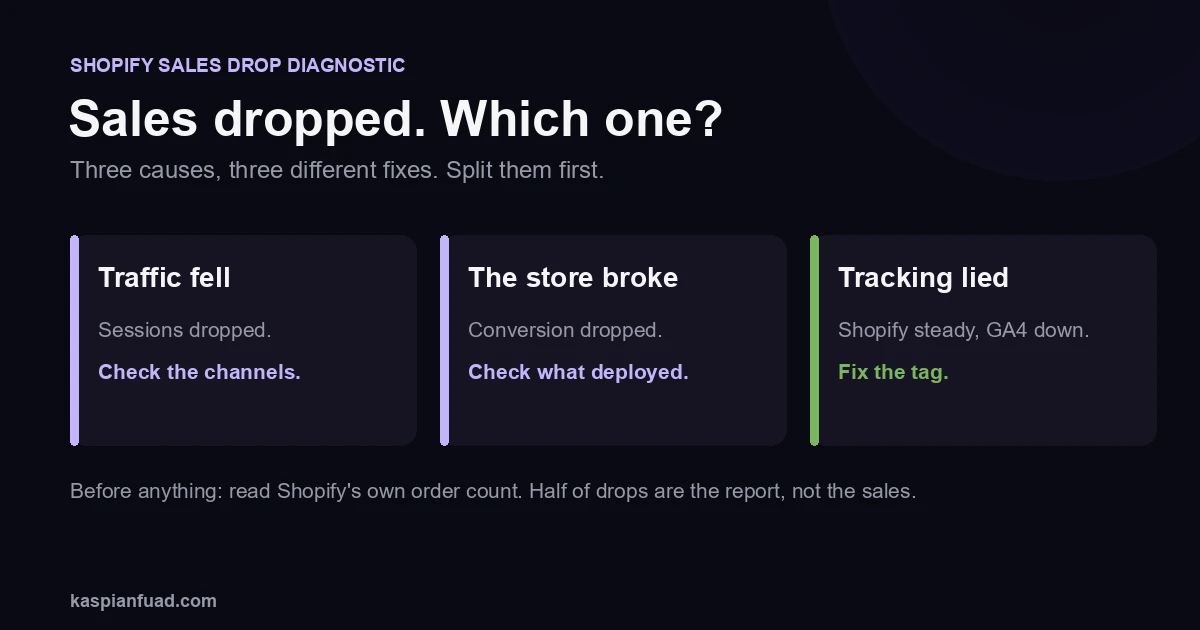
TL;DR: A sudden Shopify sales drop is almost always one of three things: traffic fell, the store broke, or the tracking lied. Split those first by checking whether sessions dropped or conversion did, then find the exact day it changed and what changed that day. Before you touch anything, check Shopify’s own order count. More than half the panicked drops I look at are a reporting problem, not a real one.
“Sales fell off a cliff on Tuesday and nothing changed.” I hear that sentence a lot, and the first half is usually true while the second half never is. Something always changed. The job is to find what, in order, cheapest checks first, without randomly changing things and burying the evidence. Here is the exact diagnostic I run.
Why did my Shopify sales suddenly drop?
Because one of three things happened, and they need completely different fixes. Traffic fell, so fewer people arrived. The store broke, so the people who arrived could not buy. Or the tracking lied, so your sales are fine and only your report dropped. Guessing which one wastes the days that matter most.
The single most useful move before anything else: open Shopify Analytics and read the raw order count for the drop window. Shopify’s native number is the source of truth, because it counts real orders on the platform, not events fired to a third-party tool. If that number is steady, your sales did not drop and you have a tracking problem, which is a very different Tuesday. The version I see most: an owner installs a new app or republishes the theme, the storefront tag quietly stops firing, and GA4 shows a cliff while Shopify’s orders never moved. The store is fine. The report is broken.
Is it a traffic problem or a conversion problem?
This one fork decides everything, so make it first.
Pull sessions and conversion rate for the drop window against the prior period, split by device. If sessions dropped and conversion held, the store is fine and the problem is upstream in your channels. If sessions held and conversion dropped, people are still arriving but something on the store stopped them buying. If both dropped, treat them as two separate investigations, because they usually have two separate causes that happened to land the same week.
Do not skip this. The most common mistake I see is an owner redesigning the product page in a panic when sessions quietly fell 40% because an ad account got paused. I use the same split at the top of every conversion diagnosis.
Did my tracking break instead of my sales?
This is the one that fools people, so rule it out early.
Your sales can be completely fine while GA4, your ad pixel, or your attribution tool shows a cliff. It happens after an app install, a theme deploy, a checkout change, or a consent and privacy update, any of which can stop events firing or double-count them. The tell is simple: Shopify’s order count is steady, but the third-party number dropped. When those two disagree, believe Shopify.
Reconcile the platforms before you believe the scary chart. Check Shopify orders, then GA4 purchases, then your ad platform’s reported conversions, for the same dates. If only the third-party ones fell, you have a tag to fix, not a store to rebuild. I go deeper on getting attribution right in Triple Whale vs Northbeam vs Polar.
What on my store changed right before the drop?
If conversion genuinely fell while traffic held, something on the store changed on a specific day. Find that day, then find that change. To see the current state of a product page in seconds, run it through the Shopify store audit, which flags a JavaScript-only buy button, heavy apps and missing trust signals.
The usual suspects, in the order I check them: a theme deploy that broke the add-to-cart or the checkout, a new or updated app that slowed the page or injected a layout shift, an out-of-stock bestseller, a price or currency bug, or a popup that started firing on load and now eats every mobile tap. On one store, a full-screen popup consumed 56% of mobile taps and the conversion drop tracked the day it went live, which is the kind of thing I found in this popup teardown.
Download the Sudden Sales Drop Diagnostic checklist (PDF)
Then walk the funnel by step and by date: sessions, product views, add to cart, begin checkout, purchase. The step where the drop concentrates points at the cause. A drop at add-to-cart is a product-page or app problem; a drop at checkout is a checkout or payment problem; a drop before product views is a traffic problem after all.
Could it be the traffic, not the store?
If sessions fell, the cause is in the channels, and the checks are quick.
Paid first: an ad account paused, a card declined, a campaign ended, or an ad got disapproved and quietly stopped spending. If paid clicks still land but stopped buying, that is a different problem, and I cover it in why Facebook ad traffic won’t convert. Then organic: a Google core update that moved rankings, a lost position on a money keyword, a broken redirect after a URL change, or a manual action in Search Console. Then the boring but real ones: seasonality against last year, a competitor promotion, or a payment gateway rejecting a spike of cards. Each is a five-minute check that saves you from fixing the wrong thing.
How do I find the exact cause fast?
Work like a bisect, not a guess.
Isolate the first day the numbers moved, down to the day, using GA4 and Shopify Analytics side by side. Pull your change log for that day: app installs and updates, theme publishes, campaign edits, price and inventory changes. The overlap between the day it broke and the thing that changed that day is almost always your answer. Change one thing, watch one day, and never change three things at once during an active drop, because you lose the ability to tell which one mattered. If the trail points into theme code or a broken integration, that is the moment to bring in help rather than keep pulling threads, and my CRO audit checklist is the same order I work in. One habit prevents the next panic entirely: keep a dated change log of every deploy, app install, and campaign edit. The next time a number moves, you line the drop up against the log in minutes instead of days.
The takeaway
- Split traffic from conversion first. Sessions down is a channel problem; conversion down is a store problem. They fix differently.
- Check Shopify’s order count before you believe any chart. Half of sudden drops are broken tracking, not lost sales.
- Find the day, then the change. Correlate the first bad day with deploys, app installs, and campaign edits.
- Read the funnel by step. The step where the drop concentrates names the cause.
- Change one thing at a time. Random fixes during an active drop destroy the evidence and make it worse.
I am Kaspian Fuad, a Shopify CRO and performance consultant. I diagnose sudden drops by ruling things out in order instead of guessing, because the fastest way to lose a week is to rebuild the thing that was never broken. If your sales dropped and you cannot find why, book a call and I will find the day it changed.