

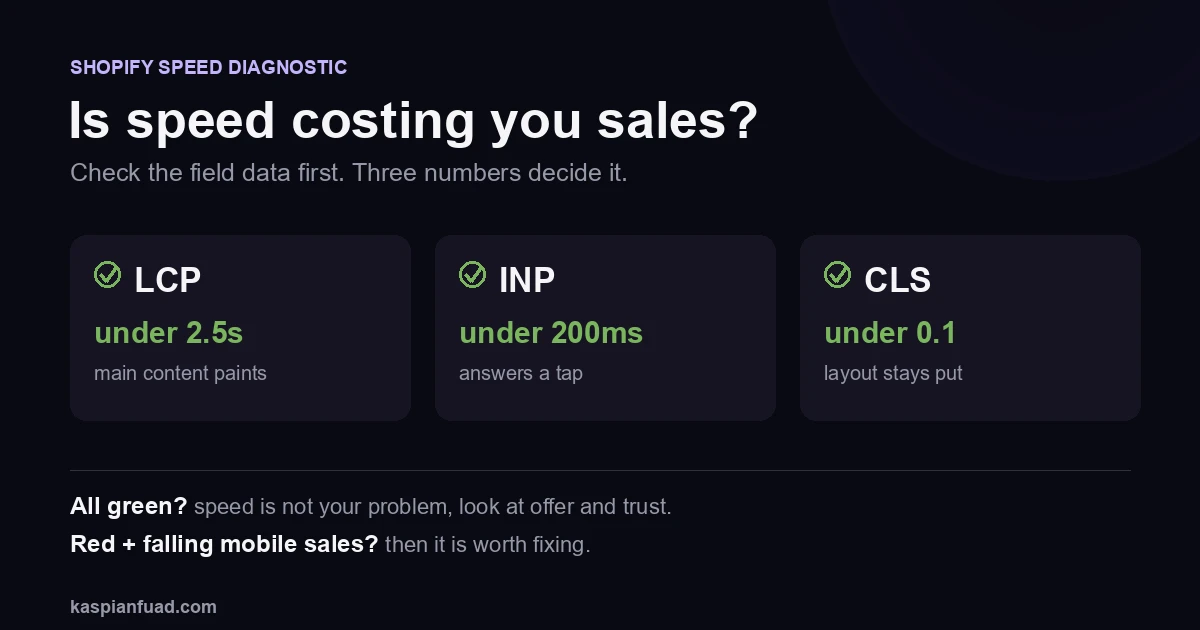
TL;DR: A slow store can cost you sales, but speed is one lever, not always your lever. I have seen stores load in 5 seconds and convert fine, and stores load in 1 second and convert terribly. Before you pay anyone to fix speed, prove it is actually costing you: check your CrUX field data, look at mobile conversion, and run the revenue math. If your Core Web Vitals are green, your problem is somewhere else.
“My store feels slow and sales are down, so I need a speed fix.” I hear some version of this most weeks. Sometimes it is right. Just as often the store is fine on speed and the real leak is the offer, the trust, or the traffic. Google and Deloitte’s Milliseconds Make Millions study across 37 brands found a 0.1s mobile speed gain lifted conversion 8.4% and average order value 9.2%. That is real money, and it is also the reason people spend on speed they do not need. So let us prove it first.
Does site speed actually affect Shopify sales?
Yes, on two fronts, but both are conditional.
The first is conversion. A page that responds slowly to a tap loses the shopper’s patience, and the effect compounds on mobile where most of your traffic lives. The Deloitte number above is the clean version of that: small speed gains, real conversion lift.
The second is ranking. Google uses Core Web Vitals as part of its page experience signals, so a slow store can lose organic visibility, which shows up as fewer sessions long before it shows up as a conversion number.
There is a third front if you buy traffic. A slow store taxes every ad click twice: you pay for the visit, then lose the shopper to a page that will not load before they give up. On a store spending on Meta or Google, that is the most expensive kind of slow.
Here is the part the “speed sells” headlines skip: speed is a multiplier on a funnel that already works. If shoppers are not adding to cart because the offer is weak or the product page does not build trust, making the page load faster just gets them to the wrong page sooner. Speed matters. It is rarely the whole story. If sales fell on a single day, a speed regression is one suspect among several in my sales-drop diagnostic.
How do I know if speed is what is costing me sales?
Measure the field, not the lab. This is the single most common mistake.
A Lighthouse score is a synthetic test on a throttled device, and it swings 15 points between runs of the same page. What Google actually ranks on, and what reflects your real shoppers, is CrUX field data. I explain the gap in Lighthouse vs CrUX, and it matters here because a scary red Lighthouse number sends owners spending on a problem their real users may not have.
Open the Core Web Vitals report in Search Console and read three numbers against the thresholds: LCP under 2.5s, INP under 200ms, and CLS under 0.1. Then look at your funnel by device. Speed is a live suspect when three things line up: field data in the red, mobile conversion falling while desktop holds, and a high bounce on your slowest templates. If your field data is green, speed is not your problem, and I would look at high traffic with low conversion instead.
How much are slow load times costing my store?
Do the arithmetic on your own numbers before you believe any benchmark.
Take your monthly revenue, your mobile traffic share, and a realistic conversion delta. On the Deloitte benchmark a 0.1s gain moved conversion 8.4%, but do not assume you will get that. Model a conservative version. A store doing $200,000 a month at 70% mobile, recovering even a 3% relative conversion gain from a speed fix, is looking at roughly $4,000 a month. That is the number that tells you whether a speed sprint is worth it, and it is the number most agencies never make you calculate.
The honest counter-example: on a used-furniture store I worked on, sales rose 51%, and almost none of it came from raw speed. The wins came from killing popup friction and rebuilding the product page. The full teardown is here. Speed was not that store’s problem. Proving that first saved the owner from spending on the wrong fix.
What actually makes a Shopify store slow?
The app stack, almost always, not the theme.
Third-party app JavaScript is the largest main-thread cost on most stores I audit. Shopify itself names apps and third-party code as the biggest drag on performance. After that comes an unoptimized hero image, then render-blocking scripts. On one apparel store I audited, twelve apps and a 3000px hero pushed mobile LCP to 7.9 seconds. The theme is rarely the villain, which is why a full rebuild is usually the wrong, expensive answer.
Most owners blame the theme because it is the thing they can see. The real weight is invisible: a review app, a popup app, a currency app, and a cart app each adding blocking time on every page. I measured what cart apps alone cost in Rebuy vs UpCart, and you can run your own store through the App Bloat Detector to see which apps are spending your speed budget. Nine times out of ten the fix is trimming and deferring apps, not rebuilding the store.
Download the Is Speed Costing You Sales diagnostic (PDF)
Should I fix it myself or hire someone?
Decide with the field data, not the feeling.
If your Core Web Vitals are green, do not spend a dollar on speed. Put it into the offer, the trust signals, or better traffic, because that is where your sales are actually leaking. If they are red and mobile conversion is slipping, a speed fix is worth it, and it pays back fast. On one store, cutting cart CLS from 0.488 to 0.001 raised reached-checkout 30% on flat traffic. On another, all five Core Web Vitals reached green and stayed there.
Do the easy wins yourself: audit the app stack, remove what you do not use, compress the hero image, and confirm nothing loads render-blocking that could defer. Hire out when the audit points at deep theme or app-conflict work, or when finding the problem is not the same as having time to ship the fix. If you want the honest version of what that costs and what to look for, I wrote the buyer’s guide to a speed service.
The takeaway
- A slow store can cost sales, but speed is one lever, not always yours. Prove it before you spend.
- Measure the field, not the lab. CrUX in Search Console, not a Lighthouse score that swings 15 points a run.
- Run the revenue math on your own numbers. Monthly revenue times mobile share times a conservative conversion delta.
- The apps are the weight, not the theme. Audit and trim the app stack before anyone talks rebuild.
- Green vitals mean look elsewhere. If speed is fine and sales are down, the leak is offer, trust, or traffic.
I am Kaspian Fuad, a Shopify CRO and performance consultant. I measure the field data before I recommend a speed fix, because the fastest way to waste money is to fix a problem you do not have. If your store is slow and you want to know whether it is actually costing you, book a call and I will show you the real number.